Template · For recruiters
Candidate call notes template
This candidate call notes template records what a candidate tells you on a screening call — current role, location and relocation, notice and availability, pay expectations, motivation, their own words against each must-have, open questions and the next steps you agreed — and pastes as plain text into your ATS, Excel, OneNote or Notion.
NoteOwl, a private AI note taker for Mac, writes these notes from the recording of the call, on your Mac with nothing uploaded, in a template you make once. It keeps the record; you make the call.
Screening call · 8 sections
- 01Current role
- 02Location and relocation
- 03Notice and availability
- 04Pay expectations
- 05Motivation
- 06Must-haves
- 07Open questions
- 08Next steps
What should candidate call notes include?
Eight things the hiring manager will ask you about: the candidate’s current role, where they can work, their notice and start date, their pay expectations, why they’re moving, what they said about each must-have, what’s still open, and the next steps you agreed.
- Current role
- What to writeTheir job title, employer and what they work on, as they described it.
- Location and relocation
- What to writeWhere they live, where they can work — on site, hybrid or remote — and what they said about relocating.
- Notice and availability
- What to writeNotice period, earliest start date, time off already booked, and any other interviews they mentioned.
- Pay expectations
- What to writeWhat they earn now and what they’re asking for, in the figures and terms they used.
- Motivation
- What to writeWhy they’re looking now and what they want from the next role, in their words.
- Must-haves
- What to writeEach requirement the hiring manager gave you, with what the candidate said about it and a short quote. Not covered? Write “Not discussed”.
- Open questions
- What to writeWhat you still need to check, and the questions the candidate asked you.
- Next steps
- What to writeWhat you and the candidate each agreed to do, and by when.
| Section | What to write |
|---|---|
| Current role | Their job title, employer and what they work on, as they described it. |
| Location and relocation | Where they live, where they can work — on site, hybrid or remote — and what they said about relocating. |
| Notice and availability | Notice period, earliest start date, time off already booked, and any other interviews they mentioned. |
| Pay expectations | What they earn now and what they’re asking for, in the figures and terms they used. |
| Motivation | Why they’re looking now and what they want from the next role, in their words. |
| Must-haves | Each requirement the hiring manager gave you, with what the candidate said about it and a short quote. Not covered? Write “Not discussed”. |
| Open questions | What you still need to check, and the questions the candidate asked you. |
| Next steps | What you and the candidate each agreed to do, and by when. |
A screening call template to copy
Paste it into your ATS, Excel, OneNote, Notion or Google Docs and fill it in during the screening call or straight after. It’s plain text, so it keeps its shape anywhere.
The last block is yours alone: your assessment, kept apart from the record of what the candidate said. Sending the candidate to a client? Use the candidate submittal template.
CANDIDATE CALL NOTES

Candidate:
Role and client:
Hiring manager:
Date of call:
Call: phone / video

1. CURRENT ROLE
- Title and employer:
- What they work on:

2. LOCATION AND RELOCATION
- Lives in:
- Can work: on site / hybrid / remote
- Relocation:

3. NOTICE AND AVAILABILITY
- Notice period:
- Earliest start:
- Time off booked / other interviews:

4. PAY EXPECTATIONS
- Now:
- Asking:

5. MOTIVATION
- Why they're looking:
- What they want next:

6. MUST-HAVES (what they said, with a short quote)
- Must-have 1:
- Must-have 2:
- Must-have 3:

7. OPEN QUESTIONS
- To check:
- They asked:

8. NEXT STEPS
- Candidate:
- Me:

MY ASSESSMENT (mine, not part of the call record)
Submit / hold / pass:
Why:
What should you leave out of your call notes?
Judgments about the person. Write what the candidate said — their figures, their dates, their words — so the hiring manager can see exactly what you heard. Your own view goes in its own line, marked as yours.
- Available soon
- Write thisFour weeks’ notice; earliest start 4 January
- Expensive
- Write thisAsking $165,000 base; on $152,000 plus a 10% bonus now
- Strong on Compose
- Write this“All our new screens have been Compose for about two years”
- Probably weak on ID checks
- Write thisHasn’t built ID-document capture; built CameraX photo capture for claims
- Seems motivated
- Write thisWants to stay native Android
- Confident, great energy
- Write thisNothing: it isn’t something the candidate said
| Not this | Write this |
|---|---|
| Available soon | Four weeks’ notice; earliest start 4 January |
| Expensive | Asking $165,000 base; on $152,000 plus a 10% bonus now |
| Strong on Compose | “All our new screens have been Compose for about two years” |
| Probably weak on ID checks | Hasn’t built ID-document capture; built CameraX photo capture for claims |
| Seems motivated | Wants to stay native Android |
| Confident, great energy | Nothing: it isn’t something the candidate said |
What does a filled-in example look like?
Like this: NoteOwl’s notes from a screening call in which an independent recruiter screens a senior Android engineer for a bank’s mobile team. Every line is something the candidate said.
Candidate call notes — Alex Moreno
Role: Senior Android Engineer, permanent, Ferncastle Bank · Hiring manager: Daniel Okafor · Call: Nadia Brooks, Monday 26 October 2026
Current role
- Senior Android engineer at Harbourline, an insurance company, for four years.
- Works on the claims app, mainly the flow where customers photograph damage to their car.
Location and relocation
- Lives in Evanston. Remote today; three days a week in the Chicago office is okay.
- Wouldn't relocate anywhere else.
Notice and availability
- Four weeks' notice.
- Family trip 21–31 December, so the earliest start is 4 January.
- In one other process, with a final round next week.
Pay expectations
- Now: $152,000 base plus a 10% bonus.
- Asking: $165,000 base.
Motivation
- Harbourline is moving all mobile work to a cross-platform framework next year; Alex wants to stay native Android.
- Wants to work on "something people use every day".
Must-haves
| Must-have | What Alex said |
|---|---|
| Kotlin and Compose | All new screens in Compose for about two years; led the move of the claims flow from XML to Compose. "That app has about two million users." |
| Camera capture | Built Harbourline's photo capture with CameraX, including the guides for a sharp picture. "I haven't done ID documents specifically, but it's the same problem." |
| Regulated industry | Insurance. Works with compliance on "what we're allowed to store on the phone and for how long". |
Open questions
- Size of the Android team (Nadia believes four engineers) — to confirm with the hiring manager.
- Is there an on-call rota? — to confirm with the hiring manager.
Next steps
| Who | What | When |
|---|---|---|
| Alex | Send an updated CV | This afternoon |
| Nadia | Send Alex's profile to Daniel Okafor | Today |
| Nadia | Confirm team size and on-call with the hiring manager | Not stated |
| Nadia | Come back to Alex either way | By Thursday |
If Daniel goes ahead, the first interview is a technical call with Marcus, who leads the mobile team.
How do you get screening call notes written for you?
Make a Candidate call template in NoteOwl once, then record each screening call — NoteOwl takes meeting notes without a bot — and choose Summarize as → Candidate call. NoteOwl writes the notes on your Mac with on-device AI models.
Once: make the template
- 1
Open Templates
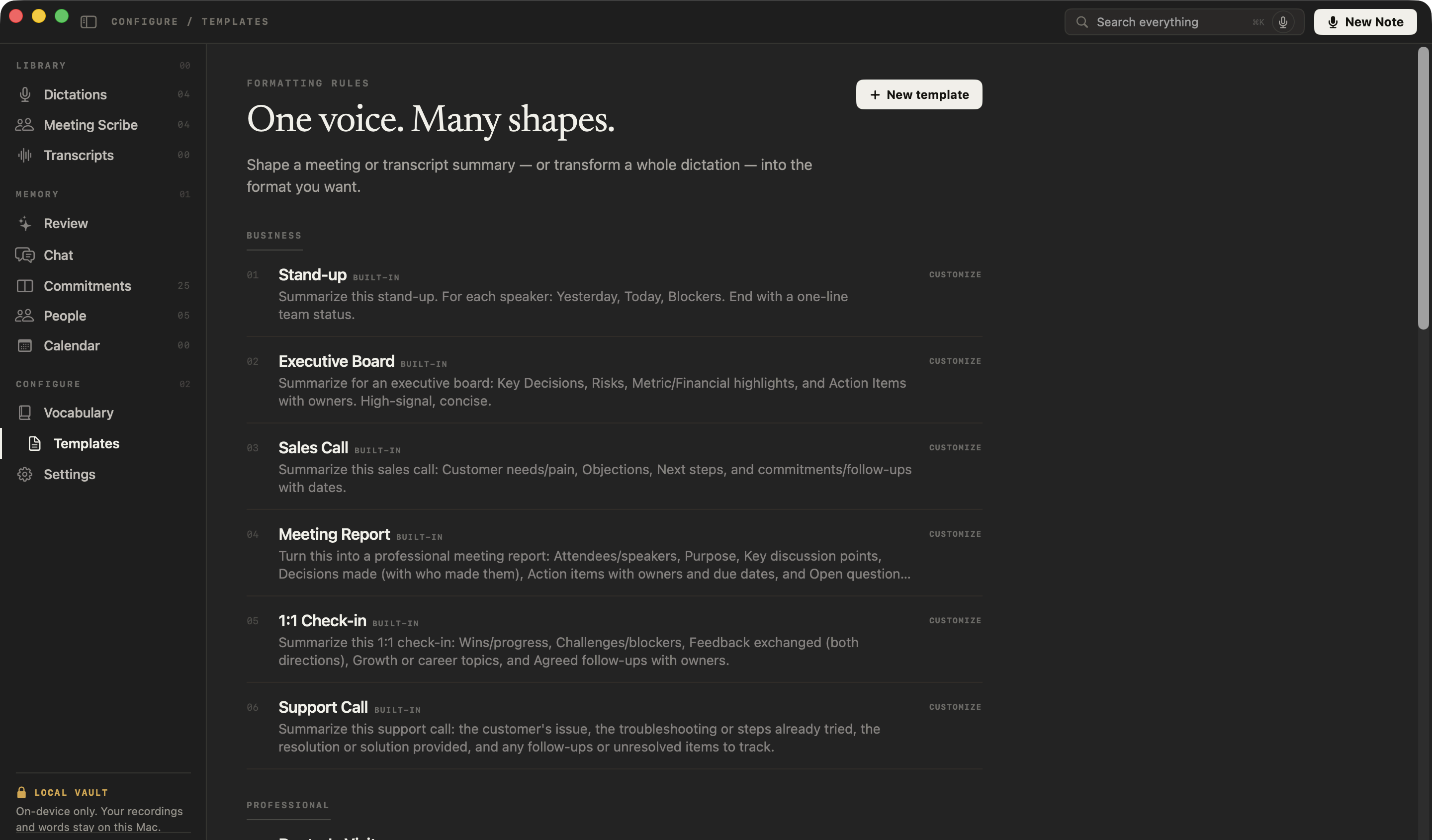
In NoteOwl’s sidebar, under Configure, click Templates, then New template at the top right.
- 2
Name it and give it the sections
Call it “Candidate call” and set Group to Professional. Paste the instruction below as the prompt — or click in the prompt, tap fn and say the sections you want. Click Add.
- 3
Or start from Interview
Click the built-in Interview template instead: NoteOwl opens a copy called “Interview (my version)”. Replace its prompt and click Save my copy.
Write candidate call notes using only what was said on this call. Don't rate, score or rank the candidate, don't say whether they fit, and don't describe their personality, confidence or tone. Refer to the candidate by name.
Current role: their job, employer and what they work on, as they described it.
Location and relocation: where they live, where they can work, and what they said about relocating.
Notice and availability: notice period, earliest start, time off already booked, and other interviews they mentioned.
Pay expectations: what they earn now and what they're asking for, in their figures.
Motivation: why they're looking and what they want next, in their words.
Must-haves: a table with each must-have from my notes or my questions, and what the candidate said about it, with a short quote. If it wasn't covered, write "Not discussed".
Open questions: anything still to check, and the questions they asked me.
Next steps: a table of who agreed to do what, and by when.
If something wasn't mentioned, write "Not stated".
Every call: use it
- 1
Note the must-haves
In Meeting Scribe, type the hiring manager’s must-haves under Notes & questions. NoteOwl keeps them with the call and gives them to the summary as context.
- 2
Record the call
Press ⌥Space or click Start Meeting. For a phone screen, put your phone on speaker beside the Mac, or make the call from the Mac.
- 3
Choose Summarize as → Candidate call
When the call ends, open Summarize as above the summary and pick your template. NoteOwl writes the notes on your Mac.
- 4
Paste them where they belong
Copy the notes into the candidate’s record in your ATS or spreadsheet. Then tap fn and dictate your own assessment there — dictation is free.
Phone screens work too: see how to take notes on phone screens on a Mac. Meetings, summaries and templates are part of NoteOwl Pro: $79 for one Mac, no subscription, with a 7-day free trial in the app. Dictation into any app is free.
Will NoteOwl judge the candidate?
Not with this template. Its instruction tells NoteOwl to write only what was said, and never to rate, rank or score the candidate, say whether they fit, or describe their personality. The recommendation is yours.
You make the call. NoteOwl keeps the record.
FAQ
Questions about screening call notes
What should you ask on a candidate screening call?
Ask what the candidate does now, where they can work, their notice period and earliest start, what they earn and expect, why they are looking, and how their experience meets each must-have. Those answers fill every section of this candidate call notes template.
Can I use this template in my ATS or Excel?
Yes. The template is plain text, so it pastes into an ATS note field, Excel, OneNote, Notion or Google Docs and keeps its eight sections. In a spreadsheet, each section works as a column.
Does NoteOwl have a built-in candidate call template?
No. None of NoteOwl’s 22 built-in templates is for screening calls, so you make it once: in NoteOwl’s Templates screen, click New template, name it Candidate call and paste the instruction from this page, or tap fn and say the sections you want. It then appears in Summarize as for every call.
Can NoteOwl write call notes from an ordinary phone call?
Yes, when your Mac can hear the call: put your phone on speaker beside the Mac, make the call from the Mac, or import a recording of it. On a speakerphone both voices reach NoteOwl through the Mac’s microphone, so the transcript puts them both under You, but the notes still hold what the candidate said.
Does NoteOwl decide whether to put a candidate forward?
No. The candidate call template asks NoteOwl for what the candidate said — their figures, dates and own words — and never for a score, a ranking or a view on fit. The recommendation is yours: you make the call, and NoteOwl keeps the record.
Are candidate calls uploaded anywhere by NoteOwl?
No. NoteOwl records, transcribes and writes your notes on your Mac with on-device AI models, so the recording, the transcript and the notes stay on your Mac and are never uploaded. No bot joins the call.
How much does NoteOwl cost for screening calls?
Recording calls, notes and templates are part of NoteOwl Pro: $79 lifetime for one Mac, no subscription, with a 7-day free trial in the app. Dictation into any app, your ATS included, is free.
Related
- Candidate submittal template Turn the call into the write-up you send the client.
- Phone screen notes on a Mac Speakerphone, calls from your Mac, or a recording you import.
- AI note taker for recruiters Screens, intake calls and debriefs, private on your Mac.
- All 22 meeting notes templates The built-in templates, with the sections each one writes.
Keep exploring
More templates
- Candidate submittal templateA candidate submittal template to copy, a recruiter candidate write-up example, and how NoteOwl drafts a submittal from a screening call with the recommendation left to you
- User interview templateA user interview template to copy, what each section holds, an example, and how NoteOwl writes research notes from a user interview
- Podcast show notes templateA podcast show notes template to copy, what each section holds, an example, and how NoteOwl writes show notes from an episode
- Brainstorming templateA brainstorming template to copy, what each section holds, an example, and how NoteOwl writes brainstorm notes
Screening call notes, written privately on your Mac
Free to download. Runs entirely on your Mac.
macOS 26 or later · Apple Silicon (M1 or newer) · 16 GB memory minimum, 24 GB recommended
About NoteOwl
NoteOwl is private AI meeting notes and memory for the Mac. It captures meetings without a bot joining the call, labels every speaker, writes summaries and action items, and builds a memory of every conversation that you can chat with — fully offline, because the speech recognition and the AI run on the Mac itself. Dictation into any app is free; Pro is a lifetime licence.
NoteOwl pricing: what’s free and what Pro adds
Last updated