For executive search
Private AI note taker for executive search
NoteOwl is a private AI note taker for executive search: it takes notes on candidate interviews and client briefings on your Mac, with no bot joining the call, and nothing is uploaded. Transcription and summaries run on your Mac with on-device AI models.
When an interview ends, NoteOwl writes it up in your own candidate report template: the candidate’s role, career moves, motivation, package and notice, in their words. The record is NoteOwl’s; the judgment stays yours, and dictating it is free.
Read the transcript
You know that moment when a bot joins your call… and everyone gets a little weird?
Yeah. NoteOwl doesn’t do that.
It’s a Mac app that takes your meeting notes right on your computer. Nothing leaves your Mac.
When you hang up? Summary, decisions, action items. All done.
Every promise gets tracked, so nothing slips through.
And you can chat with all your past meetings. Even offline.
NoteOwl. Free to download. Your next call’s the test.
How do executive search consultants use an AI note taker?
For the conversations a search rests on: client briefings, candidate interviews and progress calls. NoteOwl takes the notes without a bot in the call, writes the record in your format, and leaves the judgment to you.
The client briefing
The brief, as the client said it
Record the briefing call with no bot in it. Summarize as → Meeting Report writes the purpose, key points, decisions, action items and open questions.
The candidate interview
Listen to the candidate
On Zoom, Teams or Google Meet, nothing joins the call; in your office, NoteOwl records through your Mac’s microphone. Note a follow-up in the notes box and it feeds the write-up.
After the interview
The record, written
Summarize as → your Candidate report template writes what the candidate said under your headings. Then write, or dictate, your own assessment.
Through the search
Every promise kept
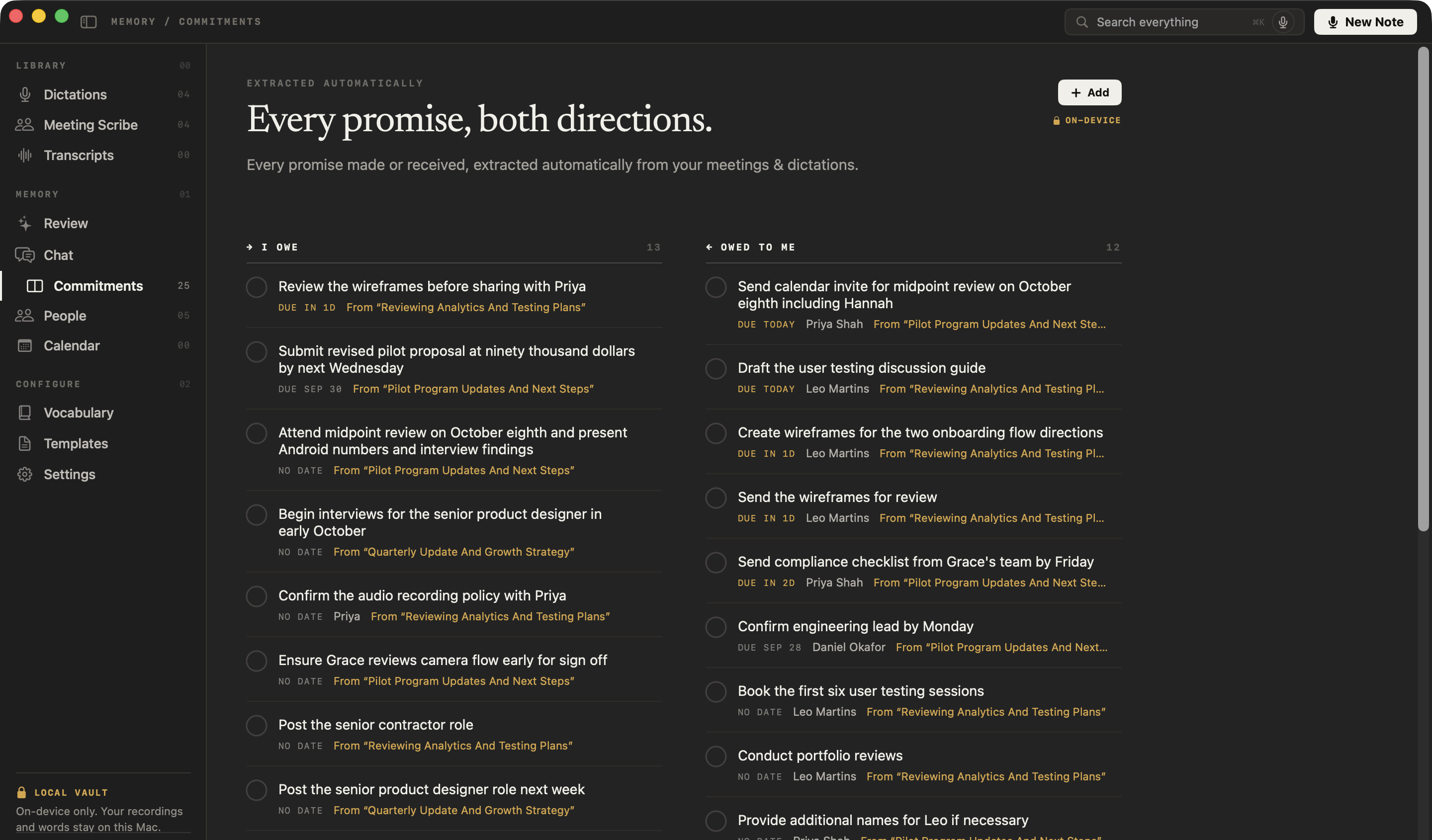
Feedback you promised a candidate, references the client asked for, dates on both sides: NoteOwl pulls them onto one board of what you owe and what you’re owed.
Where do candidate conversations go?
They stay on your Mac. A senior candidate who is still employed is trusting you with something their employer doesn’t know. NoteOwl transcribes and summarizes on your Mac with on-device AI models, and no third party receives the conversation.
What stays on your Mac
- The audio of every interview and briefing you record or import
- Transcripts, summaries and candidate reports
- Your private notes on each person
- Commitments and everything in NoteOwl’s memory
- Your Chat questions and NoteOwl’s answers
None of it is uploaded, synced to a cloud or used to train AI models, and no bot sits in the call with your candidate.
| When NoteOwl connects | What it sends |
|---|---|
| The one-time model download | Model files come to your Mac; nothing of yours is sent |
| Apple’s on-device language assets, once, if your Mac doesn’t have them | Nothing of yours; macOS downloads them from Apple |
| Checking for app updates, about once a day | A request for the list of NoteOwl versions; no personal data or content |
| Starting the trial, buying Pro or activating a Mac | Your email address and an identifier for this Mac |
| A licence status check, at most once a week (Pro) | Only your licence’s identifier |
Every connection is listed in what NoteOwl sends over the network, and it all works offline, with Wi-Fi off.
How do you write a candidate report with NoteOwl?
Save your report’s headings as a template, then use it after every interview. NoteOwl writes what the candidate said under each heading; your assessment goes in after, in your words. The instruction below is a starting point.
- 1
Open Templates
In NoteOwl’s sidebar, under Configure, click Templates, then New template at the top right.
- 2
Name it and paste the prompt
Call it “Candidate report”, paste the instruction below as the prompt, or your firm’s own headings, and click Add.
- 3
Use it after each interview
Open the interview and choose Summarize as → Candidate report. NoteOwl rewrites the notes under your headings, on your Mac.
- 4
Add your assessment
Copy the report into your document, then write your view of the candidate, or tap fn and dictate it, free.
Write a candidate report from this interview using only what the candidate said. Don't add anything.
Current role: title, company, scope and team, as they described them.
Career history: each move they talked about, with dates and their reasons, in their words.
Motivation: why they would consider this role, and what would keep them where they are.
Package and notice: current package, expectations, notice period and any constraints they mentioned.
Against the brief: what they said about each requirement the client set, with short quotes.
Open questions: what to follow up or check.
Next steps agreed on the call.
Don't rate, score, rank or recommend, and don't describe personality or fit. If a heading wasn't discussed, write "Not discussed".
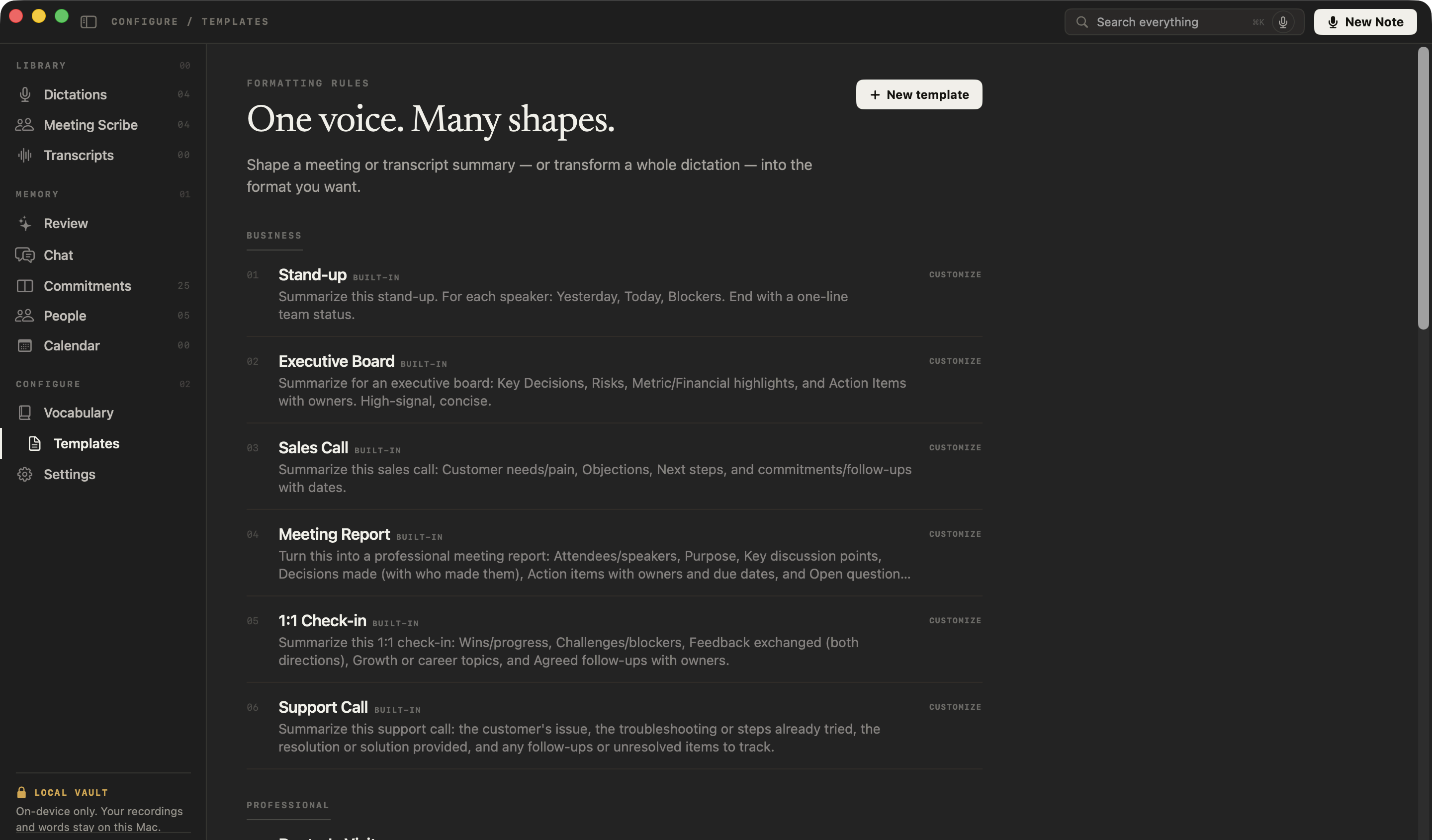
The record is NoteOwl’s; the judgment is yours. This template asks for what the candidate said, in their words, with no ratings, rankings or recommendations, so the view you give the client is your own.
Want a general shape for interview notes? See the interview notes template.
Which templates fit the client side of a search?
Three of NoteOwl’s 22 built-in meeting notes templates cover the calls around the candidates: the briefing, the weekly progress call and market-mapping conversations.
| Meeting | Template | What it writes |
|---|---|---|
| Client briefings on a new search | Meeting Report | Attendees · Purpose · Key points · Decisions · Action items · Open questions |
| Progress calls with the client | Project Log | Progress · Decisions · Blockers · Next milestones |
| Market-mapping and sourcing calls | Research | Questions · Findings · Evidence · Open questions |
How do you keep track of every candidate and client?
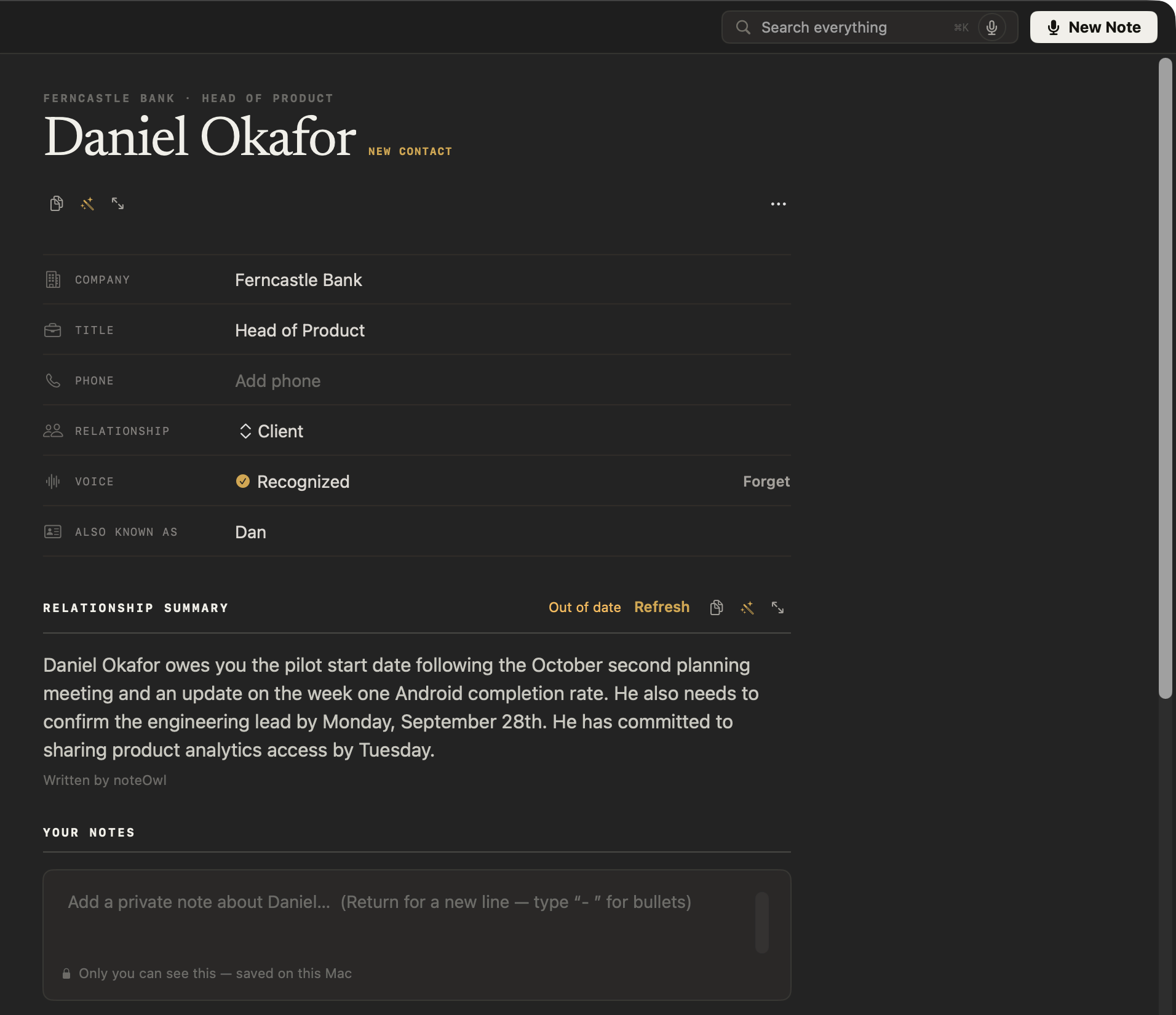
In their profiles. NoteOwl keeps a profile for the people you meet: a summary written from your conversations, your private notes, what’s still open between you, and every call. Set the relationship to Client, or type Candidate.
How do you keep the promises made during a search?
Let NoteOwl keep them. The feedback you promised a candidate and the shortlist date you gave the client go onto one board of what you owe and what you’re owed, sorted by what’s due and linked to the call it came from.
Can you find what a candidate said weeks ago?
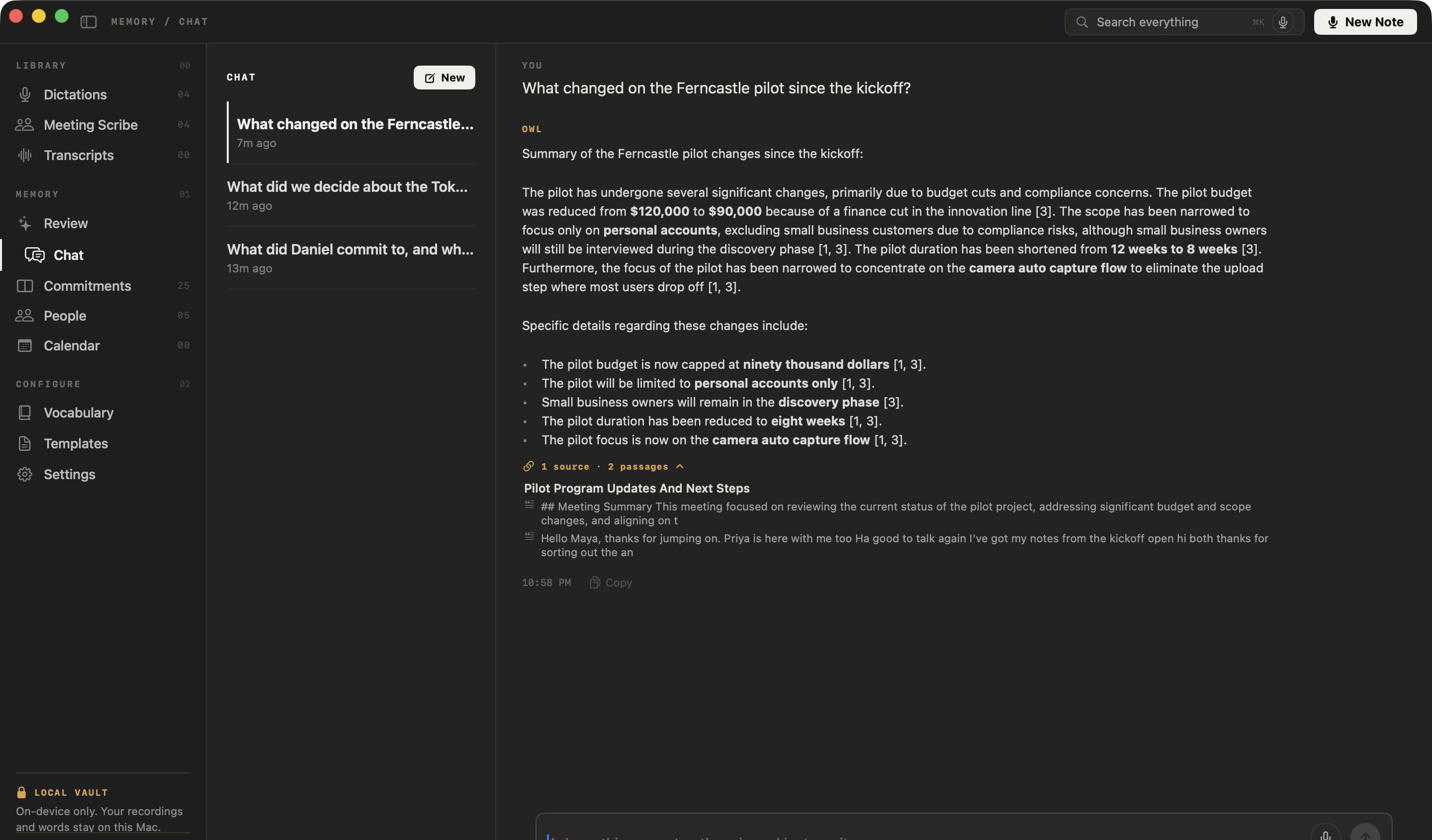
Yes. Ask NoteOwl’s chat with your meetings in plain English and it answers only from your own calls, citing the passages it used, or press ⌘K to search every interview, briefing and note.
Ask things like
- What did the candidate say about her notice period?
- What did the client say the must-haves were?
- Which candidates did I promise feedback to this week?
Can you dictate your assessment and client emails?
Yes, and it’s free forever. Tap fn in your report, an email or your search software’s note field, talk, and tap fn again: NoteOwl types your words at the cursor. It runs on your Mac, works offline and is unlimited. How free dictation works on your Mac
Casual in chat
Hey Leo, quick update from the Ferncastle call. They cut the pilot budget to $90,000, so let’s focus only on the camera auto-capture flow. Can you prioritize those wireframes for Thursday? Thanks.
- To
- Daniel Okafor
- Subject
- Next steps
Hi Daniel,
Thanks for the update today. Just confirming next steps: I will send the revised pilot proposal at $90,000 by Wednesday, the 30th. It will cover an eight-week pilot focused on camera auto-capture for personal accounts only.
I look forward to hearing who your engineering lead will be by Monday. Thanks again.
12export const pilot = {13 budgetCap: 90_000,14 weeks: 8,15 accounts: 'personal',16};17
- Polish — one tap tidies your words in the tone set for that app
- Voice notes — your impressions straight after an interview, audio and text kept together
- Rewrite by voice — select text, press ⌥X and say how to change itPro
- Custom vocabulary — client, company and candidate names spelled your wayPro
What else does NoteOwl do for a search consultant?
Everything between the calls, with NoteOwl Pro: a prep page before each meeting, recordings brought in, emails drafted from the call, all on your Mac. Running contingent searches too? See NoteOwl for recruiters.
A profile for every candidate and client
A summary written from your conversations, your private notes, what’s still open, and every call. Set the relationship to Client, or type Candidate.
Ready for the next call
NoteOwl reads your Mac’s Calendar and builds a prep page for each meeting: who’s coming, your notes, and what’s still open with them.
Help mid-call
Catch up summarizes a panel call you joined late, and Ask answers a question about it. Only you see it.
Who said what
On a call, each line of the transcript is labelled by speaker. Name a colleague and later calls know their voice.
Search every conversation
Every interview, briefing and note, one keystroke away with ⌘K.
Bring in recordings
An interview recorded on your phone or in another app (mp3, wav, m4a, aiff, flac, aac or mp4) gets a transcript, a summary and action items.
Emails drafted from the call
In a meeting, the wand drafts the follow-up email or anything you describe, from what was said, for you to edit.
Export a report
Save any interview’s notes as Markdown, PDF or text, to a folder you choose.
34 languages
Interviews and dictation in 34 languages, detected automatically.
What does NoteOwl cost for a search consultant?
Dictation is free forever. NoteOwl Pro, with interview notes, templates, profiles and Chat, is $79 for one Mac, with no subscription. Try it free for 7 days in the app first, with no card.
Step 1
Download free
Install NoteOwl and dictate into any app, free forever. NoteOwl then downloads its on-device AI models: about 8 GB, downloaded once after install (keep around 10 GB free).
Step 2
Try Pro free for 7 days
Start the trial inside the app with your email address, with no card. Record your next candidate interview and read the report.
Step 3
Buy Pro: $79
When you’re ready, buy NoteOwl Pro inside the app: a perpetual licence to NoteOwl Pro for one Mac, with no subscription.
NoteOwl needs a Mac with Apple Silicon (M1 or newer), 16 GB memory minimum, 24 GB recommended, and macOS 26 or later. What’s free and what Pro adds
FAQ
Questions search consultants ask about NoteOwl
Does a bot join the call when I interview a candidate?
No. NoteOwl records your microphone and your Mac’s audio, so it takes notes on Zoom, Microsoft Teams, Google Meet, Webex or FaceTime interviews with nothing joining the call. In your office, NoteOwl records through your Mac’s microphone instead.
Are candidate interviews uploaded to the cloud?
No. NoteOwl transcribes and summarizes candidate interviews on your Mac with on-device AI models. Recordings, transcripts and candidate reports never leave your Mac, no third party processes the audio, and nothing you record is used to train AI models.
Can NoteOwl write a candidate report?
Yes, with a template of your own. In NoteOwl, open Templates, click New template, paste your report’s headings as the prompt and click Add; after each interview, Summarize as → your template writes what the candidate said under those headings. Templates are part of NoteOwl Pro.
Does NoteOwl score or rank candidates?
No. NoteOwl has no scores, rankings or shortlists. It transcribes and summarizes the conversation in the shape your template asks for, and the candidate report template on this page asks only for what the candidate said, so the assessment is yours to write.
Can NoteOwl transcribe an interview I recorded on my phone?
Yes. Drag the recording into NoteOwl (mp3, wav, m4a, aiff, flac, aac or mp4, one at a time) and NoteOwl transcribes it on your Mac, writes a summary and action items, and adds it to your memory. Importing recordings is part of NoteOwl Pro.
Does NoteOwl connect to my executive search software?
No. NoteOwl has no integration with search, CRM or applicant tracking software. Copy the candidate report into the candidate’s record, or export it as Markdown, PDF or text; free dictation types into any app where you can type.
How much does NoteOwl cost for a search consultant?
Dictation is free forever. NoteOwl Pro, with interview notes, templates, profiles and Chat, is $79 lifetime for one Mac, with no subscription. Try Pro free for 7 days in the app first, with no card, then buy it inside the app.
Related
- AI note taker for recruiters Candidate screens and hiring-manager calls, with no bot in the call.
- Interview notes template What to capture in an interview, with a template to copy.
- People A profile for everyone you meet, written from your conversations.
- NoteOwl Pro, $79 No subscription; one Mac; try it free first.
Keep exploring
Made for this work
- Interview notes templateAn interview notes template to copy, what each section holds, an example, and how NoteOwl writes interview notes
- People profilesA personal CRM that fills itself from your meetings: who they are, what is open between you, every conversation
- AI meeting notes without a botHow NoteOwl records calls from your Mac with no bot joining, and what you get when the call ends
- Offline AI meeting notesEvery NoteOwl feature works offline after a one-time model download; what the app sends over the network, and what it never does
- Chat with your meetingsAsk your own meetings a question on your Mac, even offline; every answer cites the passage it came from
Other roles
- AI note taker for researchersUser interviews transcribed speaker by speaker, past recordings imported, searchable and askable across a study; nothing uploaded
- AI note taker for product teamsCustomer interviews, design reviews and stand-ups: decisions and owners written down, every interview searchable, plus free dictation
- AI transcription for journalistsInterviews transcribed speaker by speaker with timestamps, quotes checked against the audio, nothing uploaded
Try the private AI note taker for executive search on your next interview
Free to download. Runs entirely on your Mac.
macOS 26 or later · Apple Silicon (M1 or newer) · 16 GB memory minimum, 24 GB recommended
About NoteOwl
NoteOwl is private AI meeting notes and memory for the Mac. It captures meetings without a bot joining the call, labels every speaker, writes summaries and action items, and builds a memory of every conversation that you can chat with — fully offline, because the speech recognition and the AI run on the Mac itself. Dictation into any app is free; Pro is a lifetime licence.
NoteOwl pricing: what’s free and what Pro adds
Last updated