For construction
AI note taker for construction
NoteOwl is an AI note taker for construction work that happens on site: the walk with the superintendent, the OAC meeting in the trailer, the punch walk at the end of the job. Record on your iPhone, lock it, keep your hands free, and the transcript is free.
With NoteOwl Pro it writes a Meeting Report with the decisions and who made them, turns a punch walk into a to-do list, and learns the company names and terms you teach it. Design and owner calls run on your Mac with no bot. NoteOwl never uploads what you record.
How do construction teams use an AI note taker?
To keep what was agreed on site from living only in someone’s head. Superintendents record the site walk and the morning huddle, project managers record the OAC meeting, and everyone gets the same list of who is doing what by when.
Site walk
What the super pointed at
The framing inspection, the window delivery that slipped, the crew that’s a person short. Record the walk and read it back in the truck before the next call.
OAC meeting
Decisions, and who made them
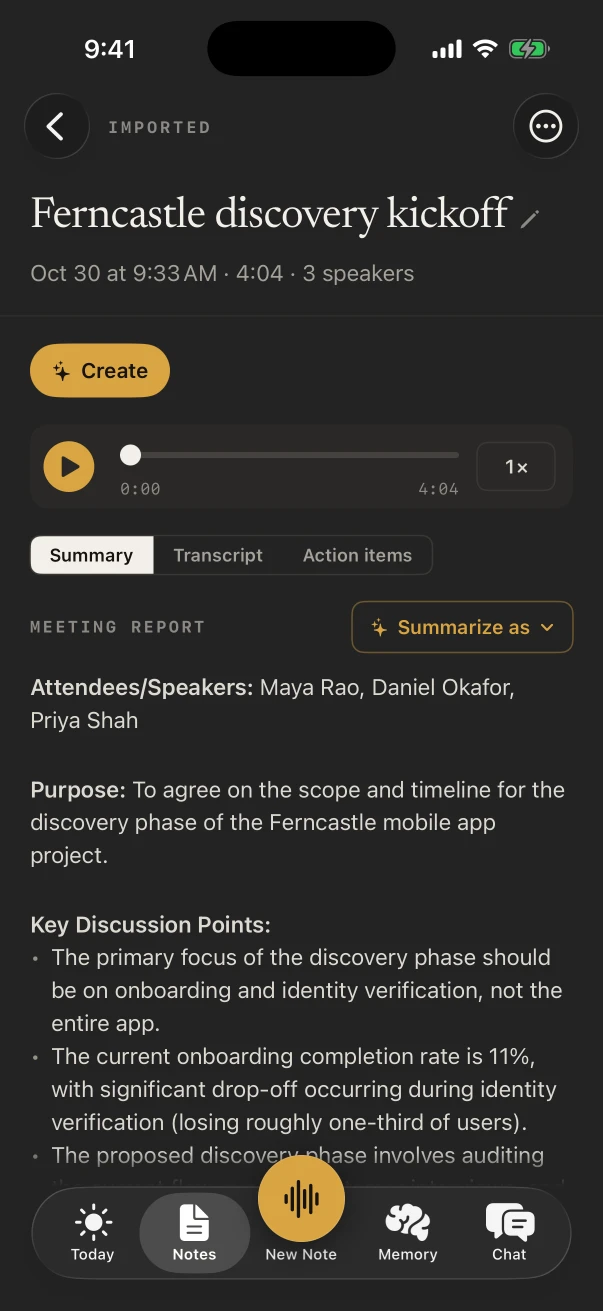
Owner, architect and contractor at one table. The Meeting Report template lists the attendees, each decision with who made it, and the action items with owners and dates.
Morning huddle
Who is on what today
The Stand-up template writes yesterday, today and blockers for each person who spoke, then a one-line status for the whole crew.
Punch walk
Every item, by priority
Walk the building with the owner’s rep and talk through each item. NoteOwl Pro writes the to-do list, grouped High, Medium and Low.
Does NoteOwl keep recording with the screen locked?
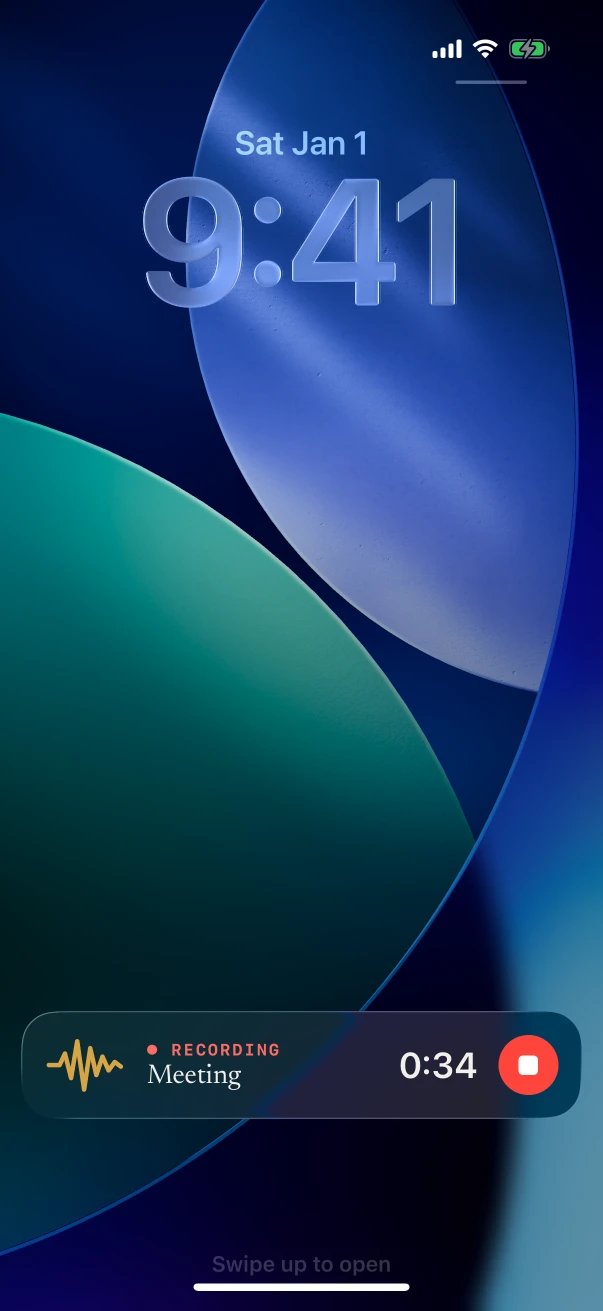
Yes. Lock the iPhone and NoteOwl keeps recording; the Lock Screen and the Dynamic Island show the timer and a stop button, so you can stop without opening the app. A phone call pauses the recording.
Recording in the room and the transcript are free. Speakers, the summary and action items come with NoteOwl Pro.
- 1
Start before the walk
Tap New Note, or press and hold the Action button once it’s set to NoteOwl.
- 2
Jot a location without stopping
Type “Level 3, east stair” under Notes & questions. It’s kept with the note and given to the summary as context.
- 3
Use the phone for other things
Open the plans or answer a text: the timer stays in the Dynamic Island while NoteOwl records.
- 4
Stop back at the trailer
The transcript is written on the iPhone. With the Meeting chip on, NoteOwl Pro adds speakers, the summary and action items.
Which templates fit construction meetings?
Meeting Report for the OAC meeting, Stand-up for the morning huddle, To-Do List for a punch walk, Project Log for a progress walk, and Executive Board for the monthly update to the owner. Each is one tap under Summarize as, with NoteOwl Pro.
- OAC meeting
- TemplateMeeting Report
- What it writesAttendees · Purpose · Key points · Decisions · Action items · Open questions
- Progress walk with the superintendent
- TemplateProject Log
- What it writesProgress · Decisions · Blockers · Next milestones
- Monthly update to the owner
- TemplateExecutive Board
- What it writesKey decisions · Risks · Financial highlights · Action items
| The moment | Template | What it writes |
|---|---|---|
| OAC meeting | Meeting Report | Attendees · Purpose · Key points · Decisions · Action items · Open questions |
| Morning huddle | Stand-up | Yesterday · Today · Blockers · Team status |
| Progress walk with the superintendent | Project Log | Progress · Decisions · Blockers · Next milestones |
| Punch walk | To-Do List | High priority · Medium · Low · Owners & deadlines |
| Monthly update to the owner | Executive Board | Key decisions · Risks · Financial highlights · Action items |
Can NoteOwl spell trade names and job terms right?
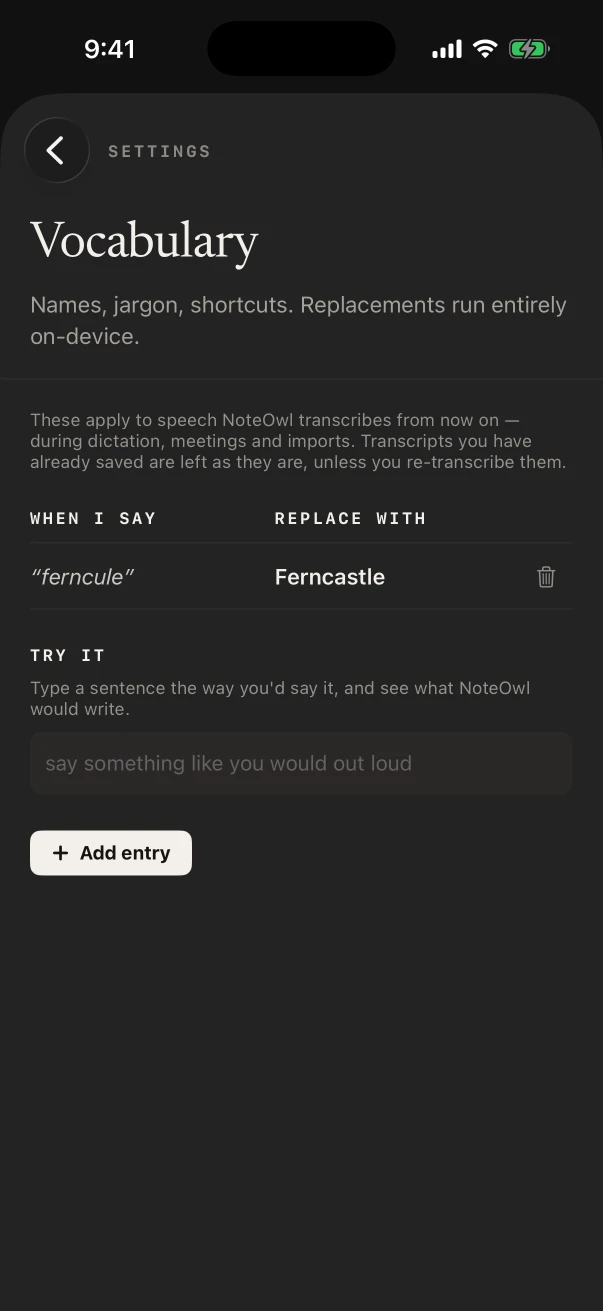
Once you teach it, with NoteOwl Pro. In Settings › Vocabulary, add a “When I say” and “Replace with” pair for a subcontractor’s company, the project name or a product, and NoteOwl uses it from then on in recordings and in the keyboard.
Notes already saved keep their wording unless you transcribe them again.
Can you write the daily log by voice?
Yes, for free. The NoteOwl keyboard types what you say into any app on the iPhone: tap its microphone and talk through weather, crews, deliveries and delays, then read it over before you save.
- Weather, crew counts and deliveries for the daily log
- An RFI question while you’re standing in front of the problem
- A text to the electrician about where the panel goes
- Tomorrow’s inspection, straight into Reminders
What does NoteOwl on Mac add on a construction project?
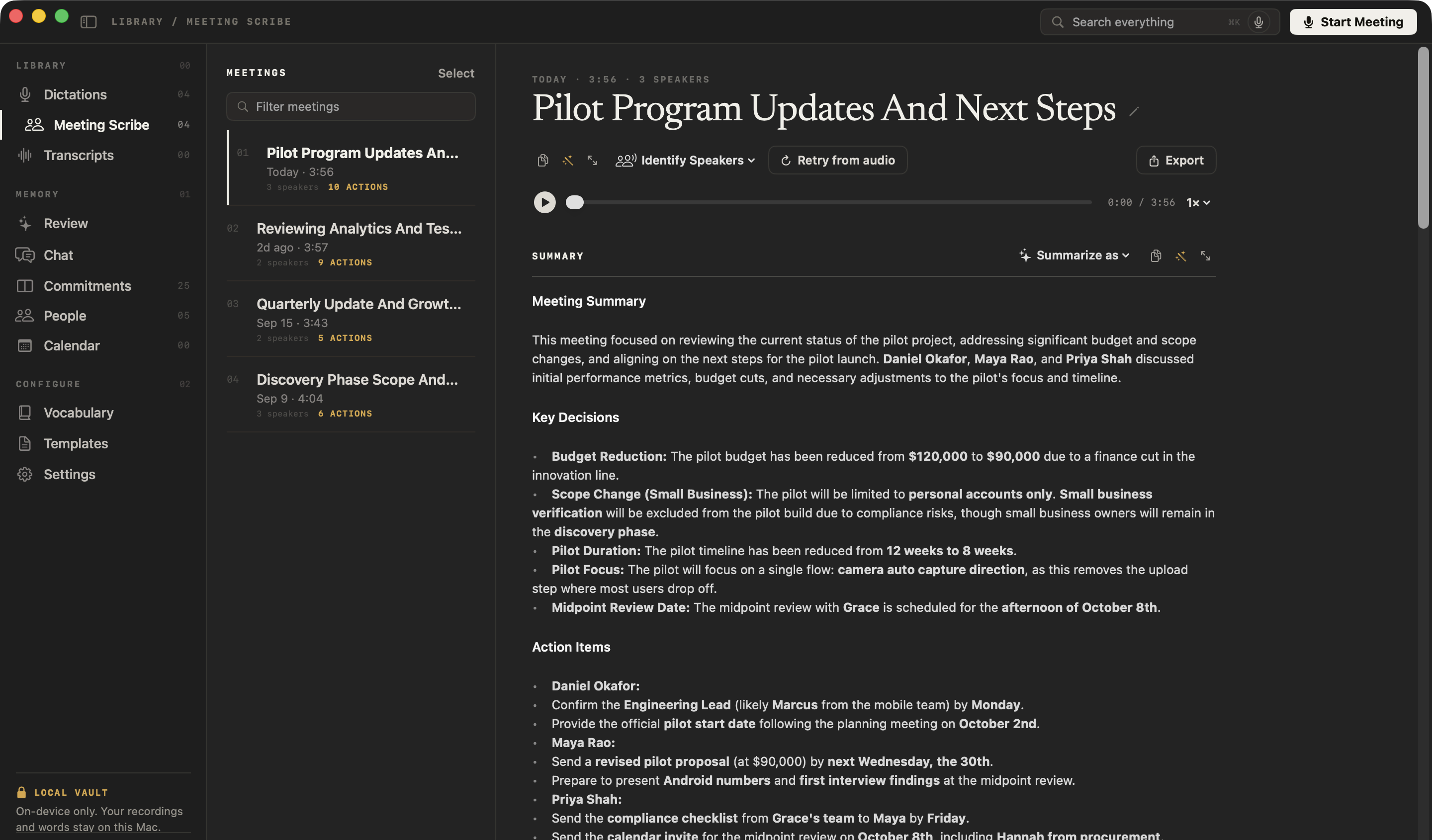
The coordination calls. Design reviews, owner calls and subcontractor meetings in Zoom, Teams or Google Meet are recorded on the Mac with no bot joining, written up when they end, and, with Pro, searchable in Chat when someone asks what was agreed.
Design and owner calls
NoteOwl ProNoteOwl records your microphone and the Mac’s audio, so it works with whatever call app the architect uses.
“When did we agree that?”
NoteOwl ProChat answers from the calls on your Mac and cites the passage, so a date or a change is easy to find again.
Emails by voice
FreeTap fn and talk in Mail or any app on the Mac: change requests, schedule updates, the weekly report.
Where do site recordings go?
They stay in NoteOwl on your iPhone. On-device AI models write the transcript and the notes on the phone, and NoteOwl never uploads what you record, so pricing talk and schedule problems aren’t sent to a cloud note taker.
- No signal on site
- Records and transcribes offline once the models have downloaded (about 3.2 GB)
- Uploads
- None: NoteOwl doesn’t upload recordings or notes
- Sharing a note
- Your choice, from the note’s ⋯ menu: Markdown, PDF or plain text
- Phone filling up
- Delete a recording’s audio and keep its text
How much does NoteOwl cost for a construction team?
Each person installs it on their own iPhone. Recording, the transcript and the keyboard are free; Meeting Reports, action items and Vocabulary are NoteOwl Pro, $20 lifetime on iPhone with no subscription and a 7-day free trial. On a Mac, Pro is $79 lifetime for one Mac.
- Record a site walk, with the live transcript
- FreeYes
- NoteOwl ProYes
- Notes & questions while it records
- FreeYes
- NoteOwl ProYes
- The keyboard for daily logs, texts and emails
- FreeYes
- NoteOwl ProYes
- Meeting Report, Stand-up and To-Do List
- FreeNo
- NoteOwl ProYes
- Speakers, and action items with owners and dates
- FreeNo
- NoteOwl ProYes
- Vocabulary for company names and job terms
- FreeNo
- NoteOwl ProYes
| Free | NoteOwl Pro | |
|---|---|---|
| Record a site walk, with the live transcript | Yes | Yes |
| Notes & questions while it records | Yes | Yes |
| The keyboard for daily logs, texts and emails | Yes | Yes |
| Meeting Report, Stand-up and To-Do List | No | Yes |
| Speakers, and action items with owners and dates | No | Yes |
| Vocabulary for company names and job terms | No | Yes |
FAQ
Questions construction teams ask about NoteOwl
Can NoteOwl write up an OAC meeting?
Yes, with NoteOwl Pro. Record the meeting with the Meeting chip on, then choose Summarize as › Meeting Report: the attendees, the purpose, the key points, each decision with who made it, the action items with owners and due dates, and the open questions.
Can NoteOwl on iPhone record a Teams call from the site trailer?
No. NoteOwl on iPhone records the people in the room through its microphone and never captures Zoom, Teams, Meet or phone calls. Join the call on a Mac and NoteOwl on Mac records it with no bot.
Does NoteOwl work on a site with no signal?
Yes. The speech and notes models live on the iPhone once downloaded (about 3.2 GB), so a site with no signal still gets its recording and transcript.
How do I share NoteOwl’s notes with the rest of the team?
Open the note, tap ⋯ › Share and send it as Markdown, PDF or plain text, or copy the summary into an email or a message. Exporting is free.
Is NoteOwl free for construction?
Recording on site with the transcript, voice notes and the dictation keyboard are free on iPhone, with no limit. Meeting Reports, to-do lists, speakers and action items are NoteOwl Pro, $20 lifetime on iPhone with no subscription.
Keep exploring
Made for this work
- Meeting minutes templateA meeting minutes template to fill in online or copy, what each section holds, an example, and how NoteOwl writes minutes
- Project update templateA project update template to copy, what each section holds, an example, and how NoteOwl writes project update notes
- Stand-up meeting templateA stand-up meeting template to fill in online or copy, what each section holds, an example, and how NoteOwl writes stand-up notes
- Custom vocabularyTeach NoteOwl names, jargon and spellings once, and every dictation, meeting and import uses them
- iPhone Action button and SiriStart a NoteOwl recording, dictation or a question from the Action button, Control Center, the Lock Screen, Back Tap, Siri or the Shortcuts app
More jobs away from a desk
- Home inspectorsFindings narrated room by room on iPhone as free voice notes, written up in your own report template with Pro, the buyer walk-through, and dictation into your report app
- Insurance adjustersClaim inspections and room-by-room damage notes recorded on iPhone, speakers, summaries and action items with Pro, search across every claim, and calls on the Mac
- Field salesIn-person customer visits on iPhone: Up next before the visit, Sales Call notes during it and a follow-up email draft after, with calls on the Mac
In these situations
- Site visitsSite visit notes spoken on iPhone as you walk (Action button, Lock Screen), the Project Log and To-Do List templates for a report and a punch list, sharing as PDF, and dictating the write-up on a Mac
- Team meetingsNotes from the weekly team or staff meeting, from an iPhone on the table or the Mac running a hybrid call: decisions, owners and open questions, the Project Log template, and finding what was decided last week
Take NoteOwl on your next site walk
Free to download. Runs entirely on your Mac or iPhone.
Mac: macOS 26 or later · Apple Silicon (M1 or newer) · 16 GB memory minimum, 24 GB recommended · iPhone: iOS 26 or later
About NoteOwl
NoteOwl is private AI meeting notes and memory for Mac and iPhone. It captures meetings without a bot joining the call, labels every speaker, writes summaries and action items, and builds a memory of every conversation that you can chat with — fully offline, because the speech recognition and the AI run on the Mac or iPhone itself. Dictation into any app is free; Pro is a lifetime licence.
NoteOwl pricing: what’s free and what Pro adds
Last updated