Guide · iPhone · iOS 26
How to summarize a voice memo on iPhone
Here’s how to summarize a voice memo on iPhone, in two ways. With Apple Intelligence, open the memo’s transcript in Voice Memos, select the text, and tap Writing Tools › Summarize. Or share the memo to NoteOwl, which transcribes it on the iPhone and writes a summary, the action items and a title by itself.
Apple’s way is built in, on iPhones with Apple Intelligence, for memos Voice Memos can transcribe. NoteOwl’s gives you who said what and a choice of 22 summary templates, from Quick Summary to To-Do List; importing and summaries are part of NoteOwl Pro, $20 lifetime.
Can an iPhone summarize a voice memo?
Yes, two ways. With Apple Intelligence, Writing Tools summarizes a memo’s transcript inside Voice Memos[1]. NoteOwl summarizes the whole memo on the iPhone, with action items, speakers and a title, in the template you choose.
How do you summarize a voice memo with Apple Intelligence?
Open the memo, tap ••• › View Transcript, select the text, then tap Writing Tools › Summarize. Key Points gives a bulleted list instead; Copy or Share sends the summary on[1,2].
It works where both features do: Voice Memos transcribes on iPhone 12 or later in ten languages, and Apple Intelligence isn’t on every iPhone model, language or region[2,3].
In Voice Memos, with Apple Intelligence · iOS 26
- 1
- 2
Select the text
Select the part you want summarized, or all of it, then tap the Writing Tools button.[2]
- 3
Tap Summarize
Or Key Points for a bulleted list, or List or Table to reorganize what was said.[2]
- 4
Copy or share the summary
Tap Copy and paste it where you need it, or tap Share and choose an app.[2]
How do you summarize a voice memo in NoteOwl?
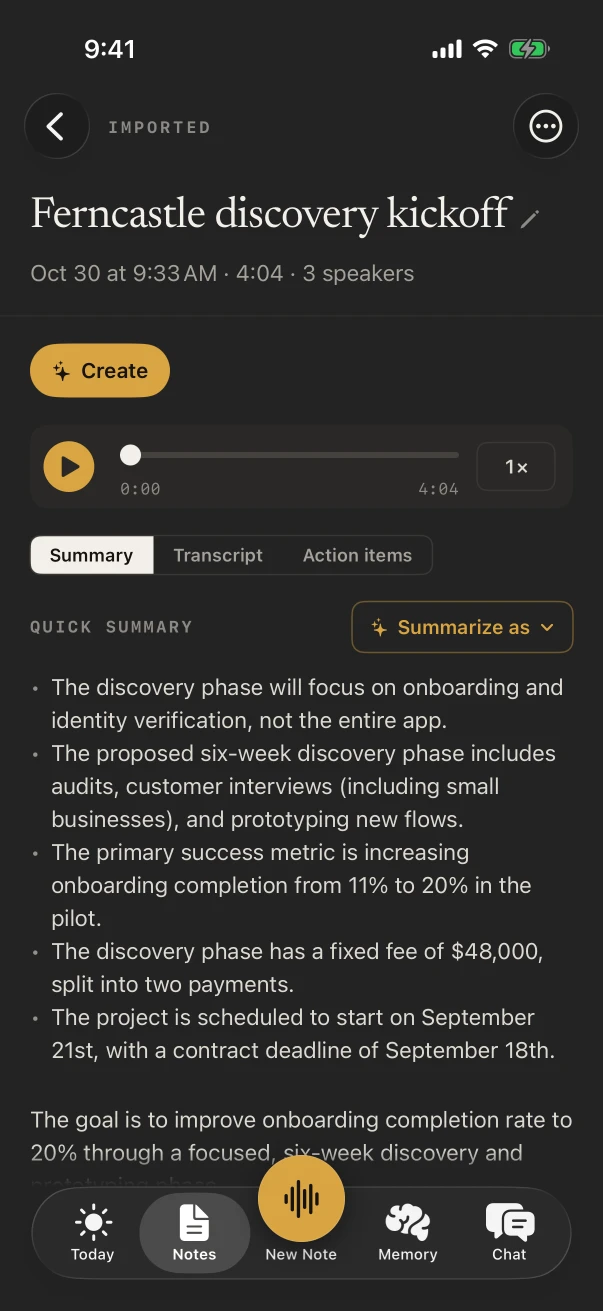
Share it from Voice Memos to NoteOwl and tap Open NoteOwl. NoteOwl transcribes the memo on the iPhone, finds the speakers and writes the summary, action items and title, with no button to press. Importing is part of NoteOwl Pro.
NoteOwl Pro on iPhone is $20 lifetime, with no subscription and a 7-day free trial. Importing audio into NoteOwl, step by step
In NoteOwl for iPhone (iOS 26 or later)
- 1
Share the memo to NoteOwl
In Voice Memos, tap the recording, tap the More Actions button (•••), tap Share and choose NoteOwl.
- 2
Tap Open NoteOwl
NoteOwl transcribes the memo on the iPhone, tells the speakers apart, then writes a summary, the action items and a title.
- 3
Choose another summary if you like
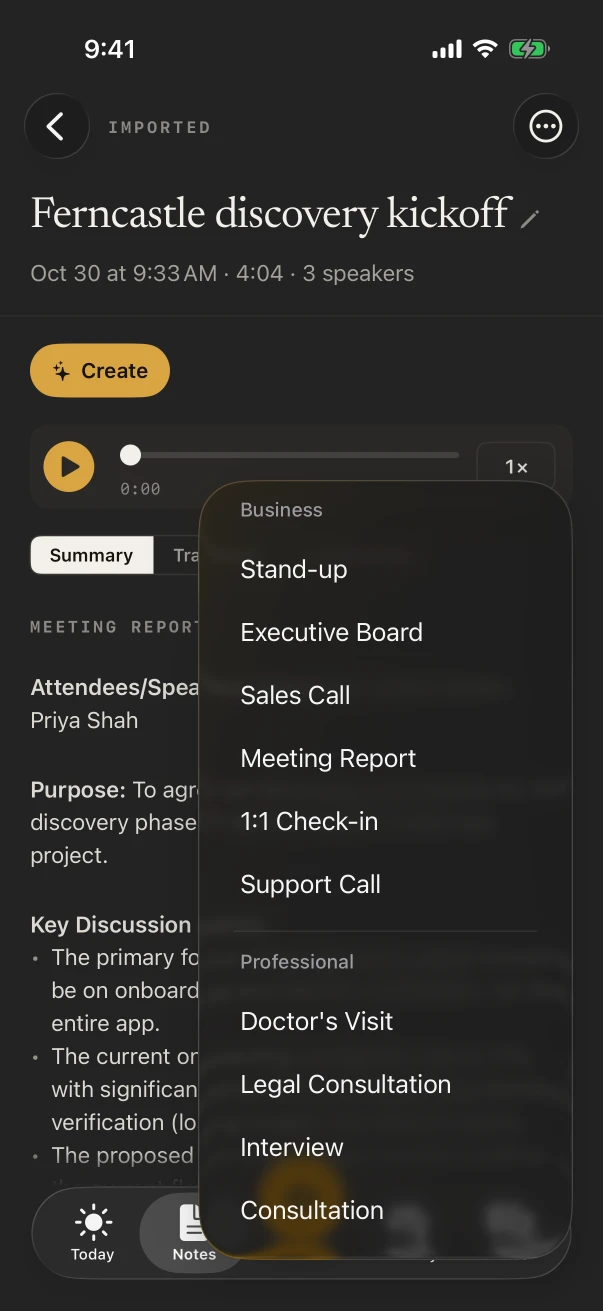
On the Summary tab, tap Summarize as and pick a template. Quick Summary gives three to five bullet points and a one-line takeaway.
- 4
Share it
Tap ⋯ › Share and choose Copy as Markdown, a Markdown file or PDF: the summary and action items come first, then the transcript.
Which summary works best for a voice memo?
It depends on what you recorded. Quick Summary suits most memos; To-Do List suits a list of jobs you talked through; Journal keeps a reflection in your own voice. Tap Summarize as to try another, as often as you like.
General
Quick Summary
Three to five bullet points with the key points, then a one-line bottom line.
Productivity
To-Do List
Every task as a checklist, grouped by priority, with the owner and deadline when you said them.
Personal
Journal
Your reflections by theme, the mood and highlights, and any gratitude or intentions, in your own voice.
General
Brainstorm
All the ideas grouped by theme, the standouts worth pursuing, and the next experiments.
Academic
Student Lecture
Study notes: main topics, key concepts and definitions, examples, and anything flagged for the exam.
Business
Meeting Report
Who spoke, the purpose, key points, decisions, action items with owners, and open questions.
What else can you make from a voice memo?
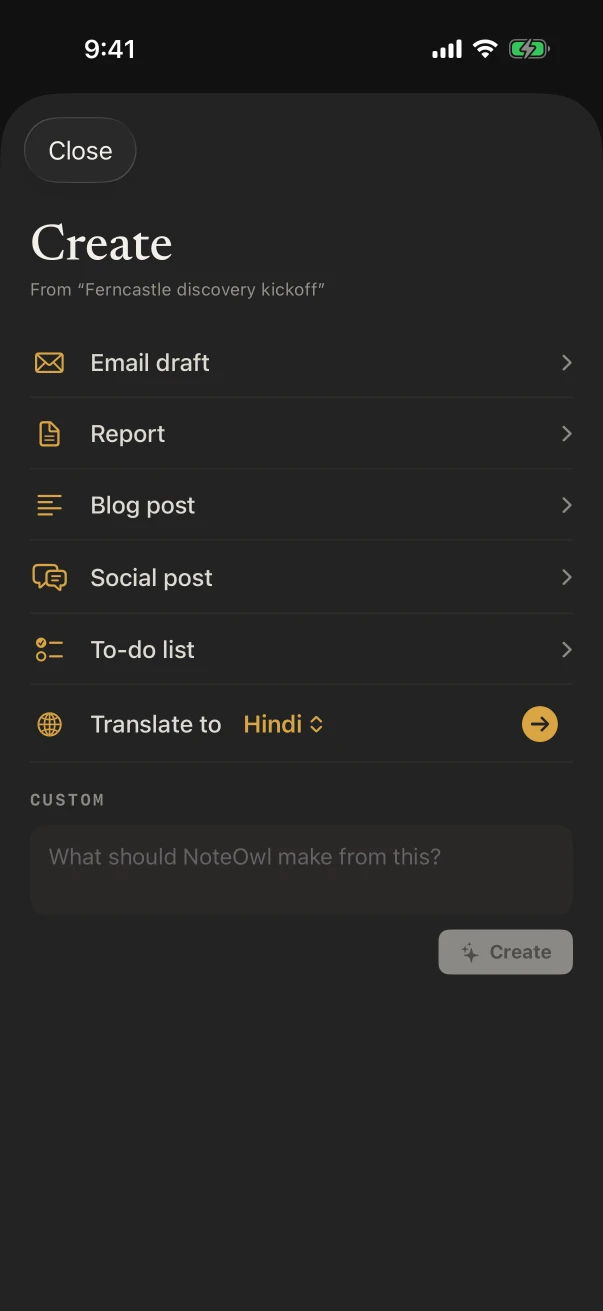
With NoteOwl Pro, tap ✦ Create on the note for an email draft, a report, a blog post, a social post or a to-do list, each written on the iPhone from what you said. Copy it or share it from there.
Your own memo, turned into a first draft: useful for an idea you talked through on a walk. Recording ideas on iPhone
Apple Intelligence or NoteOwl: which should you use?
Apple’s Writing Tools, if you have Apple Intelligence and need a short summary of the words. NoteOwl, for who said what, the action items, and a summary written to the template that fits the memo.
- Needs
- Apple IntelligenceAn iPhone with Apple Intelligence turned on, and a memo Voice Memos has transcribed
- NoteOwlNoteOwl Pro on iOS 26 or later
- Transcript languages
- Apple IntelligenceTen, on iPhone 12 or later
- NoteOwlAuto-detect, English, Hindi, Spanish, French, German
- Summary styles
- Apple IntelligenceSummarize, Key Points, List, Table
- NoteOwl22 built-in templates, or your own
- Action items
- Apple IntelligenceNot mentioned in Apple’s guide
- NoteOwlTheir own tab, written with the summary
- Who said what
- Apple IntelligenceNot mentioned in Apple’s guide
- NoteOwlA speaker on every transcript line
- Price
- Apple IntelligenceBuilt into iOS
- NoteOwlNoteOwl Pro, $20 lifetime, 7-day free trial
| Apple Intelligence | NoteOwl | |
|---|---|---|
| Needs | An iPhone with Apple Intelligence turned on, and a memo Voice Memos has transcribed | NoteOwl Pro on iOS 26 or later |
| Transcript languages | Ten, on iPhone 12 or later | Auto-detect, English, Hindi, Spanish, French, German |
| Summary styles | Summarize, Key Points, List, Table | 22 built-in templates, or your own |
| Action items | Not mentioned in Apple’s guide | Their own tab, written with the summary |
| Who said what | Not mentioned in Apple’s guide | A speaker on every transcript line |
| Price | Built into iOS | NoteOwl Pro, $20 lifetime, 7-day free trial |
FAQ
Questions about voice memo summaries
Can Voice Memos summarize a recording by itself?
Not with a button of its own in Apple’s Voice Memos guide. You summarize the transcript instead: tap the recording, then ••• › View Transcript, select the text and use Writing Tools › Summarize, which needs Apple Intelligence.
Why don’t I see Summarize in Writing Tools?
Apple says Apple Intelligence isn’t available on all iPhone models or in all languages or regions, and that it needs the latest iOS with Apple Intelligence turned on. The memo also needs a transcript first, which Voice Memos writes on iPhone 12 or later in ten languages.
Is summarizing a voice memo free?
Apple’s Writing Tools are built into iOS on iPhones with Apple Intelligence. In NoteOwl, summaries are part of NoteOwl Pro, $20 lifetime with a 7-day free trial; recording a voice note in NoteOwl and its transcript are free.
Can I summarize a voice note I record in NoteOwl?
Yes. Tap New Note, talk, and tap Stop: the transcript is free, and with NoteOwl Pro the note gets a summary and a title too. Summarize as rewrites the summary in any template, as often as you like.
How do I get the action items from a voice memo?
Share the memo to NoteOwl. With NoteOwl Pro, the note opens with an Action items tab beside the summary and the transcript, listing each task that was said, and To-Do List under Summarize as turns the memo into a checklist.
Does NoteOwl upload my voice memo to summarize it?
No. NoteOwl transcribes and summarizes the memo on the iPhone with on-device AI models, and never uploads what you record or import.
Sources
Last checked . Apple’s steps are from the iPhone User Guide for iOS 26.
Related
- Voice memos to text, with speakers Share a memo to NoteOwl for a transcript on the iPhone.
- Quick summary template Key points and a one-line takeaway, with an example.
- Summaries on Mac and iPhone Templates, action items and Summarize as.
- Voice Memos transcription not working? Apple’s fixes when a memo has no transcript.
Keep exploring
What this guide recommends
- Voice memos to text on iPhoneShare a recording from Voice Memos, Files or Photos to NoteOwl on iPhone for a transcript with speakers and times and a summary (NoteOwl Pro), with the steps
- Meeting summary templateA meeting summary template to copy, what each section holds, an example, and how NoteOwl writes it
- AI meeting summariesAI meeting summaries, decisions and action items written on your Mac or iPhone from any template, when the meeting ends
More guides
- Voice memos, iPhone to MacMove voice memos from iPhone to Mac with iCloud, AirDrop or Save to Files (Apple’s steps for iOS 26 and macOS 26), why they don’t show up, and a transcript with speakers in NoteOwl on the Mac or the iPhone
- Record audio on iPhoneRecord audio on iPhone with Voice Memos (start, pause, Voice Isolation, stereo and Spatial Audio) or with NoteOwl’s live transcript, keep recording in other apps, and start in one press
- Transcribe a video on iPhoneTranscribe a video on iPhone by sharing it from Photos or Files to NoteOwl (speakers, times, a summary and SRT, with NoteOwl Pro), or copy Apple’s Live Captions while it plays
Summarize your voice memos on your iPhone
Free to download. Runs entirely on your Mac or iPhone.
Mac: macOS 26 or later · Apple Silicon (M1 or newer) · 16 GB memory minimum, 24 GB recommended · iPhone: iOS 26 or later
About NoteOwl
NoteOwl is private AI meeting notes and memory for Mac and iPhone. It captures meetings without a bot joining the call, labels every speaker, writes summaries and action items, and builds a memory of every conversation that you can chat with — fully offline, because the speech recognition and the AI run on the Mac or iPhone itself. Dictation into any app is free; Pro is a lifetime licence.
NoteOwl pricing: what’s free and what Pro adds
Last updated