Guide · iPhone · iOS 26

The best dictation app for iPhone: 8 picks compared

The best dictation app for iPhone types your words into every app, turns your voice into text where you can trust it, works without a signal and doesn’t cap you. By those tests, NoteOwl’s free keyboard leads: it dictates into any app with no word limit, on the iPhone itself, offline.

Apple’s built-in Dictation is the other free pick and also runs on the iPhone in many languages. Wispr Flow, Superwhisper, Aqua Voice, Willow, Typeless and Gboard follow, each with its price, limits and where your voice goes, from the makers’ own pages, checked on 13 November 2026.

The picks · checked 13 November 2026

  1. 01NoteOwlBest overall: free with no word limit, on the iPhone, offline.
  2. 02Apple DictationBest built-in option: nothing to install.
  3. 03Wispr FlowFor people who want a cloud service.
  4. 04SuperwhisperFor people who want to choose between local and cloud models per mode.
  5. 05Aqua VoiceFor people who want voice editing in the cloud on every platform.
  6. 06WillowFor people who also use Willow’s Mac app.
  7. 07TypelessFor people who switch between languages mid-sentence.
  8. 08GboardFor Google keyboard users who dictate now and then.

What makes a good dictation app for iPhone?

Six things: it works in every app as a keyboard, it turns your voice into text on the iPhone rather than on a server, it keeps working offline, its price and free plan are clear, it speaks your languages, and its limits don’t get in the way.

  • Works in every app

    A keyboard you can switch to in Messages, Mail, Notes or Slack, not a separate app you copy from.

  • Where your voice is processed

    On the iPhone, or on the maker’s servers. On the phone, nothing you say leaves it.

  • Works offline

    On a plane, in a basement, on bad hotel Wi-Fi: on-device dictation keeps typing.

  • Price

    Free, a lifetime purchase, or a subscription, and what the free plan allows.

  • Languages

    The languages you speak, including when you mix two in one sentence.

  • Limits

    Weekly word caps, setup steps such as Full Access, and which iPhones are supported.

Why is NoteOwl first?

Because it meets the most tests at once: its keyboard dictates into any app for free, with no word limit, and your voice turns into text on the iPhone itself, so it works offline and nothing is uploaded.

The trade-offs, plainly: the keyboard speaks five languages (English, Hindi, Spanish, French and German), not dozens; it needs Allow Full Access; and NoteOwl opens for a moment to start listening. Polish needs iPhone 15 Pro or later, and NoteOwl needs iOS 26 or later. How to add the NoteOwl keyboard

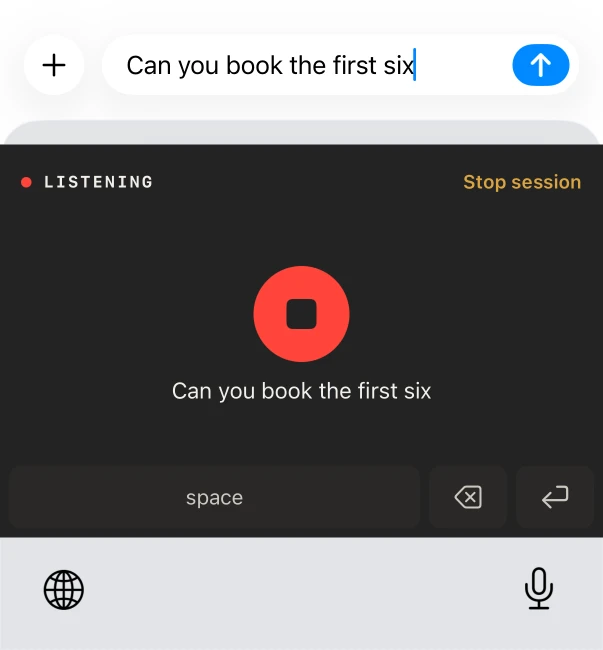
The NoteOwl keyboard on iPhone dictating a reply in Messages
Dictating in Messages with the NoteOwl keyboard.
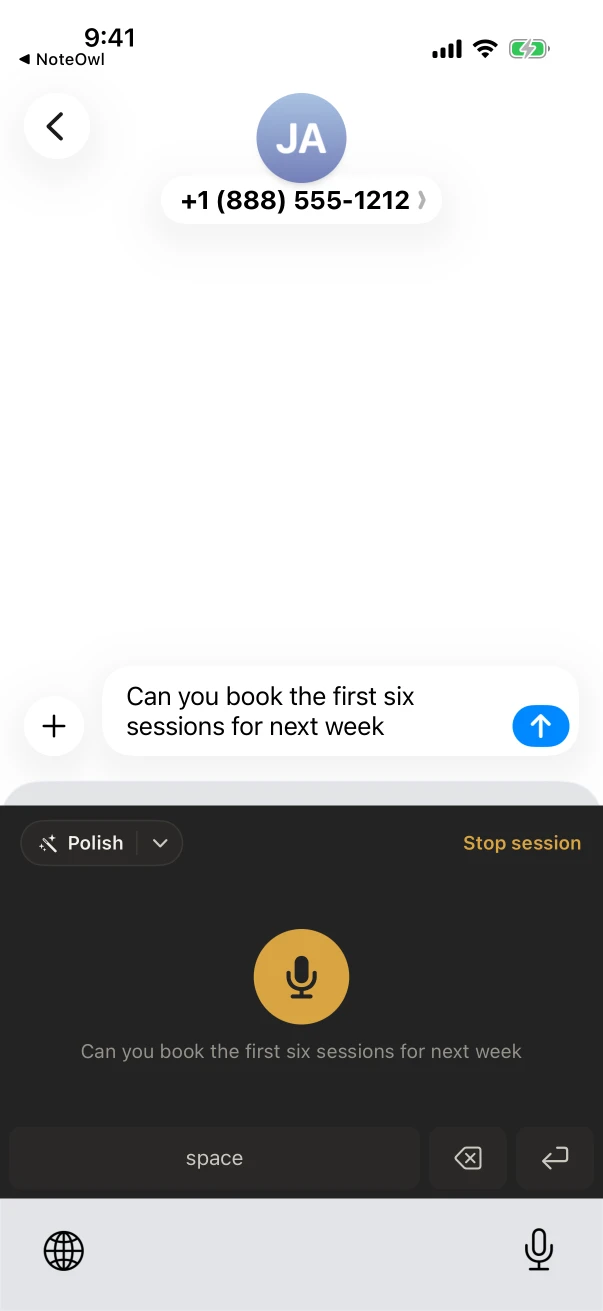
Messages on iPhone with the dictated sentence typed into the message by the NoteOwl keyboard
The words land in the message as you talk.

Which dictation apps for iPhone are worth trying?

These eight, in order: NoteOwl, Apple Dictation, Wispr Flow, Superwhisper, Aqua Voice, Willow, Typeless and Gboard. Each one types into other apps; they differ in where your voice is processed, what works offline, and what the free plan allows.

01 · 1070 AI Labs

NoteOwl

Best overall: free with no word limit, on the iPhone, offline.

Works in
Any app, as a keyboard. Add it in Settings and turn on Allow Full Access; NoteOwl opens for a moment to start listening.
Your voice
Turned into text on the iPhone, with on-device AI models. Nothing is uploaded.
Offline
Yes, after a one-time download of about 600 MB for speech.
Price
Free, with no word limit. NoteOwl Pro, $20 lifetime, adds Rewrite styles and custom vocabulary.
Languages
Auto-detect, English, Hindi, Spanish, French and German
Limits
Polish needs iPhone 15 Pro or later and works in the languages your iPhone’s built-in on-device AI supports; NoteOwl needs iOS 26 or later.
02 · Apple, built into iOS

Apple Dictation

Best built-in option: nothing to install.

Works in
Anywhere you can type: tap the microphone on the keyboard.[1]
Your voice
Apple says Dictation requests are processed on the device in many languages; in a search box, the text may go to the search provider.[1]
Offline
In many languages, with no internet connection required.[1]
Price
Built into iOS.[1]
Languages
The languages of the keyboards you add; not all languages, countries or regions have it.[1]
Limits
Stops by itself after 30 seconds without speech.[1]

03 · Wispr AI

Wispr Flow

For people who want a cloud service.

Works in
Any app, as a keyboard; in other apps it opens Flow to record.[2,3]
Your voice
“Transcription always occurs on the cloud.”[4]
Offline
No: the keyboard needs Wi-Fi or cellular data to transcribe.[3]
Price
Free with limited weekly dictation on mobile; Pro is $15 a month, or $144 a year by card, and also sold monthly, yearly or weekly in the App Store.[5,6]
Languages
Over a hundred, by its App Store listing.[2]
Limits
iOS 18.3 or later.[2]

04 · SuperUltra

Superwhisper

For people who want to choose between local and cloud models per mode.

Works in
Any app, as a custom keyboard with Full Access.[8]
Your voice
On the iPhone with its on-device models (“Your audio stays on your phone”), or in the cloud with its cloud models.[8,9]
Offline
Yes, with on-device models; cloud models need the internet.[8,9]
Price
A free tier with its local models; Pro is $8.49 a month, $84.99 a year or $249.99 once, for all your devices, and costs more in the App Store.[8,10]
Languages
Over a hundred, by its App Store listing.[7]
Limits
iOS 26 or later on the App Store.[7]

05 · Aqua Voice

Aqua Voice

For people who want voice editing in the cloud on every platform.

Works in
Any app, as a keyboard with Full Access; Aqua opens its app to start a microphone session.[11,12]
Your voice
Cloud dictation sends audio and the text around it to Aqua Voice servers.[11]
Offline
Not stated on its iPhone page.[11]
Price
2,000 free words; Pro is $10 a month billed annually or $12 month to month, or $119 a year for iPhone alone in the App Store.[13,14]
Languages
49, by its App Store listing, with Auto-detect.[11,12]
Limits
iOS 26 or later.[11]

06 · Willow Care

Willow

For people who also use Willow’s Mac app.

Works in
Any text field on the iPhone, as a keyboard.[15]
Your voice
Not stated; its listing says dictations “are processed securely”.[15]
Offline
Not stated.[15,16]
Price
Free to start with a weekly word limit, by its App Store listing; Pro, for unlimited dictation, is from $12 a user a month.[15,16]
Languages
Over a hundred, by its App Store listing.[15]
Limits
iOS 18 or later.[15]

07 · Simply

Typeless

For people who switch between languages mid-sentence.

Works in
Every app, as a keyboard, from WhatsApp and Slack to email and Notes.[17]
Your voice
Not stated; it lists “Zero cloud data retention” and history stored on the device.[17,18]
Offline
Not stated.[18]
Price
Free with limited words each week; Pro is $12 a month billed yearly, or $30 month to month.[18]
Languages
Detects the language you speak, including a mix.[17]
Limits
iOS 16.1 or later.[17]

08 · Google

Gboard

For Google keyboard users who dictate now and then.

Works in
Any app, as Google’s keyboard.[19]
Your voice
“If you use Gboard’s microphone, voice input will be sent to Google for transcription.”[19]
Offline
Not stated.[19]
Price
Free.[19]
Languages
A list of supported languages in its App Store listing.[19]
Limits
Its iPhone app was last updated in May 2022 (version 2.3.19).[19]

Which iPhone dictation apps work offline?

NoteOwl, after a one-time download of its on-device AI models; Apple Dictation, in many languages[1]; and Superwhisper, with its on-device models[9]. Wispr Flow’s keyboard needs Wi-Fi or cellular data to transcribe[3].

NoteOwl
Where your voice turns into textOn the iPhone
Works offlineYes
PriceFree; Pro $20 lifetime
Apple Dictation
Where your voice turns into textOn the iPhone, in many languages
Works offlineIn many languages
PriceBuilt into iOS
Wispr Flow
Where your voice turns into textIn the cloud
Works offlineNo
PriceFree with limits; Pro $15 a month
Superwhisper
Where your voice turns into textOn the iPhone or in the cloud, by model
Works offlineWith on-device models
PriceFree tier; Pro $84.99 a year
Aqua Voice
Where your voice turns into textOn Aqua’s servers
Works offlineNot stated
Price2,000 free words; Pro $10 a month, yearly
Willow
Where your voice turns into textNot stated
Works offlineNot stated
PriceFree with limits; Pro from $12 a month
Typeless
Where your voice turns into textNot stated
Works offlineNot stated
PriceFree with limits; Pro $12 a month, yearly
Gboard
Where your voice turns into textSent to Google
Works offlineNot stated
PriceFree
From each maker’s own pages and App Store listings, checked on 13 November 2026; “Not stated” means the maker’s pages don’t say. The details and the sources are in the cards above.

What happens to what you dictate?

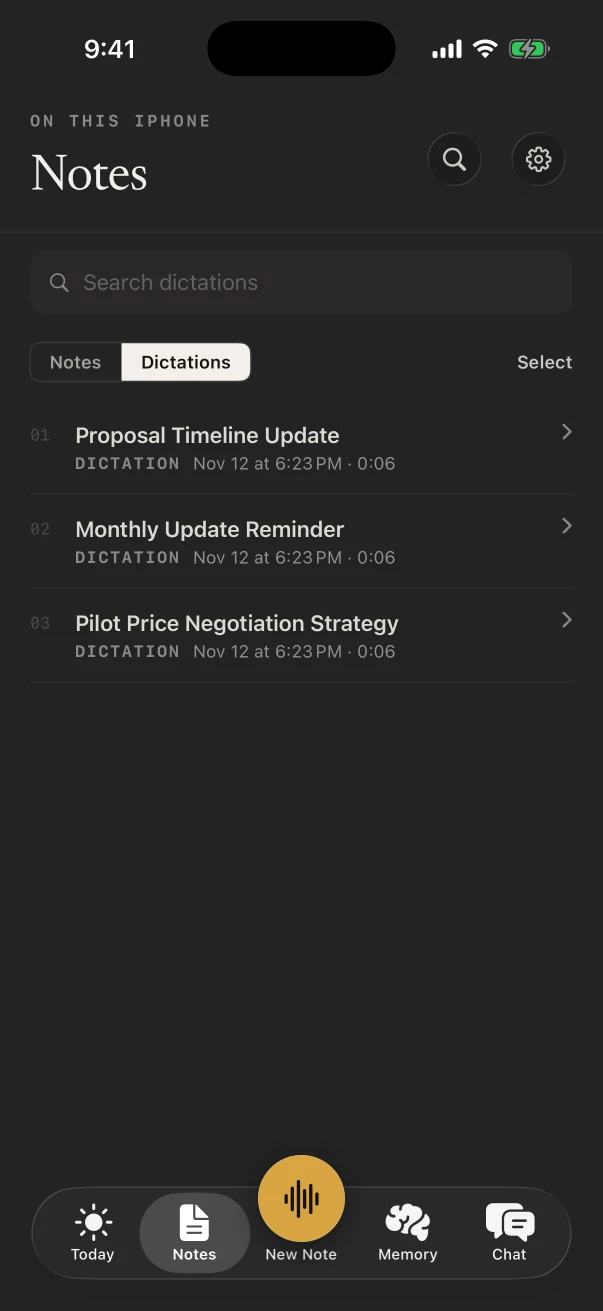
In NoteOwl, every dictation is kept on the iPhone in Notes › Dictations, with the raw words a tap away from the polished version, so nothing you said is lost if a message doesn’t send.

The same app records meetings and lectures in the room and transcribes them on the phone. NoteOwl for iPhone

Notes › Dictations in NoteOwl for iPhone, with three recent dictations
Notes › Dictations: every dictation, kept on the phone.

Sources

Last checked . Each pick’s facts are from its maker’s own website, help pages or App Store listing; Apple’s from the iPhone User Guide for iOS 26.

  1. [1]Apple, Dictate text on iPhone (iOS 26)
  2. [2]Apple App Store, Wispr Flow: AI Voice Keyboard
  3. [3]Wispr Flow Help Center, Set up the Flow keyboard on iPhone
  4. [4]Wispr Flow, Data Controls
  5. [5]Wispr Flow Help Center, Flow plans and what’s included
  6. [6]Wispr Flow, Pricing
  7. [7]Apple App Store, Superwhisper - AI Dictation
  8. [8]Superwhisper Help Center, Superwhisper on iOS
  9. [9]Superwhisper, Superwhisper for iPhone
  10. [10]Superwhisper Help Center, Plans & Pricing
  11. [11]Aqua Voice, Aqua for iPhone
  12. [12]Apple App Store, Aqua Voice: AI Dictation
  13. [13]Aqua Voice, Pricing and FAQ
  14. [14]Aqua Voice, llms.txt (Aqua’s own summary)
  15. [15]Apple App Store, Willow Dictation & AI Keyboard
  16. [16]Willow, Pricing
  17. [17]Apple App Store, Typeless: AI Voice Keyboard
  18. [18]Typeless, Pricing
  19. [19]Apple App Store, Gboard – the Google Keyboard

FAQ

Questions about dictation apps for iPhone

What is the best dictation app for iPhone?

NoteOwl, for most people: its keyboard dictates into any app for free, with no word limit, and turns your voice into text on the iPhone, so it works offline. Apple’s built-in Dictation is the other free choice. NoteOwl Pro, $20 lifetime, adds Rewrite styles and custom vocabulary.

Is there a free dictation app for iPhone with no word limit?

Yes. NoteOwl’s keyboard is free with no word limit, and Apple’s built-in Dictation is free too. Wispr Flow, Willow and Typeless list weekly limits on their free plans, and Aqua Voice gives 2,000 free words before Pro.

Which dictation apps work offline on iPhone?

NoteOwl, after a one-time download of its on-device AI models; Apple Dictation, in many languages; and Superwhisper, with its on-device models. Wispr Flow’s keyboard needs Wi-Fi or cellular data to transcribe.

Which dictation apps send your voice to the cloud?

By their own pages: Wispr Flow (“Transcription always occurs on the cloud”), Aqua Voice’s cloud dictation, Superwhisper’s cloud models and Gboard’s microphone. NoteOwl turns your voice into text on the iPhone and uploads nothing.

Why does a dictation keyboard need Full Access?

So the keyboard can work with its app. NoteOwl’s keyboard needs Allow Full Access to receive your words from the NoteOwl app, which opens for a moment to start listening. Aqua Voice and Superwhisper ask for Full Access for the same kind of reason.

Can I dictate in Hindi on iPhone?

Yes, with NoteOwl: its keyboard speaks Auto-detect, English, Hindi, Spanish, French and German, and Auto-detect picks the language for you. The text is written on the iPhone, offline once the speech model has downloaded.

Dictate into any app, on your iPhone

Free to download. Runs entirely on your Mac or iPhone.

Mac: macOS 26 or later · Apple Silicon (M1 or newer) · 16 GB memory minimum, 24 GB recommended · iPhone: iOS 26 or later

About NoteOwl

NoteOwl is private AI meeting notes and memory for Mac and iPhone. It captures meetings without a bot joining the call, labels every speaker, writes summaries and action items, and builds a memory of every conversation that you can chat with — fully offline, because the speech recognition and the AI run on the Mac or iPhone itself. Dictation into any app is free; Pro is a lifetime licence.

NoteOwl pricing: what’s free and what Pro adds

Last updated