Guide · iPhone · iOS 26

The best transcription app for iPhone: 7 picks compared

The best transcription app for iPhone turns both new recordings and the audio and video files you already have into text, says who spoke and when, exports a file you can use, and doesn’t send your audio where you don’t want it. By those tests NoteOwl leads: it transcribes on the iPhone, with speakers and times, and exports text or SRT subtitles.

Apple’s Voice Memos and Notes transcribe what you record in them. Aiko, Superwhisper, Rev, Otter and Notta follow, each with what it transcribes, where, and what it costs, from the makers’ own pages, checked on 13 November 2026.

The picks · checked 13 November 2026

  1. 01NoteOwlBest overall: recordings and files to speaker-labelled text, on the iPhone.
  2. 02Voice Memos and NotesBest built-in option, for what you record in Apple’s own apps.
  3. 03AikoFor files transcribed on the iPhone, for a single price.
  4. 04SuperwhisperFor people who dictate as much as they transcribe.
  5. 05RevFor people who want subtitle files and the option of a human transcript.
  6. 06OtterFor people who share transcripts with colleagues.
  7. 07NottaFor many languages, translation and Word or Excel exports.

What makes a good transcription app for iPhone?

Six things: it takes the files you already have, transcribes where you’re comfortable, says who spoke and when, exports a file you can use, speaks your languages, and its price and limits fit how much you transcribe.

  • Your files, too

    Voice memos, audio files and videos you already have, not only what you record in the app.

  • Where it transcribes

    On the iPhone, or on the maker’s servers after an upload.

  • Speakers and times

    Who said each line, and when, so you can find a quote and play it back.

  • What you can export

    Plain text to paste, a document, or SRT subtitles for a video.

  • Languages

    The languages you record in, including ones Apple’s transcripts don’t cover.

  • Price and limits

    Minutes a month, minutes a file, and whether you pay once or every month.

Why is NoteOwl first?

Because it covers both halves: what you record, transcribed free as you speak, and the memos, files and videos you already have, with NoteOwl Pro. It all happens on the iPhone, with a time on every line, speakers with Pro, and text, PDF or SRT to take away.

The trade-offs, plainly: importing files is part of NoteOwl Pro ($20 lifetime); it takes one file at a time; it speaks five languages plus Auto-detect, where Aiko and Notta list dozens; and it needs iOS 26 or later. Transcribing voice memos with NoteOwl

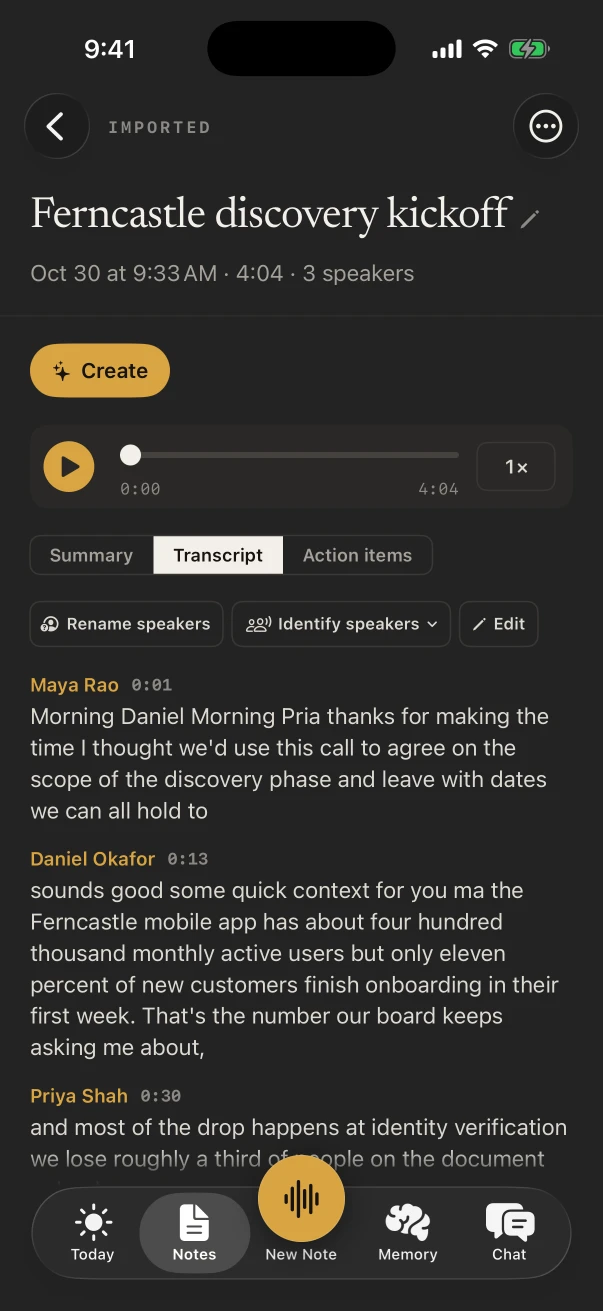
A transcript in NoteOwl for iPhone with a speaker and a time on each line, and Rename speakers and Identify speakers above it
Every line with its speaker and time.
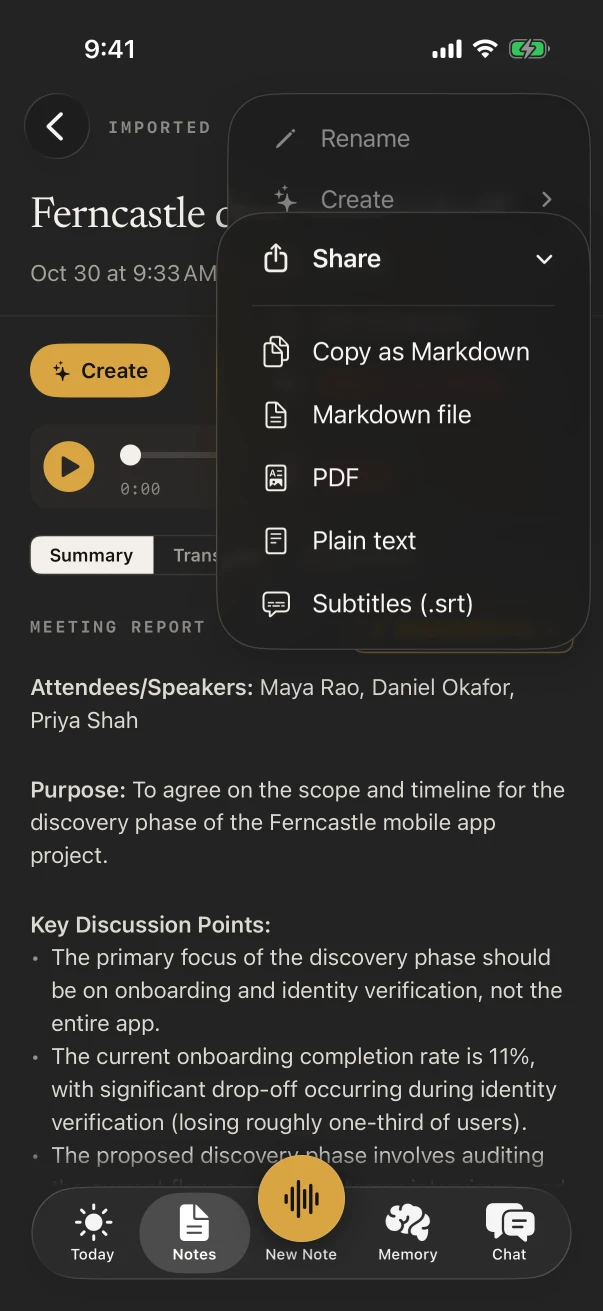
A note’s Share menu in NoteOwl for iPhone: Copy as Markdown, Markdown file, PDF, Plain text and Subtitles (.srt)
Out as text, PDF or SRT subtitles.

Which transcription apps for iPhone are worth trying?

These seven, in order: NoteOwl, Voice Memos and Notes, Aiko, Superwhisper, Rev, Otter and Notta. They all turn speech into text on an iPhone; they differ in what they’ll take, where the work happens, and what comes out.

01 · 1070 AI Labs

NoteOwl

Best overall: recordings and files to speaker-labelled text, on the iPhone.

Transcribes
Its own recordings, free; audio and video files from Voice Memos, Files and Photos with NoteOwl Pro.
Where
On the iPhone, with on-device AI models. Nothing is uploaded.
Speakers and times
With NoteOwl Pro, each speaker’s turn shows who spoke and when; rename a voice once and, where it can, NoteOwl knows it. Subtitles are timed on every plan.
Export
Plain text, Markdown, PDF or Subtitles (.srt), on every plan.
Languages
Auto-detect, English, Hindi, Spanish, French and German.
Price
Recording and transcripts free; importing with NoteOwl Pro, $20 lifetime, 7-day free trial.

02 · Apple, built into iOS

Voice Memos and Notes

Best built-in option, for what you record in Apple’s own apps.

Transcribes
Recordings made in Voice Memos, and audio recorded inside a note.[1,2]
Where
Not stated in Apple’s guides.[1]
Speakers and times
Tap a word to jump to it in the audio; speaker labels aren’t mentioned.[1,2]
Export
Copy Transcript and paste it; Notes can also add the transcript to the note.[1,2]
Languages
Ten, on iPhone 12 or later, though not in every country or region.[1]
Price
Built into iOS.[1]

03 · Sindre Sorhus

Aiko

For files transcribed on the iPhone, for a single price.

Transcribes
Audio or video files such as .m4a, .mp3, .mp4 and .mov, or a recording made in the app, after it’s made.[3]
Where
“The transcription runs on your device, so your audio is never uploaded.”[3]
Speakers and times
Timestamps in its exports; no speaker detection.[3,4]
Export
Text, text with timestamps, SRT, WebVTT, JSON and CSV.[3]
Languages
A hundred, by its maker; mixed languages in one recording “not reliably”.[3]
Price
$24 for all its platforms, with no subscription. Needs iOS 26.6 or later, and the app open while it transcribes.[3,4]

04 · SuperUltra

Superwhisper

For people who dictate as much as they transcribe.

Transcribes
Audio and video files you drop in, and your voice through its keyboard.[6,7]
Where
On the iPhone with its on-device models, which work offline, or in the cloud with its cloud models.[6,7]
Speakers and times
Not stated for the iPhone app.[6]
Export
Not stated for the iPhone app.[6]
Languages
Over a hundred, by its App Store listing.[5]
Price
A free tier with its local models; Pro $8.49 a month, $84.99 a year or $249.99 once, more in the App Store.[7,8]

05 · Rev.com, Inc.

Rev

For people who want subtitle files and the option of a human transcript.

Transcribes
Recordings made in the app, and audio and video uploaded from the phone.[9]
Where
In Rev’s cloud, once the file reaches your Rev account.[10]
Speakers and times
A searchable transcript with speakers attributed.[9]
Export
Word, PDF, plain text, SRT and WebVTT, from your Rev account.[11]
Languages
English on the free plan; 37 or more on Pro.[12]
Price
Free for 45 AI minutes a month; Essentials $29.99 a seat a month; human transcription $1.99 a minute.[12]

06 · Otter.ai, Inc.

Otter

For people who share transcripts with colleagues.

Transcribes
Live recordings, and imported audio and video files.[13]
Where
Not stated on its App Store listing.[13]
Speakers and times
Tag speakers and Otter learns to identify them; tap any word to jump to it.[13]
Export
Export is listed; formats aren’t named in its App Store listing.[13]
Languages
English, Spanish, French and Japanese.[13]
Price
Free to start; Pro is $16.99 a month or $99.99 a year in the App Store.[13]

07 · Mind Cruiser Limited

Notta

For many languages, translation and Word or Excel exports.

Transcribes
Live recordings, and imported audio and video files.[14]
Where
Not stated for the iPhone app.[14]
Speakers and times
Speaker labeling on Premium; exports with timestamps.[14]
Export
TXT, DOCX, Excel, PDF or SRT.[14]
Languages
58 for transcription, and translation into 42.[14]
Price
Free: 3 minutes a recording, and the first 3 minutes of an import. Pro $97.99 a year.[14,15]

Which iPhone transcription apps transcribe on the phone?

NoteOwl and Aiko, which say your audio is never uploaded[3], and Superwhisper with its on-device models[6]. Rev transcribes in its cloud[10]; Otter and Notta don’t say for their iPhone apps.

NoteOwl
Imports filesYes (Pro)
Where it transcribesOn the iPhone
SRT exportYes
PriceFree; Pro $20 lifetime
Voice Memos and Notes
Imports filesTheir own recordings
Where it transcribesNot stated
SRT exportNot mentioned
PriceBuilt into iOS
Aiko
Imports filesYes
Where it transcribesOn the iPhone
SRT exportYes
Price$24
Superwhisper
Imports filesYes
Where it transcribesOn the iPhone or in the cloud
SRT exportNot stated
PriceFree tier; Pro $84.99 a year
Rev
Imports filesYes
Where it transcribesIn Rev’s cloud
SRT exportYes
PriceFree 45 minutes; from $29.99 a month
Otter
Imports filesYes
Where it transcribesNot stated
SRT exportNot stated
PriceFree to start; Pro $16.99 a month
Notta
Imports filesYes
Where it transcribesNot stated
SRT exportYes
PriceFree with limits; Pro $97.99 a year
From each maker’s own pages and App Store listings, checked on 13 November 2026; “Not stated” means the maker’s pages don’t say. The details and the sources are in the cards above.

FAQ

Questions about transcription apps for iPhone

What is the best transcription app for iPhone?

NoteOwl, for most people: it transcribes your recordings for free and your audio and video files with NoteOwl Pro, on the iPhone, shows who spoke and when with NoteOwl Pro, and exports text or SRT subtitles. Pro is $20 lifetime, with no subscription.

Is there a free transcription app for iPhone?

Yes. Voice Memos and Notes transcribe what you record in them on iPhone 12 or later, and NoteOwl transcribes its own recordings for free with no limit. Rev, Notta and Otter have free plans with monthly or per-recording limits.

Which transcription apps work on the iPhone without uploading?

NoteOwl and Aiko transcribe on the iPhone and say nothing is uploaded, and Superwhisper does with its on-device models. Rev transcribes in its cloud after an upload. Otter and Notta don’t say where their iPhone apps transcribe.

Which iPhone transcription apps label speakers?

NoteOwl Pro labels each speaker’s turns, Rev attributes speakers, Otter lets you tag speakers, and Notta labels speakers on Premium. Aiko says it has no speaker detection, and Apple’s guides don’t mention speaker labels.

Can I transcribe a video on my iPhone?

Yes. Share the video from Photos or Files to NoteOwl and it transcribes the sound on the iPhone, with NoteOwl Pro. Aiko, Superwhisper, Rev, Otter and Notta also take video files, by their own pages.

Which iPhone transcription apps export SRT subtitles?

NoteOwl, from Share › Subtitles (.srt) on every plan; Aiko, which also exports WebVTT; Rev, from your Rev account; and Notta. Voice Memos lets you copy the transcript’s text.

Sources

Last checked . Each pick’s facts are from its maker’s own website, help pages or App Store listing; Apple’s from the iPhone User Guide for iOS 26.

  1. [1]Apple, View a Voice Memos transcription on iPhone (iOS 26)
  2. [2]Apple, Record and transcribe audio in Notes on iPhone (iOS 26)
  3. [3]Sindre Sorhus, Aiko
  4. [4]Apple App Store, Aiko
  5. [5]Apple App Store, Superwhisper - AI Dictation
  6. [6]Superwhisper, Superwhisper for iPhone
  7. [7]Superwhisper Help Center, Superwhisper on iOS
  8. [8]Superwhisper Help Center, Plans & Pricing
  9. [9]Apple App Store, Rev: Recorder & Transcription
  10. [10]Rev, Voice recorder app
  11. [11]Rev Help Center, File formats Rev offers
  12. [12]Rev, Pricing
  13. [13]Apple App Store, Otter Transcribe Voice Notes
  14. [14]Apple App Store, Notta Transcribe Voice to Text
  15. [15]Notta, Pricing

Turn recordings and files into text on your iPhone

Free to download. Runs entirely on your Mac or iPhone.

Mac: macOS 26 or later · Apple Silicon (M1 or newer) · 16 GB memory minimum, 24 GB recommended · iPhone: iOS 26 or later

About NoteOwl

NoteOwl is private AI meeting notes and memory for Mac and iPhone. It captures meetings without a bot joining the call, labels every speaker, writes summaries and action items, and builds a memory of every conversation that you can chat with — fully offline, because the speech recognition and the AI run on the Mac or iPhone itself. Dictation into any app is free; Pro is a lifetime licence.

NoteOwl pricing: what’s free and what Pro adds

Last updated