For real estate agents
AI note taker for real estate agents
NoteOwl is an AI note taker for real estate agents that goes where the work happens: the seller’s kitchen table, the third showing of the day, the inspection walk-through. Tap New Note on your iPhone and it records the room, with a free transcript as people talk.
With NoteOwl Pro it names who spoke, writes the notes in a template such as Consultation, and lists the action items with who owes them and by when. Calls with lenders and clients run on your Mac, with no bot joining. NoteOwl never uploads what you record.
How do real estate agents use an AI note taker?
In the conversations a deal turns on: the listing appointment, the buyer consultation, the showings and the inspection walk-through. Record each one on your iPhone, keep your hands free for the lockbox and the doors, and read the notes in the car before the next appointment.
Listing appointment
The seller’s story, in their words
Why they’re moving, the date they need to be out, what they’ve already repaired and the price they have in mind, kept as they said it rather than half-written on the back of a printout.
Buyer consultation
Must-haves and deal-breakers
Budget, schools, the commute, the third bedroom that has to work as an office. NoteOwl Pro writes it up with the Consultation template, ready for the search you set up afterwards.
Showings
What they said in each room
Record the tour, or talk through a voice note in the car straight after: what they loved, what put them off, which house is still in the running. The transcript is free.
Inspection walk-through
Repairs, owners and dates
Who wants what fixed, who is getting the quote and when it’s due. With NoteOwl Pro those come out as action items, each with a name beside it.
What does NoteOwl do on iPhone during a showing?
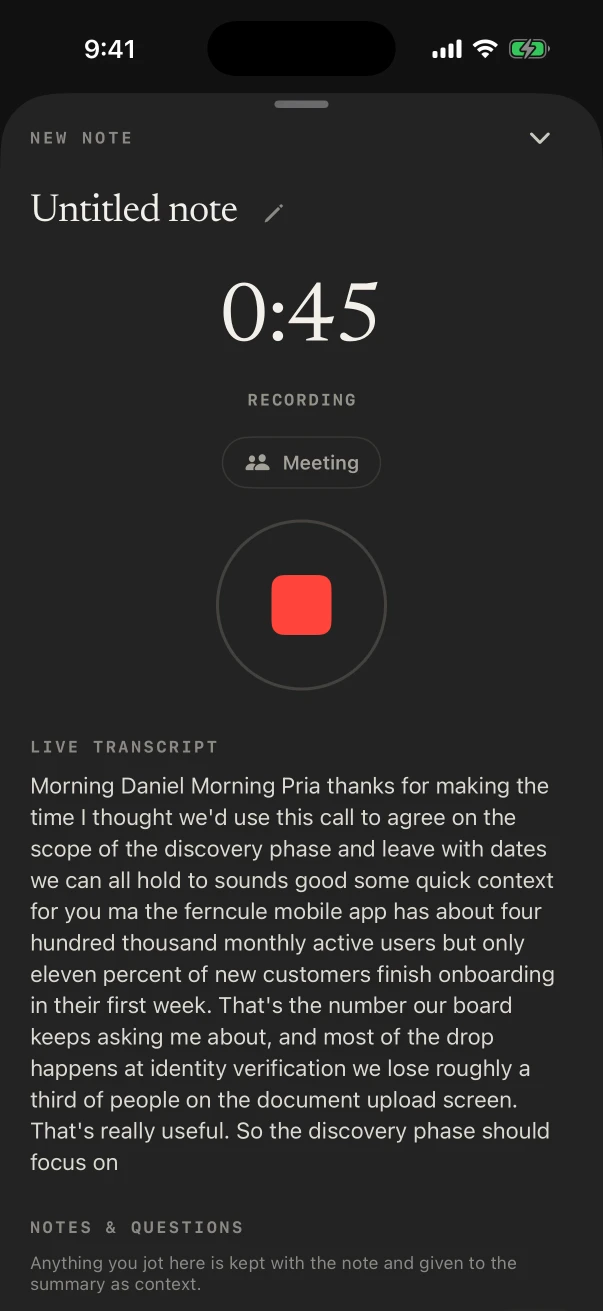
It records what’s said in the room through the iPhone’s microphone and shows the transcript as people talk, free. Lock the phone and keep your hands free: the timer stays on the Lock Screen with a stop button.
With NoteOwl Pro, turn on the Meeting chip and you also get who said what, a summary and the action items when you stop.
- 1
Tap New Note at the front door
Recording starts at once. Type the address under Notes & questions and it stays with the note.
- 2
Lock the screen
NoteOwl keeps recording with the screen locked; the Lock Screen and the Dynamic Island show the timer and a stop button.
- 3
Stop on the way out
The transcript is written on the iPhone. With the Meeting chip on, NoteOwl Pro adds speakers, a summary, action items and a title.
- 4
Name the buyers once
Tap Rename speakers and type their names; NoteOwl learns each voice and names them in later notes. NoteOwl Pro.
Which notes template fits a listing appointment?
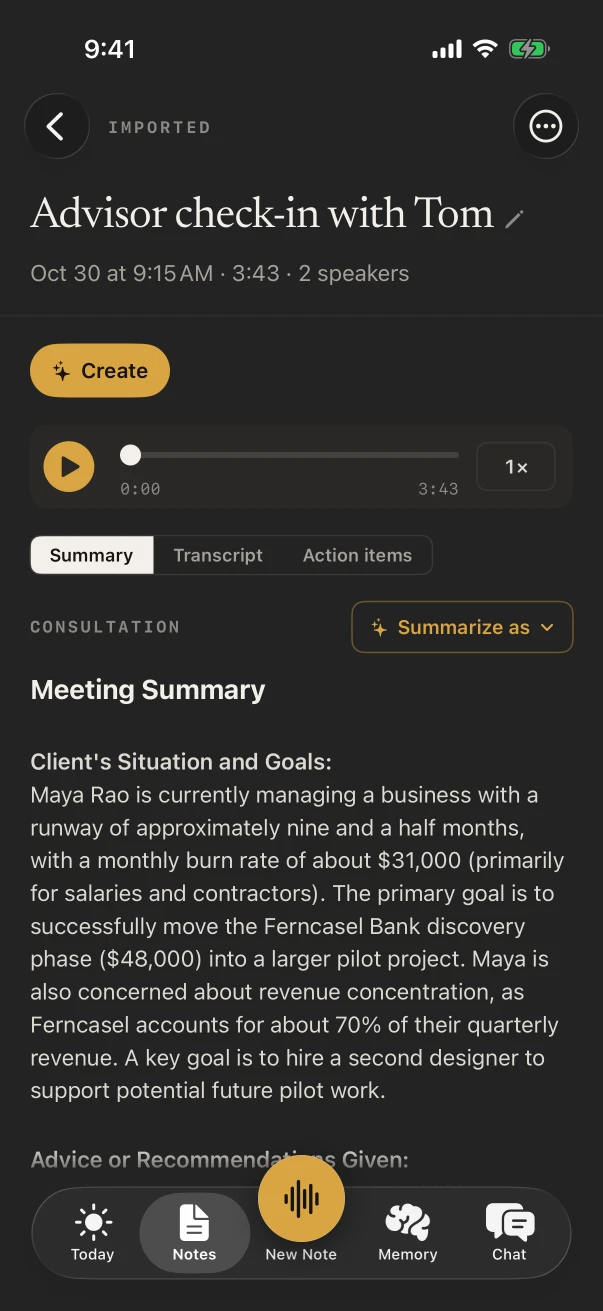
Consultation. It writes the seller’s situation and goals, the recommendations you made, the options you discussed and the agreed next steps. Pick it under Summarize as on any note, or set it as the default for meetings in Settings › Templates.
Templates are part of NoteOwl Pro. To lay notes out your own way, tap New template, or Create by speaking and say how you want them.
- Listing appointment
- TemplateConsultation
- What it writesSituation & goals · Advice · Options · Next steps
- Buyer consultation
- TemplateConsultation
- What it writesSituation & goals · Advice · Options · Next steps
- A showing, or the voice note after it
- TemplateQuick Summary
- What it writes3–5 key points · Bottom line
- Inspection walk-through
- TemplateTo-Do List
- What it writesHigh priority · Medium · Low · Owners & deadlines
- The weekly sales meeting at the brokerage
- TemplateMeeting Report
- What it writesAttendees · Purpose · Key points · Decisions · Action items · Open questions
| The moment | Template | What it writes |
|---|---|---|
| Listing appointment | Consultation | Situation & goals · Advice · Options · Next steps |
| Buyer consultation | Consultation | Situation & goals · Advice · Options · Next steps |
| A showing, or the voice note after it | Quick Summary | 3–5 key points · Bottom line |
| Inspection walk-through | To-Do List | High priority · Medium · Low · Owners & deadlines |
| The weekly sales meeting at the brokerage | Meeting Report | Attendees · Purpose · Key points · Decisions · Action items · Open questions |
Can you keep every client’s must-haves in one place?
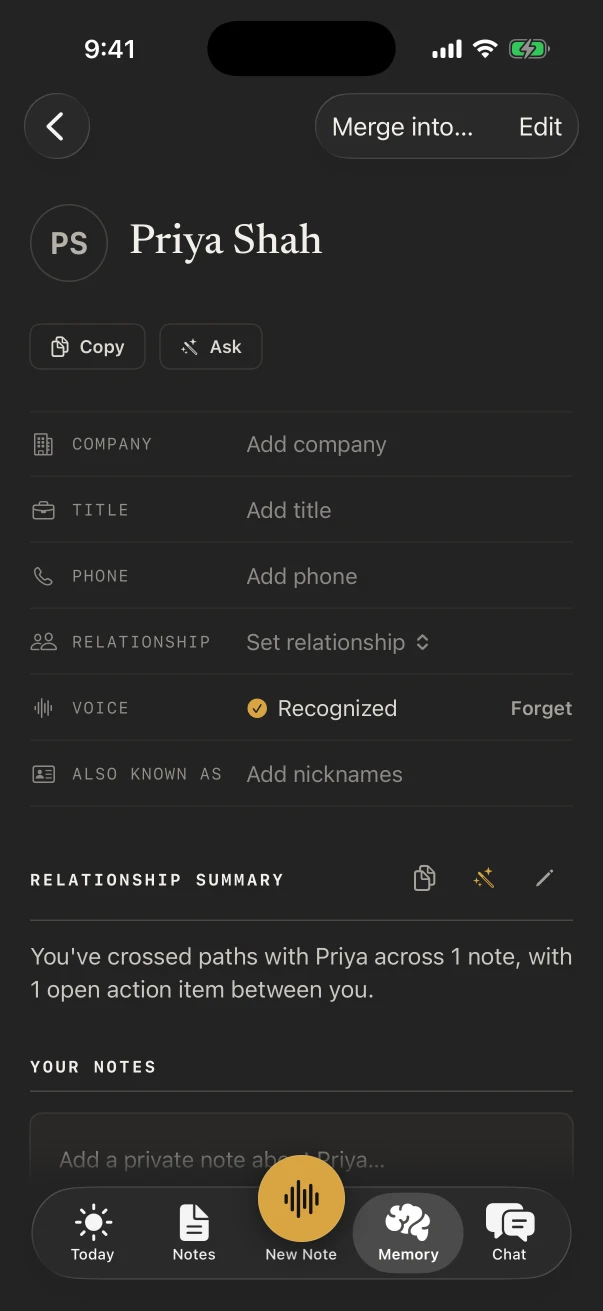
Yes, with NoteOwl Pro. Memory › People keeps a profile for each client: a relationship summary, your private notes, the open action items and every conversation you recorded with them. Add clients from Contacts, or let NoteOwl add them from your notes.
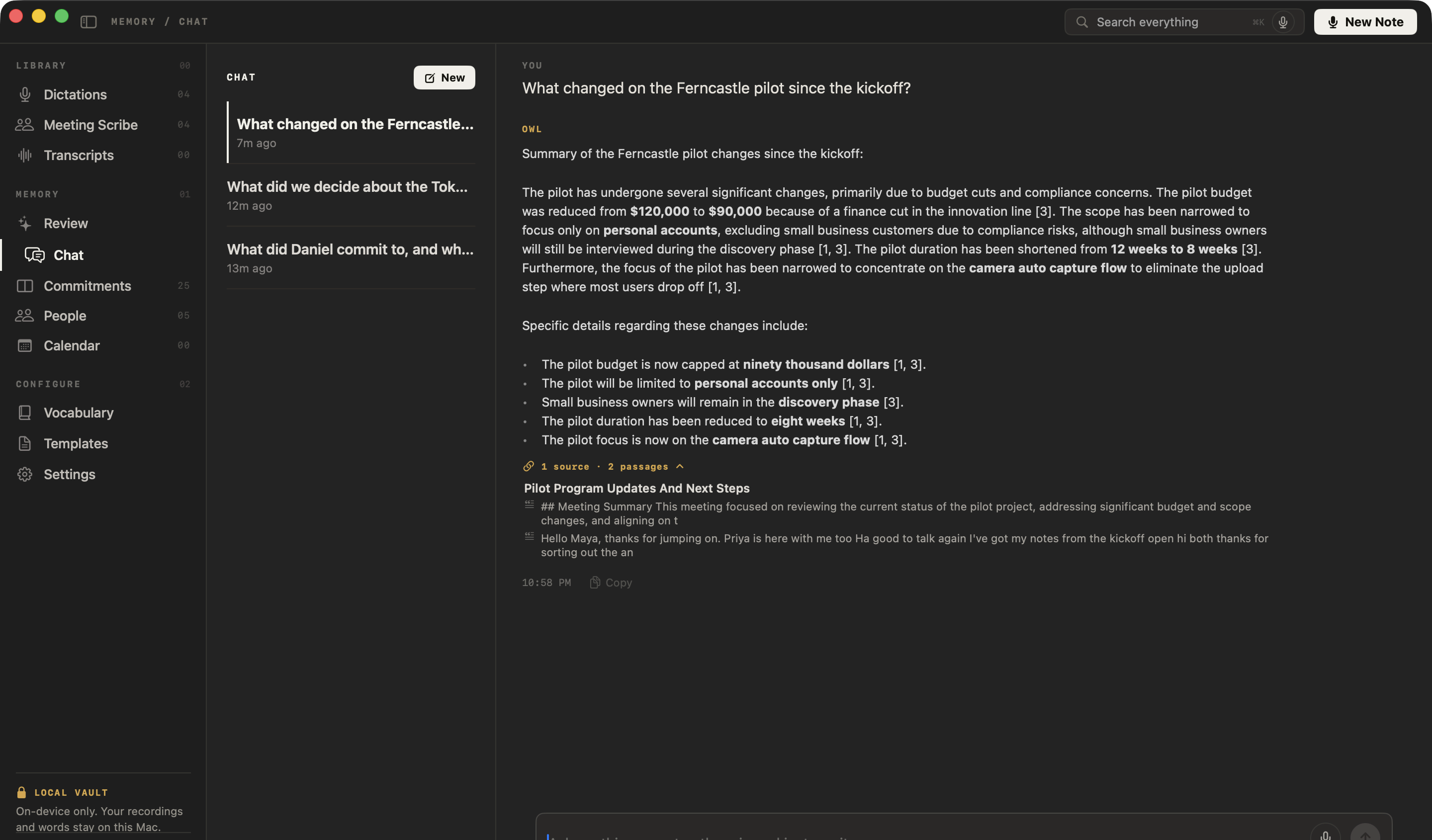
Chat answers questions from your own notes and lists the notes it used; tap one to open it.
- Which house did Daniel Okafor keep coming back to?
- What did Maya Rao say about the move-out date?
- What did I promise Priya Shah after the inspection?
Can you text clients by voice between showings?
Yes, and it’s free. Add the NoteOwl keyboard, tap its microphone in Messages, Mail or any other app and talk; the words type as you speak. NoteOwl opens for a moment to start listening.
- A heads-up to the buyers that you’re ten minutes behind
- Showing feedback for the listing agent
- The summary of an offer you text to your sellers
- Tomorrow’s reminders, straight into Reminders
What does NoteOwl on Mac add for a real estate agent?
The calls. At your desk, NoteOwl on Mac records Zoom, Teams, Google Meet or any call app with no bot joining: the lender, the other agent, the buyer relocating from out of state. Chat then answers questions across every call on that Mac.
Calls with no bot
NoteOwl ProIt records your microphone and the Mac’s audio, so it works in any call app with no bot joining.
Chat across your calls
NoteOwl ProAsk what the lender said about the rate lock, and read the passages the answer came from.
Dictation on the Mac
FreeTap fn in any app and talk: listing descriptions, emails, notes for your transaction coordinator.
Where do recordings of client conversations go?
They stay in NoteOwl on your iPhone. It transcribes and writes the notes on the phone with on-device AI models, and never uploads what you record, so a seller’s finances and a buyer’s budget aren’t handed to a note-taking service.
- Transcribed
- On the iPhone, as the conversation happens
- Uploaded
- Never: NoteOwl doesn’t upload what you record
- In a basement or a new build
- Works offline once the models have downloaded (about 3.2 GB)
- Leaving the business
- Settings › Your data exports everything, or deletes all of it
How much does NoteOwl cost for a real estate agent?
Recording a showing, its transcript and the keyboard are free. Speakers, notes in templates, action items and People are NoteOwl Pro: $20 lifetime on iPhone, with no subscription and a 7-day free trial. On a Mac, Pro is $79 lifetime for one Mac.
- Record a showing in the room, with the live transcript
- FreeYes
- NoteOwl ProYes
- Voice notes in the car between appointments
- FreeYes
- NoteOwl ProYes
- The dictation keyboard in Messages, Mail and any app
- FreeYes
- NoteOwl ProYes
- Who said what, the summary and action items
- FreeNo
- NoteOwl ProYes
- Consultation and the other templates
- FreeNo
- NoteOwl ProYes
- People, Chat and search across every note
- FreeNo
- NoteOwl ProYes
| Free | NoteOwl Pro | |
|---|---|---|
| Record a showing in the room, with the live transcript | Yes | Yes |
| Voice notes in the car between appointments | Yes | Yes |
| The dictation keyboard in Messages, Mail and any app | Yes | Yes |
| Who said what, the summary and action items | No | Yes |
| Consultation and the other templates | No | Yes |
| People, Chat and search across every note | No | Yes |
FAQ
Questions real estate agents ask about NoteOwl
Can NoteOwl record a phone call with a client on iPhone?
No. NoteOwl on iPhone records conversations in the room through the iPhone’s microphone, and a phone call pauses the recording. For calls, NoteOwl on Mac records Zoom, Teams, Google Meet or any call app on the computer, with no bot joining.
Does NoteOwl work at a listing with no phone signal?
Yes. Once its on-device AI models have downloaded (about 3.2 GB), NoteOwl records and transcribes with no connection, in a basement, a new build or a rural property. Nothing you record is uploaded.
How do I get showing notes into my CRM?
Copy the summary from the note, or share it from the note’s ⋯ menu as Markdown, PDF or plain text, and paste it wherever you keep your client records. Or dictate straight into your CRM’s iPhone app with the free NoteOwl keyboard.
Can NoteOwl tell the buyers’ voices apart?
Yes, with NoteOwl Pro. Turn on the Meeting chip and each line of the transcript gets a speaker. Rename them once and NoteOwl learns each voice and names them in later notes; your own lines show as You once it knows your voice.
Is NoteOwl free for real estate agents?
Recording in the room with the transcript, voice notes and the dictation keyboard are free on iPhone, with no limit. Speakers, summaries, templates, action items, People and Chat are NoteOwl Pro, $20 lifetime on iPhone with no subscription. On a Mac, NoteOwl Pro is $79 lifetime for one Mac.
Related
- AI voice recorder for iPhone Record the room, read the transcript live, and stop from the Lock Screen.
- Consultation notes template The four sections NoteOwl writes after a client consultation.
- People A profile for every client, with what each of you owes the other.
- Record a meeting on iPhone Every step, from New Note to the finished note.
Keep exploring
Made for this work
- Consultation notes templateA consultation notes template to copy, what each section holds, an example, and how NoteOwl writes it
- Meeting summary templateA meeting summary template to copy, what each section holds, an example, and how NoteOwl writes it
- AI voice recorder for iPhoneRecord in the room on iPhone with a live transcript (free), then speakers, a summary and action items with Pro; the timer on the Lock Screen and in the Dynamic Island
More jobs away from a desk
- Property managersMove-in and move-out walk-throughs, vendor visits and owner meetings recorded on iPhone, turned into to-do lists by priority, with what you owe and are owed due today
- ConstructionSite walks, OAC meetings, morning huddles and punch walks recorded on iPhone with the phone locked, Meeting Report and To-Do List notes, and trade terms taught with Vocabulary
- Home inspectorsFindings narrated room by room on iPhone as free voice notes, written up in your own report template with Pro, the buyer walk-through, and dictation into your report app
In these situations
- House viewingsRecord each house or apartment viewing on iPhone, say what the photos don’t show, then compare viewings by asking Chat; writing your own viewing template, and Free vs Pro
- In-person meetingsRecord a meeting around a table on iPhone (who said what, a summary and action items) or on a Mac (a hybrid meeting with a call), which device fits, the Meeting Report template, and Free vs Pro
Take NoteOwl to your next listing appointment
Free to download. Runs entirely on your Mac or iPhone.
Mac: macOS 26 or later · Apple Silicon (M1 or newer) · 16 GB memory minimum, 24 GB recommended · iPhone: iOS 26 or later
About NoteOwl
NoteOwl is private AI meeting notes and memory for Mac and iPhone. It captures meetings without a bot joining the call, labels every speaker, writes summaries and action items, and builds a memory of every conversation that you can chat with — fully offline, because the speech recognition and the AI run on the Mac or iPhone itself. Dictation into any app is free; Pro is a lifetime licence.
NoteOwl pricing: what’s free and what Pro adds
Last updated