Guide · iPhone · iOS 26
How to get AI meeting notes on iPhone
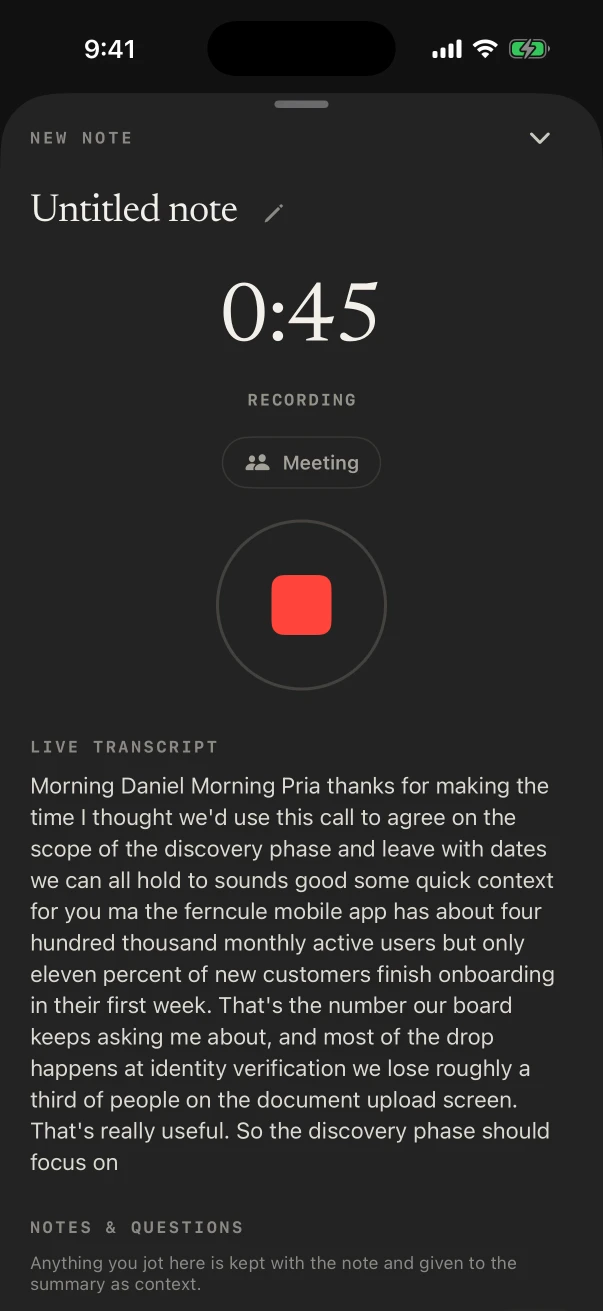
To get AI meeting notes on iPhone, put the phone on the table, open NoteOwl and tap New Note: it records the room through the iPhone’s microphone and shows the transcript as it listens, all on the phone. The recording and its transcript are free.
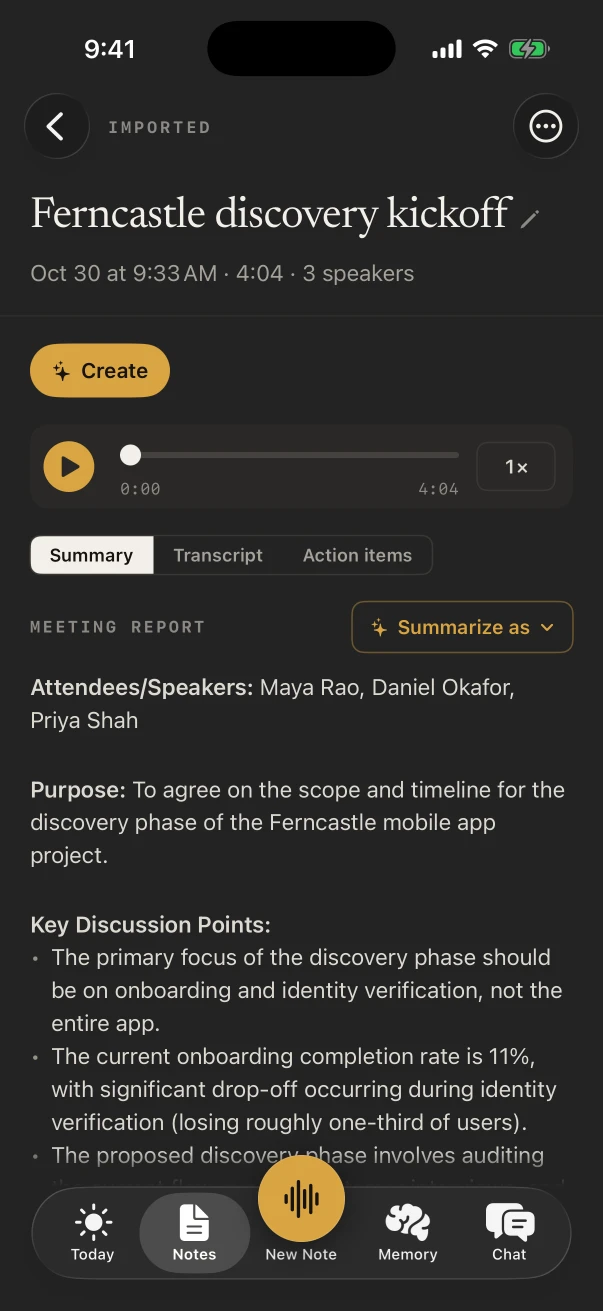
Turn on the Meeting chip, and when you stop, NoteOwl Pro tells the speakers apart and writes the summary and action items on the iPhone; Pro is $20 lifetime. It records meetings in the room.
Can an iPhone take AI meeting notes?
Yes, for meetings in the room. NoteOwl for iPhone records through the microphone and transcribes on the phone, free; with NoteOwl Pro, $20 lifetime, it tells speakers apart and writes the summary and action items on the iPhone. Nothing is uploaded.
Free
The transcript
Everything that was said, kept with the audio on the iPhone and timed for subtitles.
Pro
Speakers
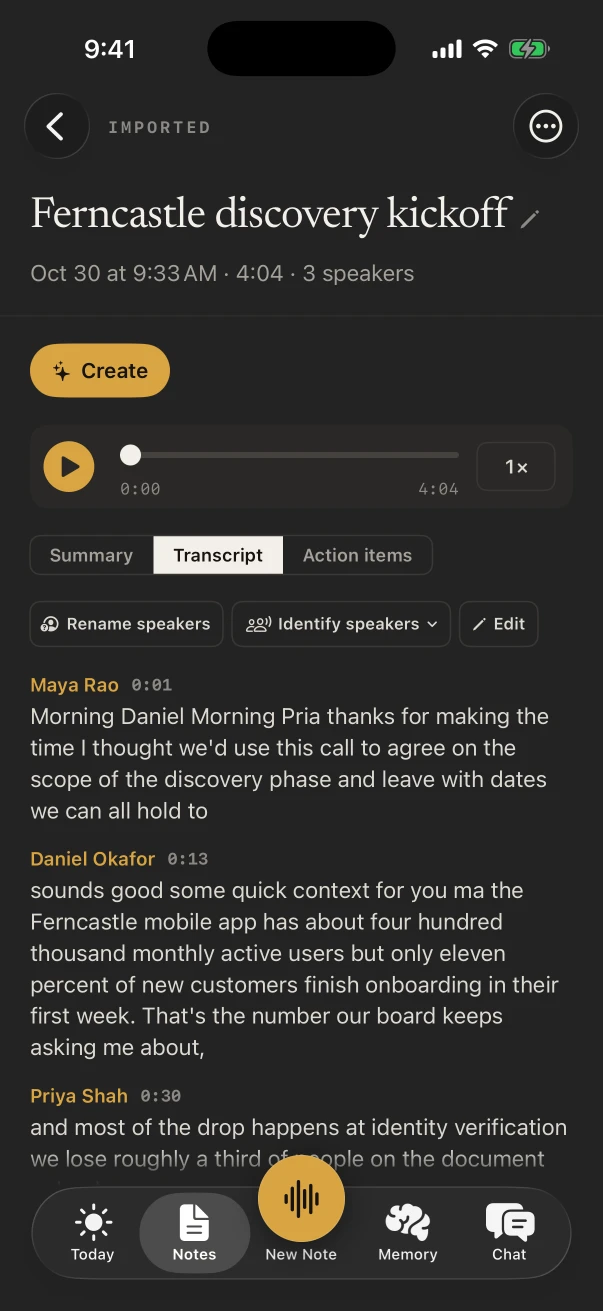
Each turn labelled with who said it; name a voice once and, where it can, NoteOwl learns it.
Pro
The summary
Written when you stop, with the built-in templates or your own.
Pro
Action items
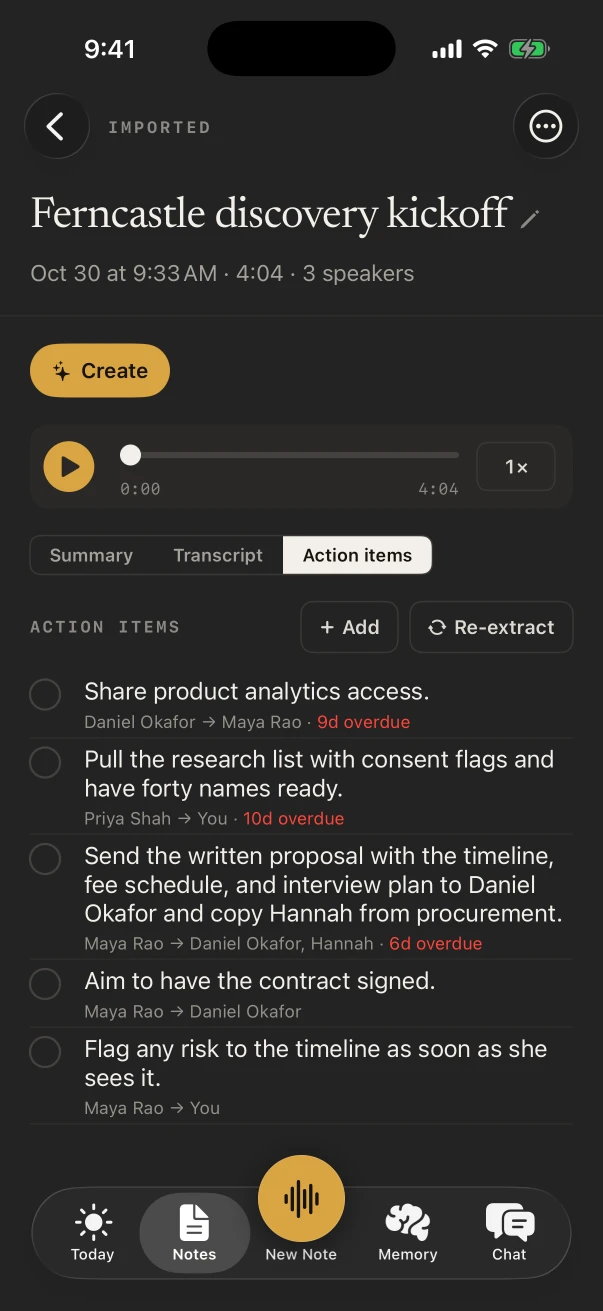
Who owes what to whom, with due dates, gathered in Memory › Action items.
How do you record a meeting on iPhone and get notes?
Tap New Note in NoteOwl with the iPhone on the table, turn on the Meeting chip, and tap Stop when the meeting ends. NoteOwl writes the transcript, speakers, summary and action items on the phone; the meeting notes need NoteOwl Pro.
In NoteOwl for iPhone (iOS 26 or later)
- 1
Download the on-device AI models once
The first time you open NoteOwl, it downloads its on-device AI models: about 600 MB for speech and about 2.6 GB for the notes model Pro uses, about 3.2 GB in all. After that it works offline.
- 2
Put the iPhone on the table
Place it between the people talking, in the room where the meeting happens.
- 3
Tap New Note
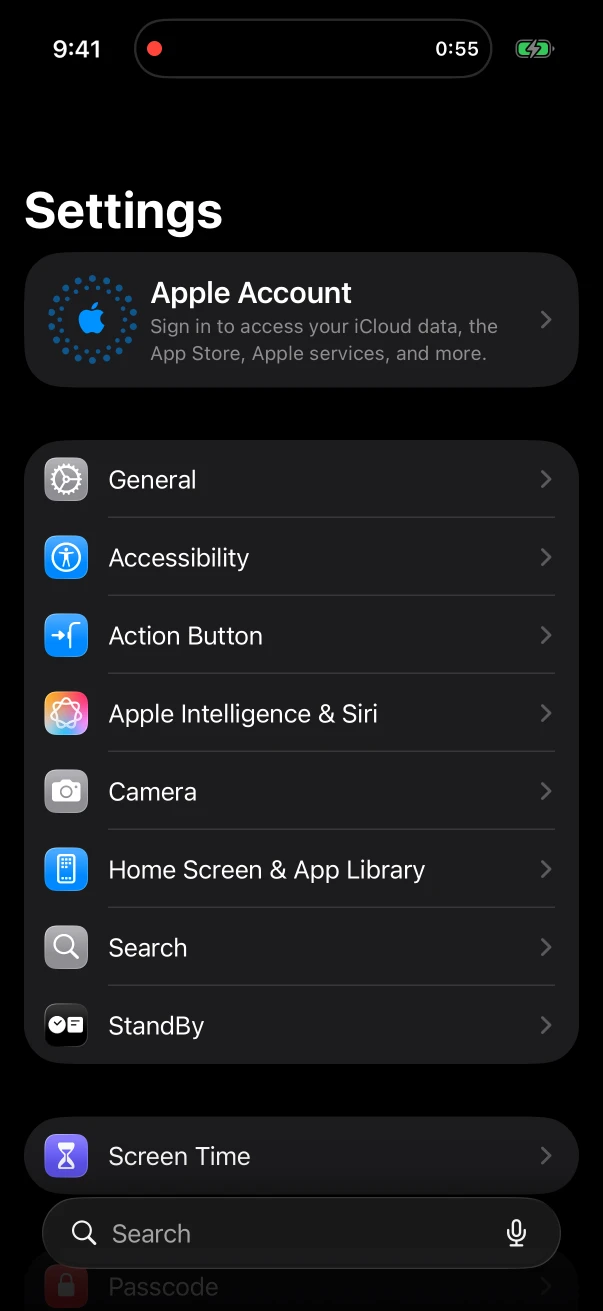
NoteOwl starts recording through the iPhone’s microphone and the transcript appears as it listens. The timer shows in the Dynamic Island, and recording keeps going with the screen locked.
- 4
Turn on Meeting
Tap the Meeting chip, during the recording or after it, so the note gets speakers, meeting notes and action items. Meetings are part of NoteOwl Pro.
- 5
Tap Stop
NoteOwl writes the summary, the action items and a title on the iPhone. With Summarize as, rewrite the summary with another template, such as Meeting Report or 1:1 Check-in.
- 6
Name the speakers
In the transcript, tap Rename speakers and give each voice a name. Where it can, NoteOwl learns each voice for later notes.
- 7
Share the notes
Copy the summary, share the note as Markdown, PDF, plain text or subtitles, or, with NoteOwl Pro, tap ✦ Create › Email draft for a follow-up you send yourself.
Does the recording keep going when the screen locks?
Yes. NoteOwl keeps recording with the screen locked, and the timer stays in the Dynamic Island with a Stop button, so you can put the phone down and listen. If another app takes the audio, the recording pauses.
What do you get when the meeting ends?
With NoteOwl Pro: a summary written on the iPhone, the action items with who owes them and when, and a transcript with a speaker on every line. Rename speakers once and NoteOwl learns each voice for later notes.
Can NoteOwl for iPhone record Zoom, Teams or phone calls?
No. NoteOwl for iPhone records the room through its microphone; it doesn’t capture video-call or phone-call audio, from Zoom, Teams, Meet, FaceTime or the Phone app. For calls, use NoteOwl on the Mac, which records your microphone and your Mac’s audio with no bot.
One product on both: the Mac takes your calls, the iPhone takes the meetings in the room. AI meeting notes without a bot, on the Mac
Can Apple’s own apps take meeting notes?
- Record and transcribe
- Notes and Voice MemosNotes and Voice Memos, on iPhone 12 or later, in the languages Apple lists
- NoteOwlNoteOwl, on the iPhone, free
- Speaker labels
- Notes and Voice MemosNot mentioned in Apple’s guide
- NoteOwlYes, with NoteOwl Pro
- Summary
- Notes and Voice MemosWith Apple Intelligence, in Notes and with Writing Tools
- NoteOwlWritten when you stop, with meeting templates (Pro)
- Action items with owners
- Notes and Voice MemosNot mentioned in Apple’s guide
- NoteOwlYes, with due dates (Pro)
| Notes and Voice Memos | NoteOwl | |
|---|---|---|
| Record and transcribe | Notes and Voice Memos, on iPhone 12 or later, in the languages Apple lists | NoteOwl, on the iPhone, free |
| Speaker labels | Not mentioned in Apple’s guide | Yes, with NoteOwl Pro |
| Summary | With Apple Intelligence, in Notes and with Writing Tools | Written when you stop, with meeting templates (Pro) |
| Action items with owners | Not mentioned in Apple’s guide | Yes, with due dates (Pro) |
Does iPhone meeting transcription work offline?
Yes, with NoteOwl. After a one-time download of its on-device AI models, about 3.2 GB in all, NoteOwl records, transcribes and writes the notes on the iPhone, and it works offline from then on.
Sources
Last checked . Apple’s features are from the iPhone User Guide for iOS 26.
FAQ
Questions about meeting notes on iPhone
Can an iPhone take AI meeting notes?
Yes, for meetings in the room. NoteOwl for iPhone records through the microphone and transcribes on the phone for free; with NoteOwl Pro, $20 lifetime, it tells speakers apart and writes the summary and action items on the iPhone. Nothing is uploaded.
Can NoteOwl record a Zoom or Teams call on iPhone?
No. On iPhone, NoteOwl records the room through the microphone; it doesn’t capture Zoom, Microsoft Teams, Google Meet, FaceTime or phone-call audio.
Does iPhone meeting transcription work offline?
Yes, with NoteOwl. After a one-time download of its on-device AI models, about 3.2 GB in all, NoteOwl records, transcribes and writes notes on the iPhone, and it works offline from then on.
Is it free to record meetings on iPhone with NoteOwl?
Recording a meeting in the room and its transcript are free. Speakers, the summary, action items and templates are part of NoteOwl Pro: $20 lifetime, with no subscription and a 7-day free trial.
Does the recording stop if I lock my iPhone?
No. NoteOwl keeps recording with the screen locked, and the timer stays in the Dynamic Island with a Stop button. If another app takes the audio, the recording pauses.
Where are my iPhone meeting notes stored?
On the iPhone. NoteOwl records, transcribes and writes the notes with on-device AI models, and nothing is uploaded. You can export any note, or all your data at once, whenever you like.
Related
- AI voice recorder for iPhone Record the room with a live transcript; speakers and a summary with Pro.
- Meeting notes for calls, on the Mac Zoom, Teams, Meet or FaceTime, recorded on your Mac.
- AI meeting summaries The summary, decisions and action items, written when the meeting ends.
- How to take meeting notes Before, during and after the meeting.
Keep exploring
What this guide recommends
- AI voice recorder for iPhoneRecord in the room on iPhone with a live transcript (free), then speakers, a summary and action items with Pro; the timer on the Lock Screen and in the Dynamic Island
- AI meeting summariesAI meeting summaries, decisions and action items written on your Mac or iPhone from any template, when the meeting ends
- Action items and commitmentsAction items that involve you become commitments: what you owe and what you are owed, sorted by what is due
- AI meeting notes without a botHow NoteOwl records calls from your Mac with no bot joining, or a meeting in the room on iPhone, and what you get when it ends
More guides
- iPhone dictation fixesApple’s fixes when iPhone dictation isn’t working on iOS 26 (Enable Dictation, language, the 30-second stop, microphone, Screen Time, restart, update), each sourced, then the NoteOwl keyboard as an on-device option
- Record lectures on iPhoneHow to record a lecture on iPhone with Voice Memos or NoteOwl (recording and transcript free), and turn it into study notes with the Student Lecture template in NoteOwl Pro
- Best voice recorder for iPhoneSeven AI voice recorder apps for iPhone compared on six tests (keeps recording, live transcript, notes afterwards, where your audio goes, price, limits), from each maker’s own pages, with NoteOwl first
Take your next meeting’s notes on your iPhone
Free to download. Runs entirely on your Mac or iPhone.
Mac: macOS 26 or later · Apple Silicon (M1 or newer) · 16 GB memory minimum, 24 GB recommended · iPhone: iOS 26 or later
About NoteOwl
NoteOwl is private AI meeting notes and memory for Mac and iPhone. It captures meetings without a bot joining the call, labels every speaker, writes summaries and action items, and builds a memory of every conversation that you can chat with — fully offline, because the speech recognition and the AI run on the Mac or iPhone itself. Dictation into any app is free; Pro is a lifetime licence.
NoteOwl pricing: what’s free and what Pro adds
Last updated