Guide · iPhone · iOS 26

The best AI note taker app for iPhone: 6 picks compared

The best AI note taker app for iPhone records a meeting in the room, then gives you a summary, the action items and who said what, and keeps your meetings where you can trust them. By those tests NoteOwl leads: it writes all of it on the iPhone, with nothing uploaded, and NoteOwl Pro is $20 lifetime, not a subscription.

Granola, Otter, Fireflies, Jamie and Bluedot follow. Each records in-person meetings on the iPhone; they differ in where meetings are processed, how speakers are labelled, and their limits and price, all from the makers’ own pages, checked on 13 November 2026.

The picks · checked 13 November 2026

  1. 01NoteOwlBest overall: meeting notes written on the iPhone, for a lifetime price.
  2. 02GranolaFor people who already use Granola on a computer.
  3. 03OtterFor people who share and comment on meeting notes with others.
  4. 04FirefliesFor people whose desk meetings already run through Fireflies.
  5. 05JamieFor people who want notes without the audio being kept.
  6. 06BluedotFor people who import recordings as often as they record.

What should an AI note taker app for iPhone do?

Six things: record a meeting in the room, write a summary with action items, say who said what, answer questions across past meetings, keep your meetings where you can trust them, and cost a price you won’t regret in a year.

  • Meetings in the room

    Put the phone on the table and record; the app keeps going when the screen locks.

  • Summary and action items

    Notes you’d send round, with who owes what, not just a transcript.

  • Who said what

    Real names on the lines, or at least Speaker A and Speaker B.

  • Ask your notes

    Questions across past meetings, answered from what was actually said.

  • Where your meetings go

    Processed on the iPhone, or uploaded to the maker’s servers.

  • Price

    A lifetime price, a monthly subscription or a free plan with limits.

Why is NoteOwl first?

Because it writes the notes on the iPhone itself, transcript, speakers, summary and action items, with nothing uploaded; none of the others says it does. Recording and transcripts are free, and NoteOwl Pro is $20 lifetime, with no subscription.

The trade-offs, plainly: the notes, speakers and Chat need NoteOwl Pro; it records meetings in the room, and online meetings are recorded with NoteOwl on the Mac; it needs iOS 26 or later and a download of about 3.2 GB first; and it speaks five languages plus Auto-detect. How to get AI meeting notes on iPhone

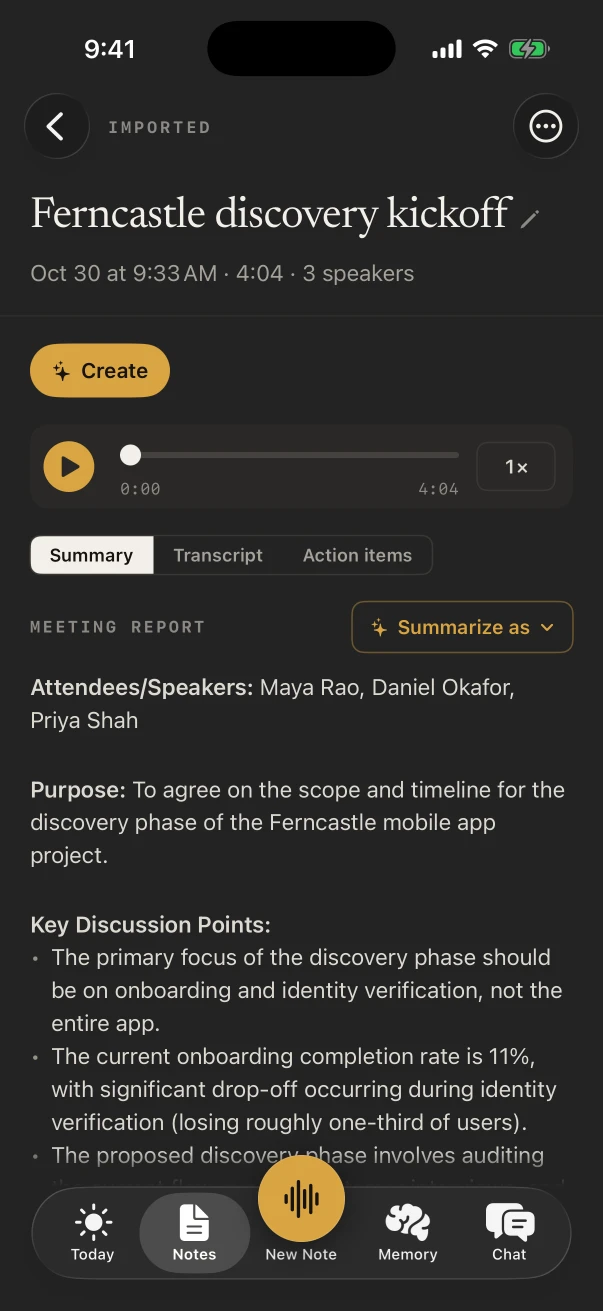
A meeting summary in NoteOwl for iPhone, with the player above it and Summarize as for choosing another template
The summary, written on the iPhone.
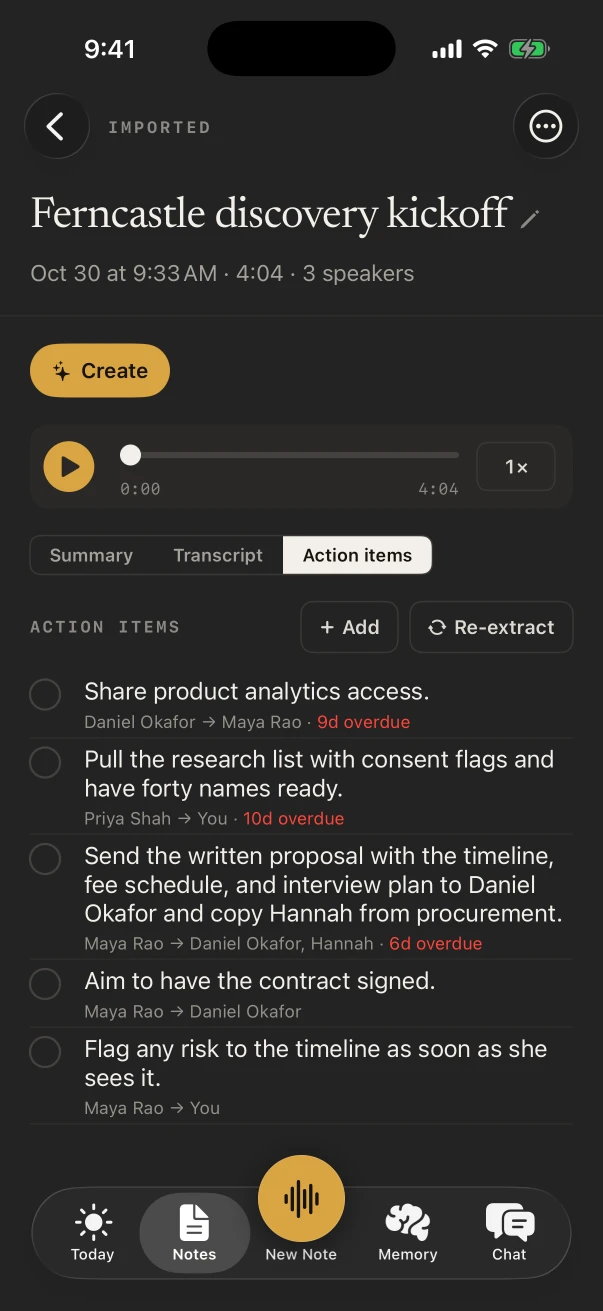
A meeting’s action items in NoteOwl for iPhone, each with its owner and due date, and overdue items marked
Action items, with owners and dates.

Which AI note taker apps for iPhone are worth trying?

These six, in order: NoteOwl, Granola, Otter, Fireflies, Jamie and Bluedot. Each records in-person meetings on the iPhone and writes notes; they differ in where the meeting is processed, how speakers are labelled, and what you pay.

01 · 1070 AI Labs

NoteOwl

Best overall: meeting notes written on the iPhone, for a lifetime price.

Meetings
In the room, through the iPhone’s microphone, with the transcript as it listens, free. It keeps going with the screen locked.
Notes
A summary, action items and a title when you stop, in any of 22 templates (Pro).
Who said what
A speaker on every line; name a voice once and, where it can, NoteOwl knows it next time (Pro).
Ask your notes
Chat answers from all your notes and lists the ones it used; People and action items across meetings (Pro).
Where meetings go
Recorded, transcribed and summarized on the iPhone with on-device AI models; never uploaded.
Price
Recording and transcripts free. NoteOwl Pro $20 lifetime, no subscription, 7-day free trial.

02 · Granola inc

Granola

For people who already use Granola on a computer.

Meetings
Built for in-person meetings, through the phone’s microphone; start from the Lock Screen or a widget.[1,3]
Notes
A shareable summary with highlights, decisions and action items.[1]
Who said what
Speakers labelled Speaker A, Speaker B and so on, on mobile.[2]
Ask your notes
Chat about your notes and the people in the meeting.[1]
Where meetings go
Processed in the cloud during or after the meeting; the cached audio is then deleted. 17 languages on mobile.[2,3,5]
Price
The mobile apps are free to use; Business is $14 a user a month.[4]

03 · Otter.ai, Inc.

Otter

For people who share and comment on meeting notes with others.

Meetings
Records in one tap, with the transcript in real time.[6]
Notes
Automated notes and summaries; assign action items in shared notes.[6]
Who said what
Tag the speakers and Otter learns to identify them.[6]
Ask your notes
Ask about one meeting, or gather answers across all your conversations.[6]
Where meetings go
Not stated on its App Store listing.[6]
Price
Free to start; Pro is $16.99 a month or $99.99 a year in the App Store.[6]

04 · FIREFLIES.AI CORP.

Fireflies

For people whose desk meetings already run through Fireflies.

Meetings
One tap to record in-person meetings, interviews, lectures and coffee chats.[7]
Notes
Summaries by topic, with action items and key decisions.[7]
Who said what
Speaker labels, in over a hundred languages.[7]
Ask your notes
Ask about one meeting or all of them; answers link to the moment it was said.[7]
Where meetings go
Records without a connection, then uploads; processing needs the internet.[8]
Price
A free plan; Pro $18 a seat a month, or $10 billed annually.[9]

05 · wespond UG

Jamie

For people who want notes without the audio being kept.

Meetings
Records in-person meetings from the phone, with what’s said shown as it happens.[10,11]
Notes
Summaries with key points, decisions and action items, usually about 5 to 10 minutes after.[10,13]
Who said what
Speakers identified automatically.[10]
Ask your notes
Ask Jamie questions in Chat, on every plan.[14]
Where meetings go
“Audio is streamed, not stored”, except a few seconds per speaker when Speaker Clips are on.[12]
Price
Free: 10 AI notes a month, 30 minutes a meeting. Plus from $22 a month in the App Store.[10,14]

06 · Twiso Inc.

Bluedot

For people who import recordings as often as they record.

Meetings
Captures in-person meetings, and imports audio and video from the phone.[15,16]
Notes
Summaries and next-step lists after every meeting.[15]
Who said what
Speaker differentiation that separates each voice in the transcript.[16]
Ask your notes
AI Chat answers questions about your meetings.[15]
Where meetings go
Uploaded to Bluedot, which writes the transcript and notes.[17]
Price
Free for 5 meetings in all; Pro $25 a user a month, or $20 billed annually.[18]

Which iPhone note takers keep meetings on the phone?

NoteOwl, which does everything on the iPhone. By their own pages, Granola processes meetings in the cloud[3], Fireflies and Bluedot upload recordings[8,17], Jamie streams the audio[12], and Otter’s listing doesn’t say.

NoteOwl
Where meetings are processedOn the iPhone
Who said whatNames you give (Pro)
PriceFree; Pro $20 lifetime
Granola
Where meetings are processedCloud
Who said whatSpeaker A, Speaker B
PriceMobile free; Business $14 a month
Otter
Where meetings are processedNot stated
Who said whatTagged speakers
PriceFree to start; Pro $16.99 a month
Fireflies
Where meetings are processedCloud, after upload
Who said whatSpeaker labels
PriceFree plan; Pro from $10 a month, yearly
Jamie
Where meetings are processedCloud, streamed
Who said whatIdentified automatically
PriceFree 10 notes a month; from $22 a month
Bluedot
Where meetings are processedCloud, after upload
Who said whatSeparated voices
Price5 free meetings; Pro from $20 a month, yearly
From each maker’s own pages and App Store listings, checked on 13 November 2026; “Not stated” means the maker’s pages don’t say. The details and the sources are in the cards above.

FAQ

Questions about AI note taker apps for iPhone

What is the best AI note taker app for iPhone?

NoteOwl, for most people: it records meetings in the room and writes the transcript, speakers, summary and action items on the iPhone, with nothing uploaded, and NoteOwl Pro is $20 lifetime rather than a subscription. Recording and transcripts are free.

Is there a free AI note taker app for iPhone?

NoteOwl records and transcribes meetings for free with no limit; its summaries need Pro. Granola’s mobile apps are free to use, and Fireflies, Jamie and Bluedot have free plans with limits on meetings, notes or minutes.

Which AI note takers for iPhone don’t upload your meetings?

NoteOwl records, transcribes and summarizes on the iPhone and never uploads. By their own pages, Granola processes in the cloud, Fireflies and Bluedot upload recordings, and Jamie streams the audio for processing without storing it.

Does NoteOwl for iPhone work for online meetings?

NoteOwl for iPhone records meetings in the room, through the microphone. It doesn’t capture the audio of a Zoom, Teams or Meet call on the iPhone.

Which AI note taker apps for iPhone have no subscription?

NoteOwl: Pro on iPhone is $20 lifetime, with no subscription. Otter, Fireflies, Jamie and Bluedot sell monthly or yearly plans, and Granola’s Business plan is monthly.

Do AI note taker apps for iPhone tell speakers apart?

All six on this list do in some form. NoteOwl Pro lets you name a voice once and, where it can, recognizes it later; Granola labels Speaker A and Speaker B on mobile; Otter learns speakers you tag; Fireflies, Jamie and Bluedot label speakers by themselves.

Sources

Last checked . Each pick’s facts are from its maker’s own website, help pages or App Store listing.

  1. [1]Apple App Store, Granola - AI Meeting Notes
  2. [2]Granola Help Center, How transcription works on mobile
  3. [3]Granola, Security
  4. [4]Granola Help Center, Subscriptions and billing
  5. [5]Granola Help Center, Multi-language support
  6. [6]Apple App Store, Otter Transcribe Voice Notes
  7. [7]Apple App Store, Fireflies: AI Note Taker
  8. [8]Fireflies Help Center, How to upload unprocessed files in the Fireflies mobile app
  9. [9]Fireflies, Pricing
  10. [10]Apple App Store, AI Meeting Note Taker - Jamie
  11. [11]Jamie Docs, Mobile app
  12. [12]Jamie, meetjamie.ai
  13. [13]Jamie Docs, Summary
  14. [14]Jamie, Pricing
  15. [15]Apple App Store, Bluedot AI Note Taker
  16. [16]Bluedot, Bluedot for iPhone
  17. [17]Bluedot Help Center, Recording a meeting on the iPhone app
  18. [18]Bluedot, Pricing

Meeting notes on your iPhone or Mac

Free to download. Runs entirely on your Mac or iPhone.

Mac: macOS 26 or later · Apple Silicon (M1 or newer) · 16 GB memory minimum, 24 GB recommended · iPhone: iOS 26 or later

About NoteOwl

NoteOwl is private AI meeting notes and memory for Mac and iPhone. It captures meetings without a bot joining the call, labels every speaker, writes summaries and action items, and builds a memory of every conversation that you can chat with — fully offline, because the speech recognition and the AI run on the Mac or iPhone itself. Dictation into any app is free; Pro is a lifetime licence.

NoteOwl pricing: what’s free and what Pro adds

Last updated