For event planners
AI note taker for event planners
NoteOwl is an AI note taker for event planners, for the conversations that happen on your feet: the venue walkthrough, the tasting, the meeting with the florist, the final walkthrough the week before. Record on your iPhone as you go, and the transcript is free.
With NoteOwl Pro, a site visit becomes a checklist with owners and dates, every vendor promise lands in one list of what you’re owed, and the Due today widget keeps it on your Home Screen. Planning calls run on your Mac with no bot. NoteOwl never uploads what you record.
How do event planners use an AI note taker?
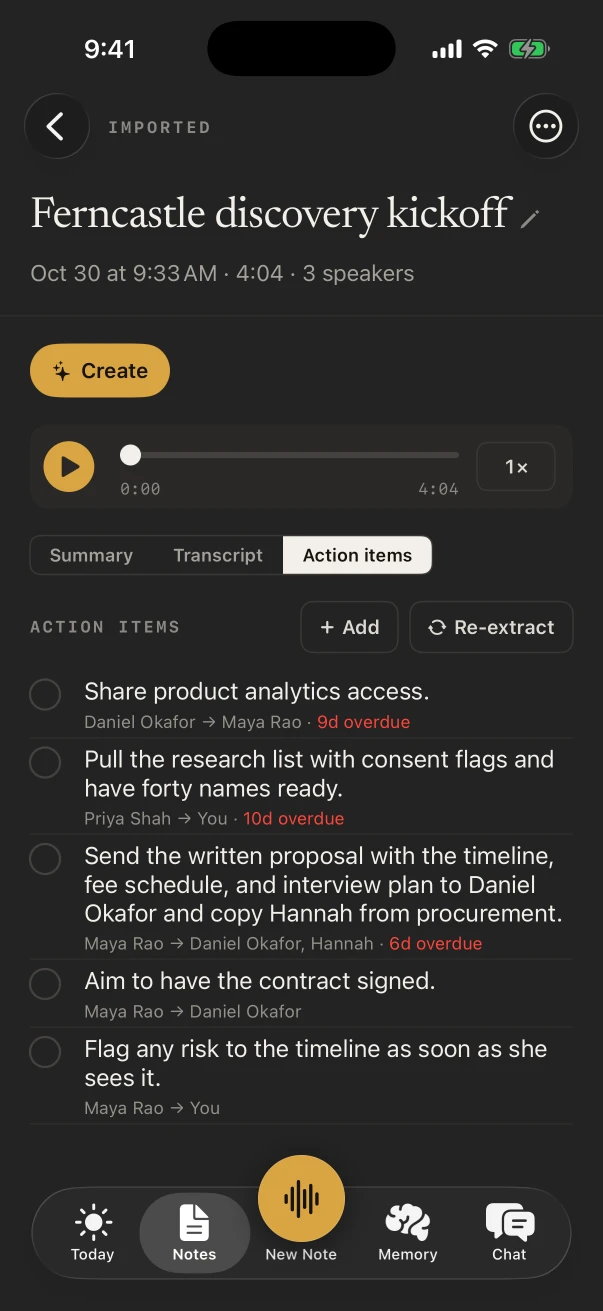
To catch the details that make or break the day. Wedding and corporate planners record the client consultation, the venue walkthrough and each vendor meeting, then work from a list of who promised what by when instead of a dozen notebooks and voice memos.
Client consultation
The brief, in their words
Date, guest count, budget, the feeling they want and the one thing they don’t. The Consultation template writes it up with NoteOwl Pro.
Venue walkthrough
Load-in, power, the room flip
Ask the coordinator your questions as you walk and the answers are in the transcript, from the freight elevator to the curfew.
Vendor meetings and tastings
What’s included, and by when
The menu changes, the linen count, the deposit date. NoteOwl Pro lists the action items on both sides.
Final walkthrough
The last checklist
Walk the run of show with the venue and key vendors, and the To-Do List template writes every open item by priority.
What does NoteOwl do on a venue walkthrough?
It records the conversation as you walk the venue with its coordinator, through the iPhone’s microphone, and the transcript is free. With NoteOwl Pro, Summarize as › To-Do List turns it into everything to confirm, grouped by priority, with owners and deadlines where they were said.
- 1
Title it with the venue and date
Tap Untitled note while it records and type it, so the free title search finds it later.
- 2
Ask your questions out loud
Load-in times, power for the band, where the photo booth goes: the answers are in the transcript.
- 3
Start the day on Today
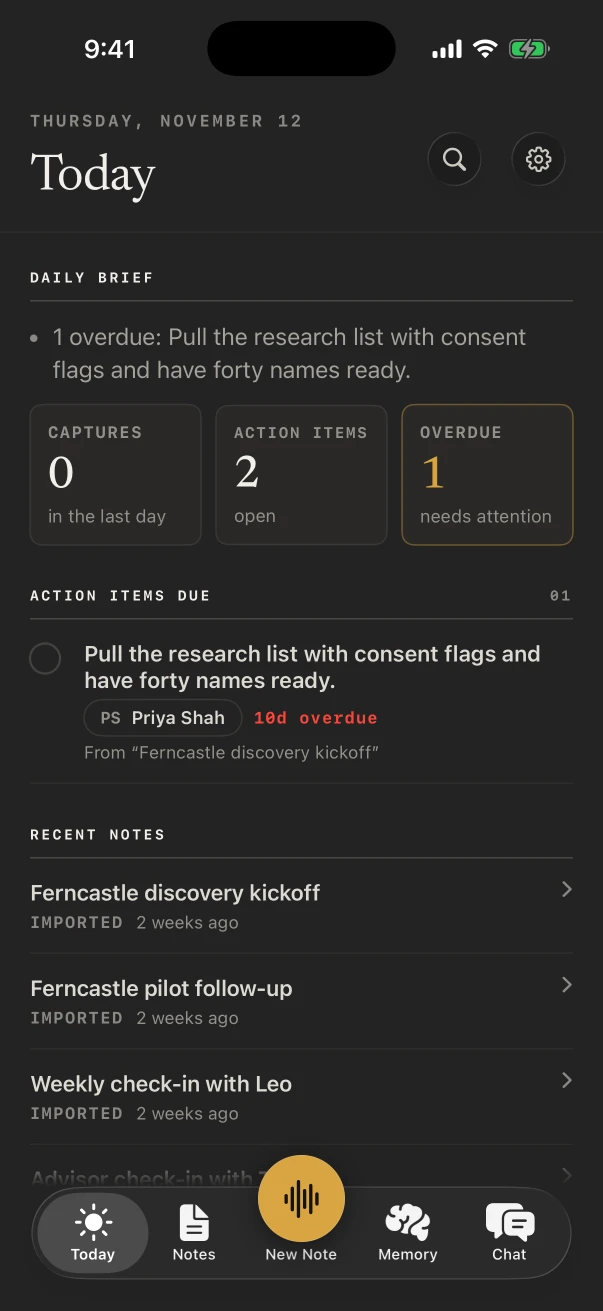
The Today tab lists your recent notes and, with NoteOwl Pro, the action items due and anything overdue.
Can NoteOwl track what every vendor promised?
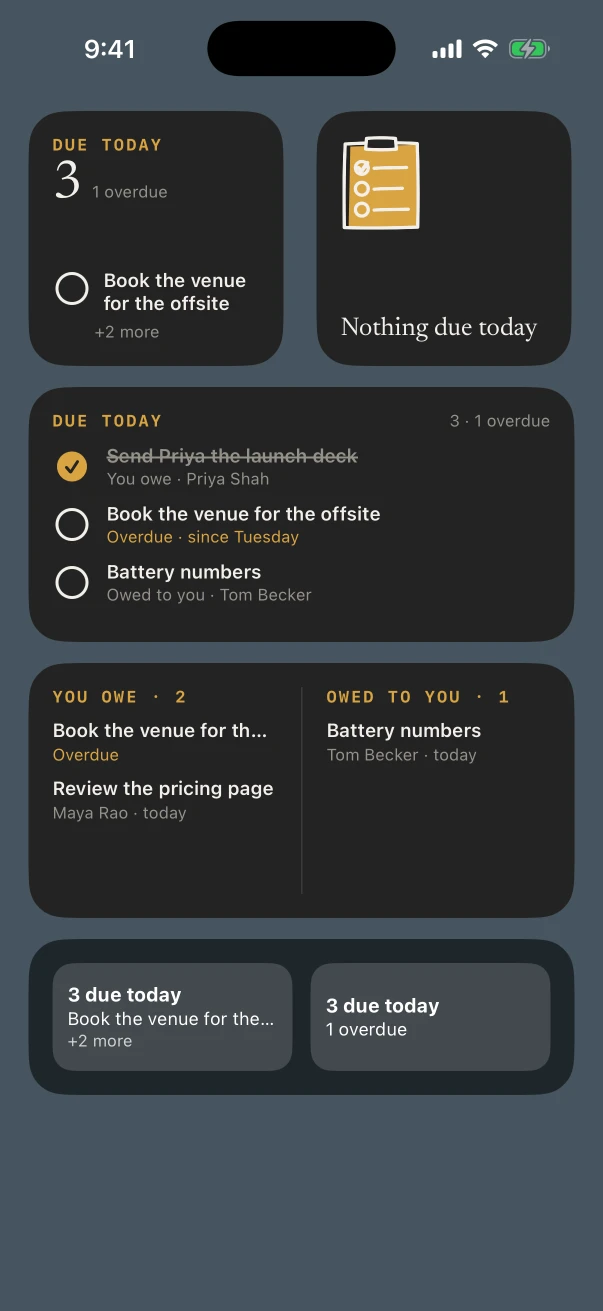
Yes, with NoteOwl Pro. Action items from every meeting collect in Memory › Action items, split into what you owe and what you’re owed. The Due today widget shows what’s due on your Home Screen, and each vendor gets a profile in People with every conversation.
Which notes templates fit event planning?
Consultation for the client brief, To-Do List for a site visit or the final walkthrough, Meeting Report for a vendor meeting, Brainstorm for a theme session with the client, and Presentation when you walk a committee through the plan. All with NoteOwl Pro.
- Client consultation
- TemplateConsultation
- What it writesSituation & goals · Advice · Options · Next steps
- Venue walkthrough or site visit
- TemplateTo-Do List
- What it writesHigh priority · Medium · Low · Owners & deadlines
- Vendor meeting or tasting
- TemplateMeeting Report
- What it writesAttendees · Purpose · Key points · Decisions · Action items · Open questions
- Theme and design session
- TemplateBrainstorm
- What it writesIdeas by theme · Standouts · Next experiments
- Presenting the plan to a committee
- TemplatePresentation
- What it writesMain message · Key points · Standout moments · Q&A
| The moment | Template | What it writes |
|---|---|---|
| Client consultation | Consultation | Situation & goals · Advice · Options · Next steps |
| Venue walkthrough or site visit | To-Do List | High priority · Medium · Low · Owners & deadlines |
| Vendor meeting or tasting | Meeting Report | Attendees · Purpose · Key points · Decisions · Action items · Open questions |
| Theme and design session | Brainstorm | Ideas by theme · Standouts · Next experiments |
| Presenting the plan to a committee | Presentation | Main message · Key points · Standout moments · Q&A |
Can you reply to vendors by voice on event day?
Yes, free. The NoteOwl keyboard types what you say into Messages, Mail or any other app: tap its microphone and talk while you carry boxes. NoteOwl opens for a moment to start listening, and the words type into the message.
- A change in the running order for the DJ
- A late dietary change for the caterer
- Shuttle times confirmed with the hotel
- A reply to the client between setups
What does NoteOwl on Mac add for an event planner?
Planning calls. Corporate clients, hotels and remote vendors meet on Zoom, Teams or Google Meet, and NoteOwl on Mac records those calls with no bot joining, writes them up when they end, and answers questions across them in Chat.
Calls, recorded with no bot
NoteOwl ProThe Mac records your microphone and its own audio, so it works in any call app.
One list of promises
NoteOwl ProWhat you owe and what you’re owed, from every call, each with the call it came from.
Proposals by voice
FreeTap fn and dictate a proposal, a run of show or an email in any app on the Mac.
Where do recordings of client meetings go?
They stay in NoteOwl on your iPhone. Budgets, guest details and a client’s plans are transcribed and summarized on the phone by on-device AI models, and NoteOwl never uploads what you record.
- Written
- On the iPhone, with on-device AI models
- Uploaded
- Nothing you record
- A venue with weak signal
- Works offline once the models are downloaded (about 3.2 GB)
- After the event
- Share or delete a note from its ⋯ menu
How much does NoteOwl cost for an event planner?
Recording a walkthrough, its transcript and the keyboard are free. Checklists, action items, the Due today widget, People and Translate are NoteOwl Pro: $20 lifetime on iPhone, with no subscription and a 7-day free trial. On a Mac, Pro is $79 lifetime for one Mac.
- Record a walkthrough or tasting, with the live transcript
- FreeYes
- NoteOwl ProYes
- Voice notes between meetings
- FreeYes
- NoteOwl ProYes
- The dictation keyboard in any app
- FreeYes
- NoteOwl ProYes
- To-Do List, Consultation and the other templates
- FreeNo
- NoteOwl ProYes
- Action items, Today and the Due today widget
- FreeNo
- NoteOwl ProYes
- Translate a meeting into another language
- FreeNo
- NoteOwl ProYes
| Free | NoteOwl Pro | |
|---|---|---|
| Record a walkthrough or tasting, with the live transcript | Yes | Yes |
| Voice notes between meetings | Yes | Yes |
| The dictation keyboard in any app | Yes | Yes |
| To-Do List, Consultation and the other templates | No | Yes |
| Action items, Today and the Due today widget | No | Yes |
| Translate a meeting into another language | No | Yes |
FAQ
Questions event planners ask about NoteOwl
Can NoteOwl make a checklist from a site visit?
Yes, with NoteOwl Pro. Record the visit, open the note and choose Summarize as › To-Do List: every task as a checklist grouped High, Medium and Low priority, with the owner and the deadline when they were said.
Can NoteOwl translate a meeting with a vendor?
Yes, with NoteOwl Pro. Open the note, tap ✦ Create and choose Translate, pick the language, and NoteOwl writes the transcript in that language on the iPhone.
Can NoteOwl record a planning call on Zoom?
On a Mac, yes: NoteOwl on Mac records Zoom, Teams, Google Meet or any call app with no bot joining. NoteOwl on iPhone records meetings in the room and never captures a call.
Does NoteOwl work at a venue with no signal?
Yes. A ballroom basement with no bars is fine: once its on-device AI models are on the iPhone (about 3.2 GB), NoteOwl records and transcribes without a connection.
Is NoteOwl free for event planners?
Recording in the room with the transcript, voice notes and the dictation keyboard are free on iPhone. Templates, action items, widgets with what’s due, People, Chat and Translate are NoteOwl Pro, $20 lifetime on iPhone with no subscription.
Keep exploring
Made for this work
- To-do list templateA to-do list template to copy, what each section holds, an example, and how NoteOwl writes it
- Brainstorming templateA brainstorming template to copy, what each section holds, an example, and how NoteOwl writes brainstorm notes
- iPhone widgetsNoteOwl’s iPhone widgets (New note, Keyboard, Capture, Last capture, Due today, Up next), what each does and needs, and its Live Activities in the Dynamic Island
More jobs away from a desk
- TeachersParent-teacher conferences, department meetings, professional development and observation debriefs recorded on iPhone, with free dictation for emails and report card comments
- CoachesIn-person and walking coaching sessions on iPhone, video sessions on the Mac with no bot, the 1:1 Check-in template, and a profile with every session for each client
- HRExit interviews, new-hire orientation, benefits sessions and site visits recorded on iPhone, notes in your own template, and what you keep or delete under your control
In these situations
- Site visitsSite visit notes spoken on iPhone as you walk (Action button, Lock Screen), the Project Log and To-Do List templates for a report and a punch list, sharing as PDF, and dictating the write-up on a Mac
- Conferences and talksRecord talks, panels and seminars from your seat on iPhone, the Presentation template with the Q&A, remembering the people you meet, and online sessions recorded on a Mac
Take NoteOwl to your next venue walkthrough
Free to download. Runs entirely on your Mac or iPhone.
Mac: macOS 26 or later · Apple Silicon (M1 or newer) · 16 GB memory minimum, 24 GB recommended · iPhone: iOS 26 or later
About NoteOwl
NoteOwl is private AI meeting notes and memory for Mac and iPhone. It captures meetings without a bot joining the call, labels every speaker, writes summaries and action items, and builds a memory of every conversation that you can chat with — fully offline, because the speech recognition and the AI run on the Mac or iPhone itself. Dictation into any app is free; Pro is a lifetime licence.
NoteOwl pricing: what’s free and what Pro adds
Last updated