Voice memos to text · iPhone
How to transcribe voice memos on iPhone, with speakers
To transcribe voice memos on iPhone with NoteOwl, open the recording in Voice Memos, tap the More Actions button (•••), tap Share and choose NoteOwl, then tap Open NoteOwl. NoteOwl turns the memo into a transcript that shows who spoke and when, and writes a summary, all on the iPhone.
Importing recordings is part of NoteOwl Pro: $20 lifetime with no subscription, with a 7-day free trial. The same works for audio from Files and videos from Photos, and nothing is uploaded.
How do you transcribe a voice memo on iPhone?
Share it to NoteOwl. In Voice Memos, tap the recording, tap ••• and Share, choose NoteOwl, then tap Open NoteOwl. NoteOwl transcribes it on the iPhone and adds speakers, times and a summary. Importing recordings needs NoteOwl Pro.[1]
On a Mac? Here is how to transcribe a voice memo on Mac.
- 1
Open the memo
In the Voice Memos app, tap the recording you want as text, then tap the More Actions button (•••).
- 2
Share it to NoteOwl
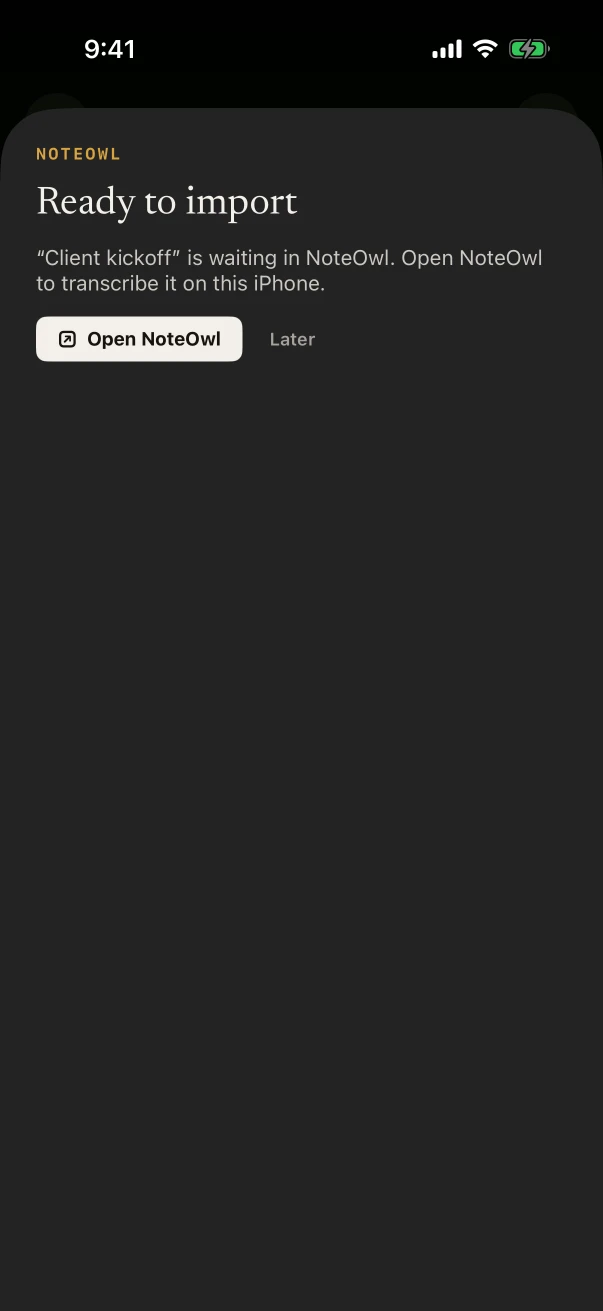
Tap Share and choose NoteOwl. The sheet says “Ready to import”.
- 3
Tap Open NoteOwl
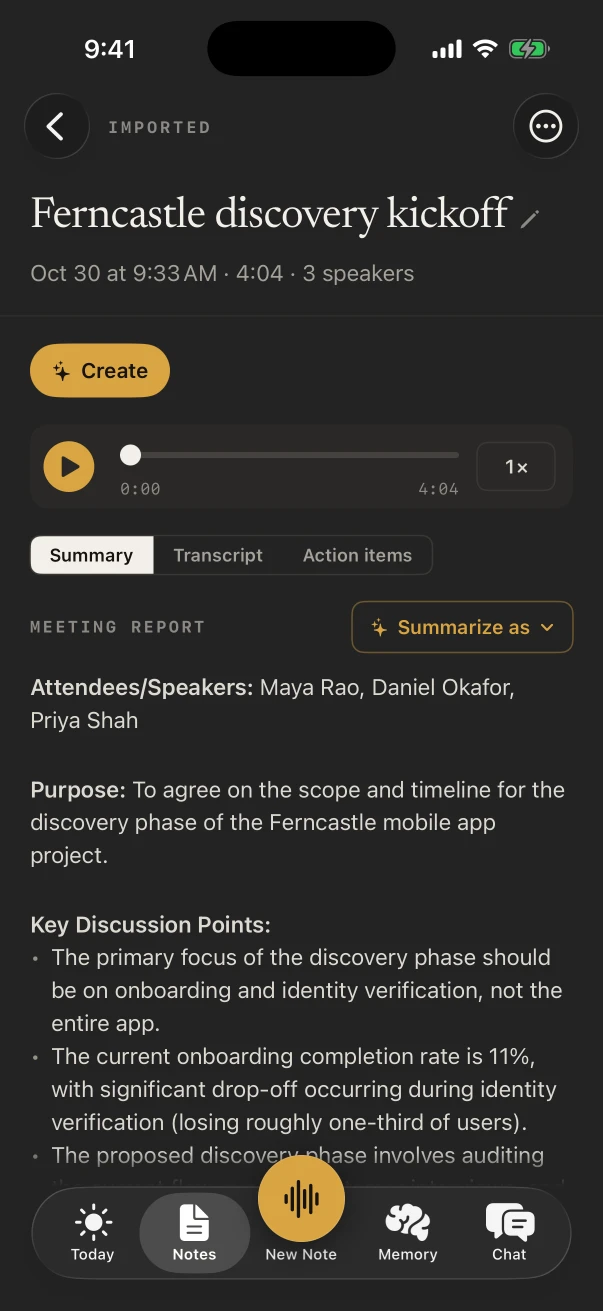
NoteOwl transcribes the memo on the iPhone, finds the speakers, then writes the summary, the action items and a title.
- 4
Read it as a note
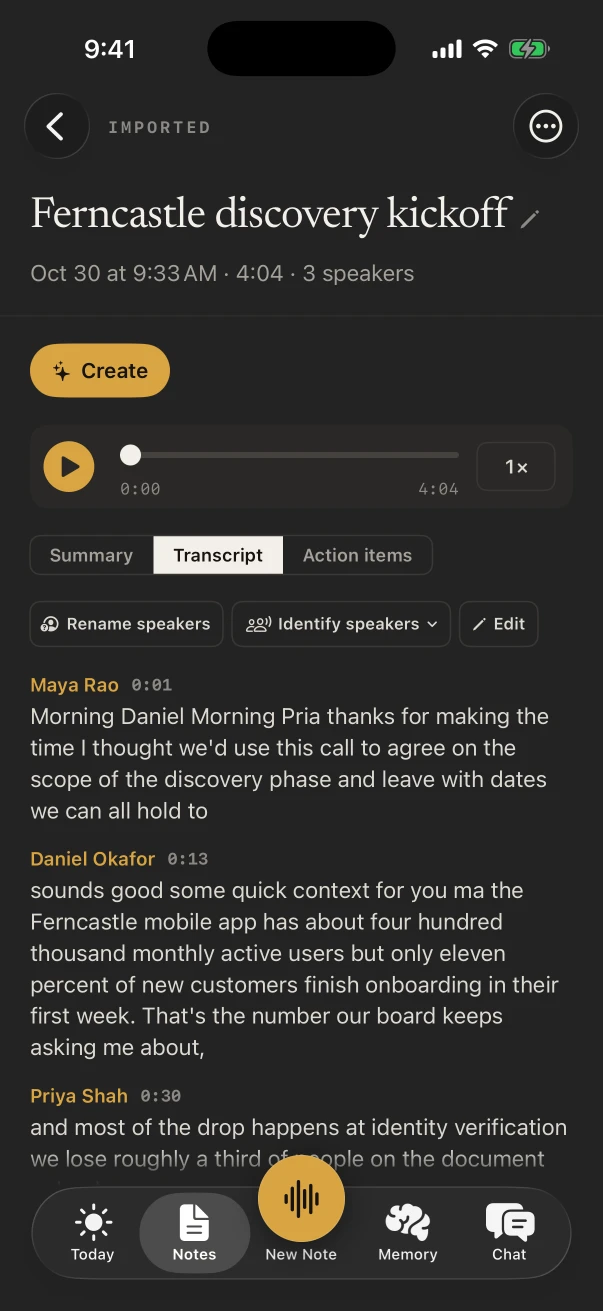
The memo is now a note with its audio and three tabs: Summary, Transcript with speakers and times, and Action items.
Can a voice memo transcript show who is speaking?
Yes. NoteOwl labels each speaker’s turns in an imported memo, with the time each one starts. Tap Rename speakers to give each one a name; where it can, NoteOwl learns those voices and recognises them in later notes.
The audio stays with the note, so you can play the memo back beside its transcript. More on how NoteOwl recognises speakers.
Can NoteOwl summarize a voice memo?
Yes. Once the transcript is done, NoteOwl writes a summary, pulls out the action items and gives the note a title, on the iPhone. Summarize as rewrites the summary in another template, and ✦ Create › Email draft turns the note into a follow-up email.
The action items join the rest in Memory, under “I owe” and “Owed to me”; see how NoteOwl writes summaries.
Do you need NoteOwl Pro to transcribe voice memos?
Yes. Importing recordings, from Voice Memos, Files or Photos, is part of NoteOwl Pro on iPhone: $20 lifetime, with no subscription, and a 7-day free trial. Anything you record in NoteOwl itself is transcribed free.
So for the next conversation, skip Voice Memos and record it in NoteOwl, with the transcript as you go.
Which audio files can NoteOwl transcribe on iPhone?
Audio such as M4A, MP3, WAV and AIFF, and video such as MP4 and MOV, whose sound NoteOwl transcribes. Share a file from Voice Memos, Files or Photos, or import it inside NoteOwl. One file imports at a time.
Voice Memos
Tap the recording, then ••• › Share › NoteOwl.
Files
Share an audio file from the Files app to NoteOwl.
Photos
Share a video and NoteOwl transcribes its sound.
Inside NoteOwl
Touch and hold New Note and choose Import audio or video, then pick the file.
- Audio
- M4A (what Voice Memos shares), MP3, WAV and AIFF
- Video
- MP4 and MOV; NoteOwl transcribes the sound
- At a time
- One file; the next can follow once it’s done
- Where it runs
- On the iPhone, with on-device AI models
- Plan
- NoteOwl Pro, $20 lifetime; 7-day free trial
FAQ
Questions about transcribing voice memos on iPhone
Does NoteOwl upload my voice memos to transcribe them?
No. Sharing a memo copies it into NoteOwl on the same iPhone, and NoteOwl transcribes it there with on-device AI models. The audio, the transcript and the summary stay on your phone.
Can I transcribe a voice memo for free on iPhone?
Importing a recording into NoteOwl needs NoteOwl Pro, which has a 7-day free trial. Recording in NoteOwl itself is free: tap New Note instead of opening Voice Memos, and the transcript is written as you record.
What happens if I tap Later instead of Open NoteOwl?
The memo waits in NoteOwl, and it is imported and transcribed the next time you open the app.
Can I export the transcript of a voice memo?
Yes, on every plan. Open the note, tap ⋯ › Share and choose Markdown, PDF, plain text or Subtitles (.srt), then send the file anywhere from the share sheet.
How do I transcribe a voice memo on a Mac?
Save the memo as a file and drop it into NoteOwl on your Mac, which transcribes it with speaker labels on the Mac; importing recordings is part of NoteOwl Pro there.
Sources
Last checked .
Related
- Transcribe a voice memo on Mac Apple’s Voice Memos transcript on macOS 26, and NoteOwl with speakers.
- Record in NoteOwl instead Tap New Note and the transcript is written as you record, free.
- Transcription Audio and video files to speaker-labelled text, on Mac and iPhone.
- Subtitles from a recording Export any timed transcript as an SRT file.
Keep exploring
More on iPhone
- iPhone widgetsNoteOwl’s iPhone widgets (New note, Keyboard, Capture, Last capture, Due today, Up next), what each does and needs, and its Live Activities in the Dynamic Island
- iPhone Action button and SiriStart a NoteOwl recording, dictation or a question from the Action button, Control Center, the Lock Screen, Back Tap, Siri or the Shortcuts app
- NoteOwl for iPhoneThe private AI note taker for iPhone: recording in the room with a live transcript, the free dictation keyboard, widgets and the Action button, Mac vs iPhone, Free vs Pro and requirements
On Mac
- Audio to textTranscription software for Mac and iPhone: drop in or share an audio or video file and get a speaker-labelled transcript with timestamps, unlimited, with nothing uploaded
- Voice memo to textHow to turn a Voice Memos recording into text on a Mac, with Apple’s own tools and with NoteOwl
- Subtitle generatorTurn a recording into an SRT subtitle file with timecodes and speaker names, on your Mac or iPhone
Guides
- Best transcription app for iPhoneSeven transcription apps for iPhone compared on files, where they transcribe, speakers and times, exports such as SRT, languages and price, from each maker’s own pages, with NoteOwl first
- Voice Memos transcription fixesSeven fixes from Apple’s iOS 26 pages when Voice Memos shows no transcript (iPhone model, language, region, where the transcript is, older recordings, microphone, restart and update), then NoteOwl for Hindi and speakers
- Summarize a voice memoTwo ways to summarize a voice memo on iPhone: Apple Intelligence’s Writing Tools on the Voice Memos transcript, or NoteOwl’s summary, action items and 22 templates, step by step
- Voice memos, iPhone to MacMove voice memos from iPhone to Mac with iCloud, AirDrop or Save to Files (Apple’s steps for iOS 26 and macOS 26), why they don’t show up, and a transcript with speakers in NoteOwl on the Mac or the iPhone
- Transcribe a video on iPhoneTranscribe a video on iPhone by sharing it from Photos or Files to NoteOwl (speakers, times, a summary and SRT, with NoteOwl Pro), or copy Apple’s Live Captions while it plays
Turn your voice memos into notes on iPhone
Free to download. Runs entirely on your Mac or iPhone.
Mac: macOS 26 or later · Apple Silicon (M1 or newer) · 16 GB memory minimum, 24 GB recommended · iPhone: iOS 26 or later
About NoteOwl
NoteOwl is private AI meeting notes and memory for Mac and iPhone. It captures meetings without a bot joining the call, labels every speaker, writes summaries and action items, and builds a memory of every conversation that you can chat with — fully offline, because the speech recognition and the AI run on the Mac or iPhone itself. Dictation into any app is free; Pro is a lifetime licence.
NoteOwl pricing: what’s free and what Pro adds
Last updated