Use case · In-person meetings
AI note taker for in-person meetings
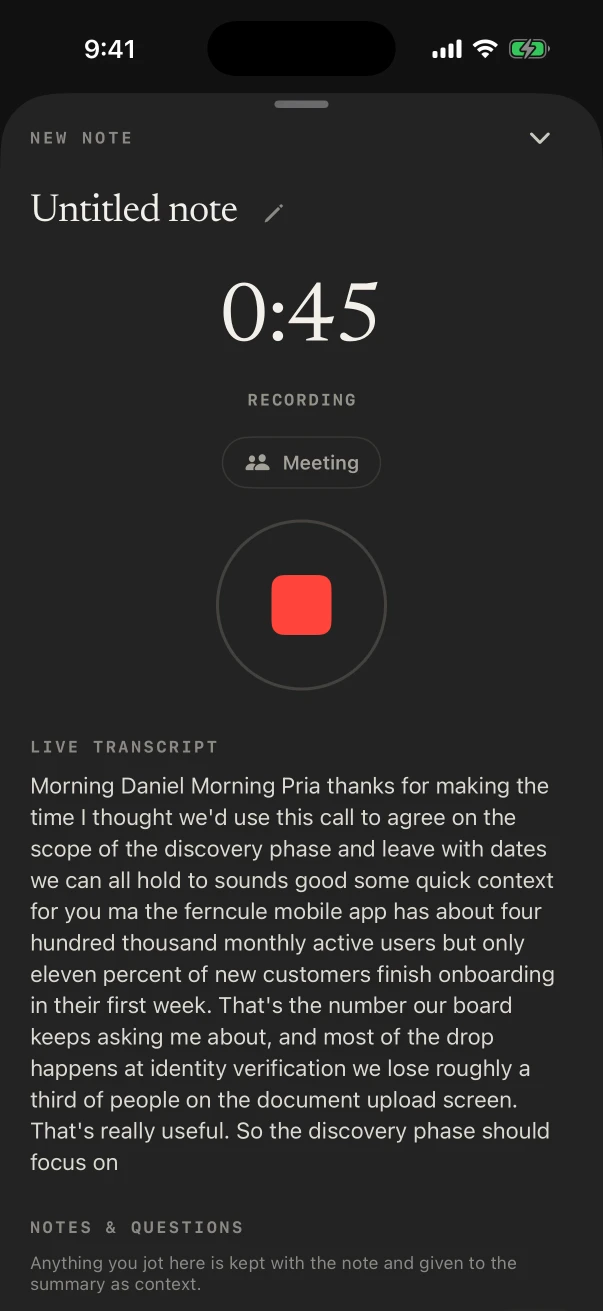
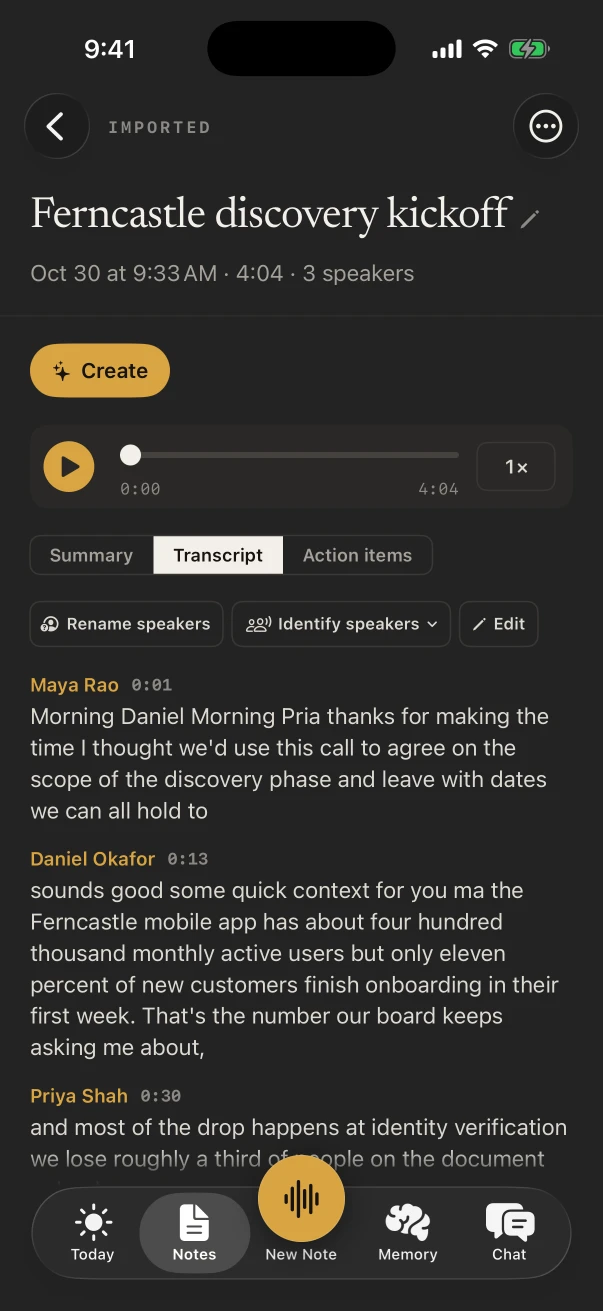
NoteOwl is an AI note taker for in-person meetings. Put your iPhone on the table and it records the room, shows the transcript as people talk, and when you stop writes who said what, a summary and the action items, on the phone.
On a Mac, it records a meeting through the microphone and any call joined from that Mac, with no bot. Whichever you use, NoteOwl never uploads what you record.
Can an AI note taker work in an in-person meeting?
Yes, if it runs on a device in the room. Note takers that work as a bot join a video call, so a meeting around a table gives them nothing to join. NoteOwl listens through your iPhone’s or Mac’s microphone instead, and writes the notes on that device.
The whole conversation, as text
FreeThe live transcript fills in while people talk and is saved with the audio. Tap any line later to hear exactly how it was said.
A name on every line
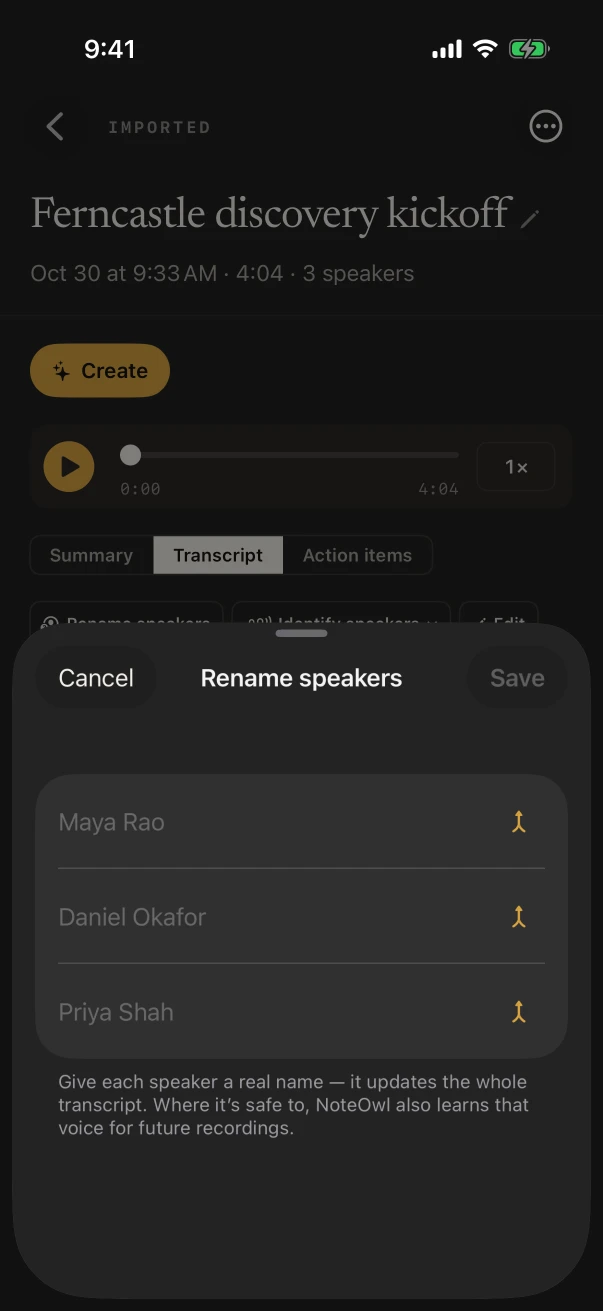
NoteOwl ProNoteOwl tells the voices around the table apart. Rename Speaker 2 to Daniel once and it knows his voice at the next meeting.
Decisions, and who owns what
NoteOwl ProThe summary lists what was decided, and each action item says who owes it to whom and by when, such as You → Priya, Friday.
Your own jottings, kept
FreeType a point under Notes & questions while it records. NoteOwl keeps it with the meeting and gives it to the summary as context.
Should you record an in-person meeting on your iPhone or your Mac?
On your iPhone when everyone is in the room: it separates the voices around the table. On your Mac when some people join by call: NoteOwl splits the callers by speaker, and everyone in the room is heard through the microphone, under You.
On iPhone
- Lay it flat in the middle of the table and tap New Note. Turn on the Meeting chip for speakers, a summary and action items.
- Lock it and leave it. The timer and a Stop button stay on the Lock Screen and in the Dynamic Island.
- Recording and the transcript are free. Speakers, the summary and action items come with NoteOwl Pro.
- How to record a meeting on iPhone, step by step
On Mac
- Press ⌥ Space or click Start Meeting in Meeting Scribe, and talk. NoteOwl records the microphone and whatever the Mac plays.
- Made for a hybrid meeting run from the laptop: the people on the call get a speaker each, and the room appears as You.
- The transcript, summary and action items are written on the Mac. Meetings on Mac are part of NoteOwl Pro.
- Record a meeting on your Mac
Where should the phone go in a meeting room?
In the middle of the table, between the people who will talk most, screen up and away from a laptop fan or a coffee machine. A phone on the table hears the room; one in a bag mostly hears the bag.
Before you tap New Note
- Teach NoteOwl your voice during setup, so your own lines say You instead of a speaker number.
- Add your name in Settings › Who you are, so an action item reads You → Priya when it’s yours to do.
- Name the meeting while it records: tap Untitled note and type, or let NoteOwl Pro title it from what was said.
- More than a few voices? Afterwards, Identify speakers lets you say how many people spoke, from 2 to 8.
Which template fits an in-person meeting?
Meeting Report, for most: the attendees, the purpose, the key points, the decisions with who made them, the action items with owners and dates, and the open questions. Summarize as swaps it for any other built-in template, or for one you write.
Built-in template
Meeting Report
- Attendees
- Purpose
- Key points
- Decisions
- Action items
- Open questions
A coffee one-to-one reads better as the 1:1 Check-in template, and a whiteboard session as the Brainstorm template. On iPhone, Settings › Templates › Defaults sets the template every new meeting starts with.
Also worth trying
- 1:1 Check-in
- Brainstorm
- Consultation
- Quick Summary
Is an AI note taker for in-person meetings free?
Recording and the transcript are, on iPhone, with no limit. Who said what, the summary, action items and Chat are NoteOwl Pro: $20 lifetime on iPhone and $79 lifetime on Mac, with no subscription and a 7-day free trial.
Free
- Recording any meeting in the room on iPhone, with the live transcript
- Notes & questions typed while it records
- Sharing the transcript as Markdown, PDF or plain text
- Deleting a recording and keeping its text
NoteOwl Pro
- Speakers, named once and recognised in later meetings
- A summary in Meeting Report or any of the 22 built-in templates
- Action items under I owe and Owed to me
- Chat across every meeting, answers with their source
- Meetings on Mac, in the room or on any call
Free never expires, and nothing you recorded is locked if you don’t buy Pro. What’s free and what Pro adds
Does NoteOwl upload the meeting?
No. NoteOwl never uploads what you record. The transcript, speakers and summary are written by on-device AI models on the iPhone or Mac in the room, so a meeting in a basement office or a café with no Wi-Fi gets the same notes.
- Where it’s written
- On the iPhone or Mac that recorded the meeting
- iPhone download
- about 3.2 GB of on-device AI models, once, during setup
- Mac download
- about 8 GB, downloaded once after install (keep around 10 GB free)
- Wi-Fi in the meeting
- Not needed once the models are on the device
- Uploads
- None: NoteOwl never uploads what you record
FAQ
Questions about in-person meeting notes
Can NoteOwl record people in the room and on a Zoom call at once?
On a Mac, yes. It records the microphone and the Mac’s audio together, so the room and the callers are in one transcript: the callers are split by speaker and the room appears under You. NoteOwl on iPhone records the room only, and a phone call pauses it.
How many people can NoteOwl tell apart in a room?
On iPhone, Identify speakers finds them automatically, or you can say how many spoke, from 2 to 8. Rename each one once and NoteOwl recognises that voice in your later notes. Telling speakers apart is part of NoteOwl Pro.
Is a meeting recorder app the same as an AI note taker?
Not quite. A meeting recorder app keeps the audio; an AI note taker also writes it up. NoteOwl does both: the recording and the transcript are free on iPhone, and NoteOwl Pro adds speakers, the summary, action items and a memory you can ask.
Does the iPhone keep recording if the screen locks?
Yes. NoteOwl keeps recording with the screen locked or another app open, and the Lock Screen and Dynamic Island show the timer with a Stop button. If a phone call comes in, the recording pauses and carries on afterwards, or you tap Resume.
Where are my in-person meeting notes stored?
On the iPhone or Mac you recorded on, in NoteOwl. You can export a note as Markdown, PDF or plain text, delete its recording and keep the text, or delete it entirely.
Related
Keep exploring
Made for this situation
- Meeting notes on iPhoneHow to record a meeting in the room on iPhone and get the transcript (free), then speakers, a summary and action items with NoteOwl Pro, step by step; calls are recorded on the Mac
- AI voice recorder for iPhoneRecord in the room on iPhone with a live transcript (free), then speakers, a summary and action items with Pro; the timer on the Lock Screen and in the Dynamic Island
- Speaker recognitionTranscripts that say who said what: speakers separated automatically, and a voice named once is recognised in later meetings, on your Mac or iPhone
- Meeting minutes templateA meeting minutes template to fill in online or copy, what each section holds, an example, and how NoteOwl writes minutes
- Action items and commitmentsAction items that involve you become commitments: what you owe and what you are owed, sorted by what is due
Who it’s for
- Real estate agentsListing appointments, buyer consultations, showings and inspection walk-throughs recorded on iPhone, the Consultation template, a profile per client, and calls on the Mac
- Property managersMove-in and move-out walk-throughs, vendor visits and owner meetings recorded on iPhone, turned into to-do lists by priority, with what you owe and are owed due today
- Insurance adjustersClaim inspections and room-by-room damage notes recorded on iPhone, speakers, summaries and action items with Pro, search across every claim, and calls on the Mac
More situations
- Team meetingsNotes from the weekly team or staff meeting, from an iPhone on the table or the Mac running a hybrid call: decisions, owners and open questions, the Project Log template, and finding what was decided last week
- Site visitsSite visit notes spoken on iPhone as you walk (Action button, Lock Screen), the Project Log and To-Do List templates for a report and a punch list, sharing as PDF, and dictating the write-up on a Mac
- Conferences and talksRecord talks, panels and seminars from your seat on iPhone, the Presentation template with the Q&A, remembering the people you meet, and online sessions recorded on a Mac
Take notes at your next in-person meeting with NoteOwl
Free to download. Runs entirely on your Mac or iPhone.
Mac: macOS 26 or later · Apple Silicon (M1 or newer) · 16 GB memory minimum, 24 GB recommended · iPhone: iOS 26 or later
About NoteOwl
NoteOwl is private AI meeting notes and memory for Mac and iPhone. It captures meetings without a bot joining the call, labels every speaker, writes summaries and action items, and builds a memory of every conversation that you can chat with — fully offline, because the speech recognition and the AI run on the Mac or iPhone itself. Dictation into any app is free; Pro is a lifetime licence.
NoteOwl pricing: what’s free and what Pro adds
Last updated