Widgets and Live Activities · iPhone
Voice recorder widget for iPhone, plus Live Activities
NoteOwl’s voice recorder widget for iPhone starts recording with one tap from the Home Screen or the Lock Screen, without opening the app. Other NoteOwl widgets turn on the dictation keyboard, import a recording, list what is due today, or show your next meeting.
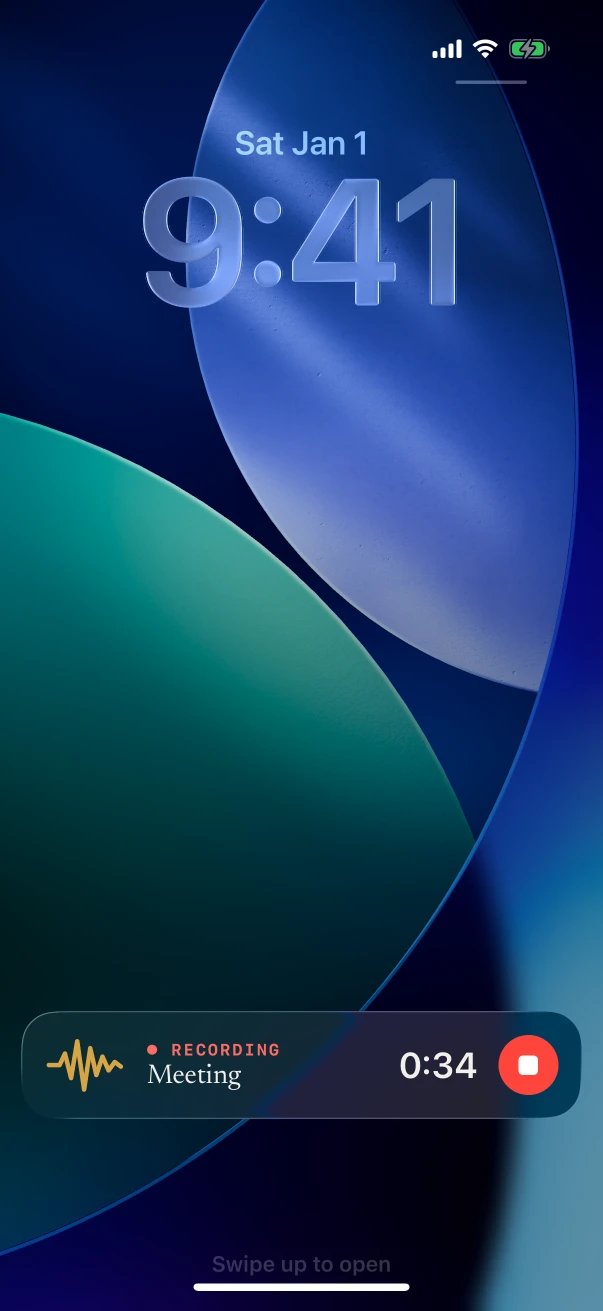
While NoteOwl records, a Live Activity keeps the timer and a Stop button on the Lock Screen and in the Dynamic Island. The capture widgets are free; Due today and Up next come with NoteOwl Pro.
What NoteOwl widgets are there for iPhone?
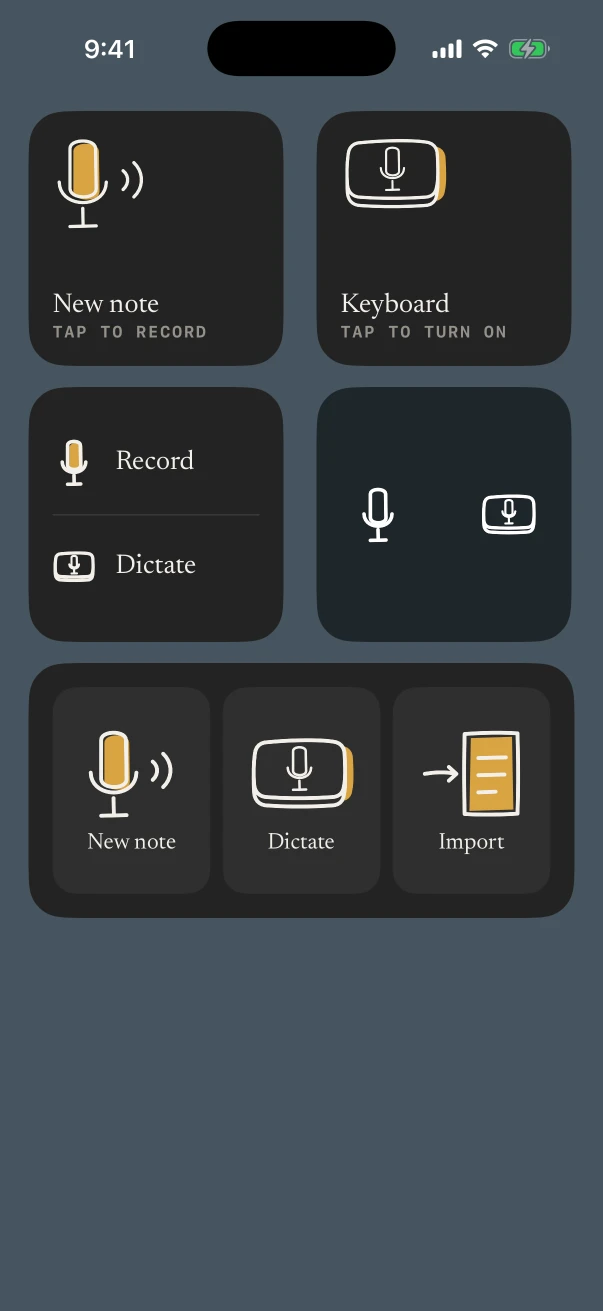
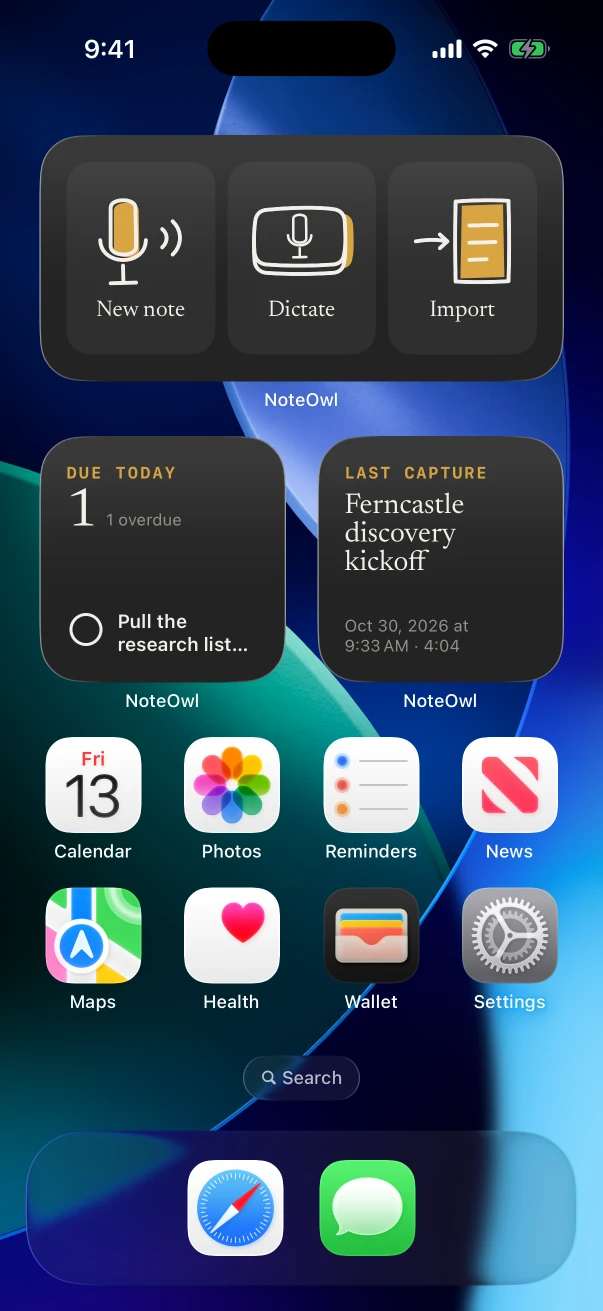
Six. New note, Keyboard and Capture start a recording or dictation in one tap; Last capture shows your latest recording; Due today and Up next, with NoteOwl Pro, show what’s due and your next meeting. Most come in Home Screen and Lock Screen sizes.
- New note
- What it doesTap to start recording
- Where it goesHome Screen (small); Lock Screen (round)
- PlanFree
- Keyboard
- What it doesTap to turn on the NoteOwl keyboard’s dictation, ready in any app
- Where it goesHome Screen (small); Lock Screen (round)
- PlanFree
- Capture
- What it doesRecord and Dictate, or New note, Dictate and Import
- Where it goesHome Screen (small, medium)
- PlanFree; Import needs Pro
- Last capture
- What it doesThe title, date and length of your latest recording; the title alone on the Lock Screen
- Where it goesHome Screen (small); Lock Screen
- PlanFree
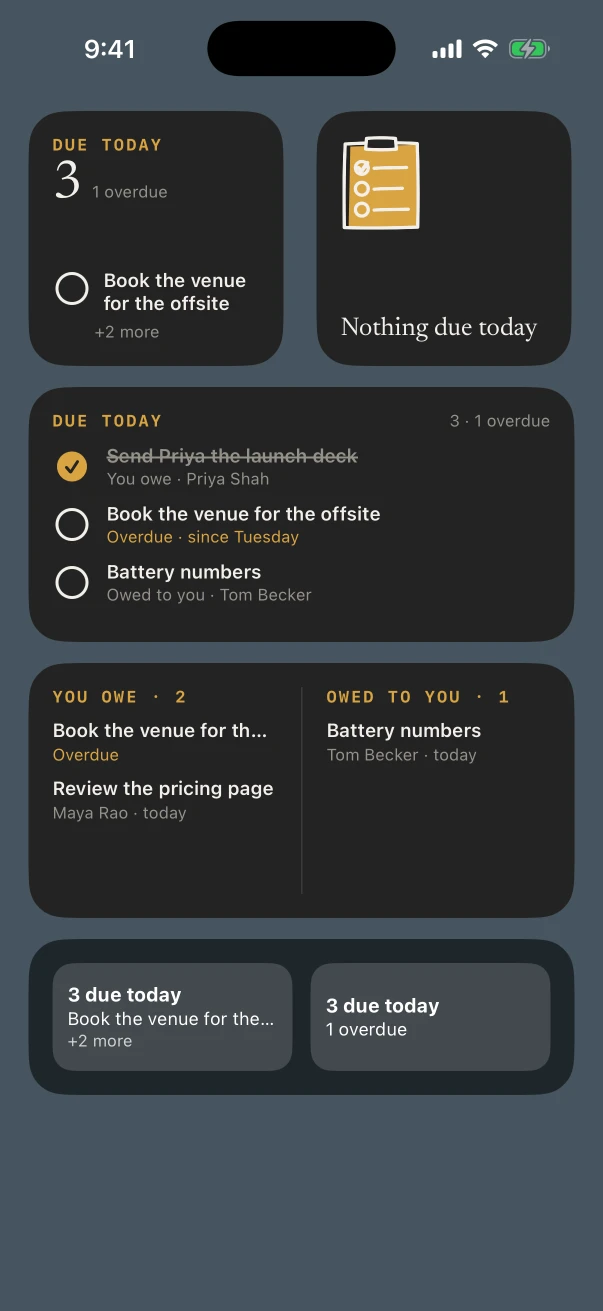
- Due today
- What it doesAction items due today, ticked off from the widget
- Where it goesHome Screen (small, medium); Lock Screen
- PlanNoteOwl Pro
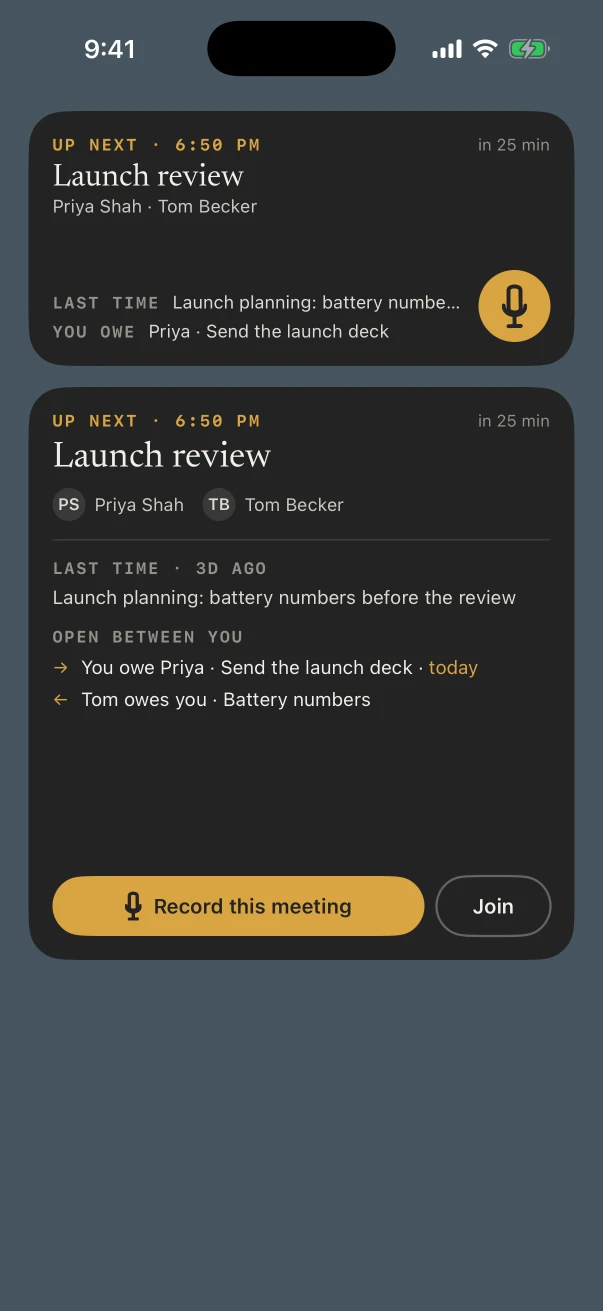
- Up next
- What it doesYour next meeting, who’s in it, what you last discussed, and Record this meeting
- Where it goesHome Screen (medium, large); Lock Screen
- PlanNoteOwl Pro, with your calendar
| Widget | What it does | Where it goes | Plan |
|---|---|---|---|
| New note | Tap to start recording | Home Screen (small); Lock Screen (round) | Free |
| Keyboard | Tap to turn on the NoteOwl keyboard’s dictation, ready in any app | Home Screen (small); Lock Screen (round) | Free |
| Capture | Record and Dictate, or New note, Dictate and Import | Home Screen (small, medium) | Free; Import needs Pro |
| Last capture | The title, date and length of your latest recording; the title alone on the Lock Screen | Home Screen (small); Lock Screen | Free |
| Due today | Action items due today, ticked off from the widget | Home Screen (small, medium); Lock Screen | NoteOwl Pro |
| Up next | Your next meeting, who’s in it, what you last discussed, and Record this meeting | Home Screen (medium, large); Lock Screen | NoteOwl Pro, with your calendar |
How do you add a NoteOwl widget to the iPhone Home Screen?
Touch and hold the Home Screen background until the apps jiggle, tap Edit, then Add Widget. Find NoteOwl, pick a widget and a size, tap Add Widget, then Done. Lock Screen widgets are added when you customize the Lock Screen.[1]
- 1
Edit the Home Screen
Touch and hold the Home Screen background until the apps jiggle, tap Edit at the top, then tap Add Widget.
- 2
Find NoteOwl
Scroll or search for NoteOwl, tap it, and swipe through its widgets and sizes.
- 3
Add it
Tap Add Widget, move the widget where you want it, then tap Done.
What shows in the Dynamic Island while NoteOwl records?
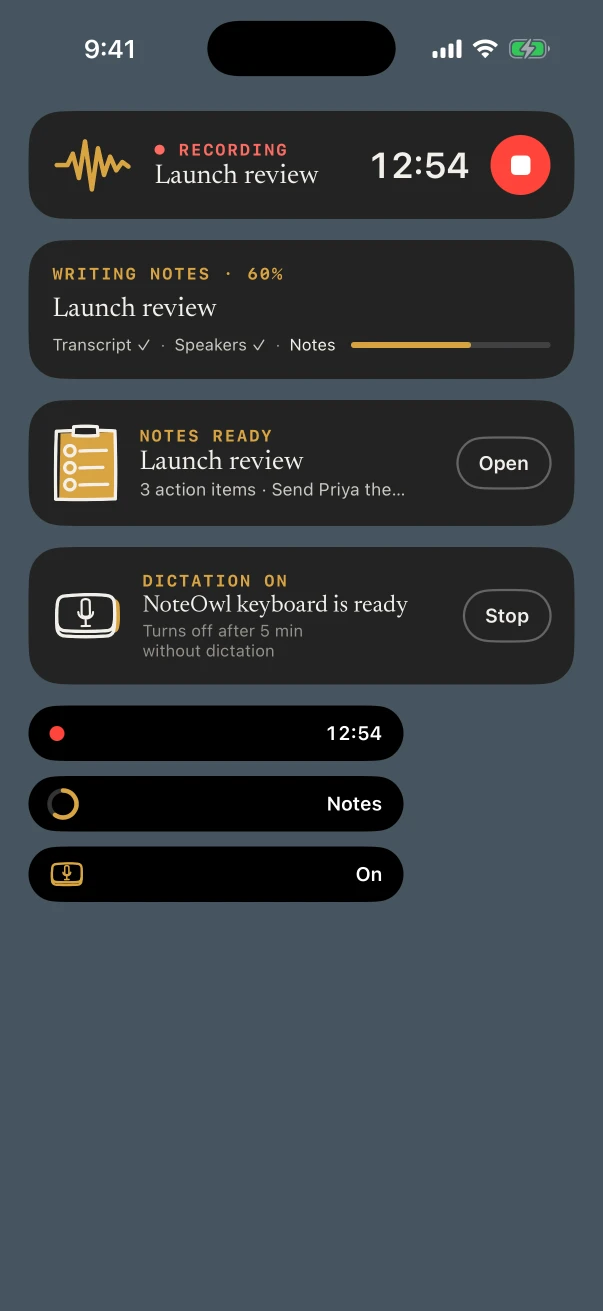
A red dot and the running timer. Expanded, it says Recording with a Stop button, and the same Live Activity sits on the Lock Screen. With NoteOwl Pro it then shows the notes being written and, when they’re done, Notes ready.
Recording
FreeThe note’s title, the running timer and a red Stop button. In the Dynamic Island: a red dot and the timer.
Writing notes
NoteOwl ProAfter you stop: Transcript ✓ · Speakers ✓ · Notes, with how far along it is.
Notes ready
NoteOwl ProThe title and a line such as “3 action items”, with Open to go straight to the note.
Dictation on
Free“NoteOwl keyboard is ready”, with Stop. It turns off after five minutes without dictation.
What the recording itself gives you, free and with Pro, is on the AI voice recorder for iPhone page.
Which NoteOwl widgets need NoteOwl Pro?
Due today and Up next. On the free plan they show NOTEOWL PRO and open the Pro page when tapped. New note, Keyboard, Capture and Last capture work on every plan, though Capture’s Import tile needs Pro to bring in a file.
Due today
The action items due today, from every note, with what’s overdue. Tick one off right there; the medium size can split them into You owe and Owed to you from the widget’s Edit menu.
Up next
Your next meeting from the calendar, who’s in it, what you discussed last time and what’s open between you. Record this meeting starts a note linked to it. It moves on by itself when each meeting ends.
The items come from action items NoteOwl finds in your notes, and the meetings from meeting prep with your calendar.
FAQ
Questions about NoteOwl’s iPhone widgets
Can a widget start recording without opening NoteOwl?
Yes. Tap New note, or Record in the Capture widget, and recording starts with the timer in the Dynamic Island. NoteOwl opens only when something needs setting up first, such as the microphone or the speech model download.
Is there a voice memo widget for the iPhone Lock Screen?
Yes. Add NoteOwl’s round New note button to the Lock Screen and one tap starts a recording that NoteOwl transcribes on the iPhone. The round Keyboard button beside it turns on the NoteOwl keyboard’s dictation.
Do NoteOwl widgets show my notes on the Lock Screen?
While the iPhone is locked, NoteOwl’s Lock Screen widgets show counts and times only, such as “3 due today”, and a meeting appears as “Meeting”. Titles and names show once you unlock.
Can I tick off action items from a widget?
Yes, with NoteOwl Pro. Tap the circle beside an item in the Due today widget to mark it done, or tap it again to open it again. A ticked item stays in the widget until midnight.
What does Record this meeting do in the Up next widget?
It starts a meeting note linked to that calendar event, and when you stop, NoteOwl adds the speakers, the summary and the action items. Up next needs NoteOwl Pro and your calendar turned on in Settings › Calendar.
Sources
Last checked .
Keep exploring
More on iPhone
- iPhone Action button and SiriStart a NoteOwl recording, dictation or a question from the Action button, Control Center, the Lock Screen, Back Tap, Siri or the Shortcuts app
- NoteOwl for iPhoneThe private AI note taker for iPhone: recording in the room with a live transcript, the free dictation keyboard, widgets and the Action button, Mac vs iPhone, Free vs Pro and requirements
- AI voice recorder for iPhoneRecord in the room on iPhone with a live transcript (free), then speakers, a summary and action items with Pro; the timer on the Lock Screen and in the Dynamic Island
On Mac
- Action items and commitmentsAction items that involve you become commitments: what you owe and what you are owed, sorted by what is due
- Meeting prepA prep page for every meeting on your calendar: who is coming, your notes, and what your memory holds about them, on your Mac, and for today’s meetings on iPhone
- Voice notes on your MacVoice notes and dictations saved as searchable text on your Mac or iPhone, with the raw words beside the polished version on the Mac; free
Who uses it
- Property managersMove-in and move-out walk-throughs, vendor visits and owner meetings recorded on iPhone, turned into to-do lists by priority, with what you owe and are owed due today
- Field salesIn-person customer visits on iPhone: Up next before the visit, Sales Call notes during it and a follow-up email draft after, with calls on the Mac
- Event plannersVenue walkthroughs, vendor meetings, tastings and client consultations recorded on iPhone, turned into checklists with owners and dates, with what’s due on the Home Screen
Put a one-tap recorder on your iPhone
Free to download. Runs entirely on your Mac or iPhone.
Mac: macOS 26 or later · Apple Silicon (M1 or newer) · 16 GB memory minimum, 24 GB recommended · iPhone: iOS 26 or later
About NoteOwl
NoteOwl is private AI meeting notes and memory for Mac and iPhone. It captures meetings without a bot joining the call, labels every speaker, writes summaries and action items, and builds a memory of every conversation that you can chat with — fully offline, because the speech recognition and the AI run on the Mac or iPhone itself. Dictation into any app is free; Pro is a lifetime licence.
NoteOwl pricing: what’s free and what Pro adds
Last updated