Guide · iPhone · iOS 26

The best AI voice recorder app for iPhone: 7 picks compared

The best AI voice recorder app for iPhone keeps recording when you lock the phone, shows the words as they’re said, turns the recording into notes afterwards, and keeps your audio where you can trust it. By those tests NoteOwl leads: recording and a live transcript are free, on the iPhone, and NoteOwl Pro adds speakers and a summary.

Apple’s Voice Memos is the built-in choice, with transcripts on iPhone 12 or later. Otter, Just Press Record, Rev, Voicenotes and Notta follow, each with its price, limits and where your recordings go, from the makers’ own pages, checked on 13 November 2026.

The picks · checked 13 November 2026

  1. 01NoteOwlBest overall: a live transcript on the iPhone, free, with notes afterwards.
  2. 02Voice MemosBest built-in recorder: nothing to install, with transcripts on newer iPhones.
  3. 03OtterFor people who want a cloud meeting assistant and shared notes.
  4. 04Just Press RecordFor people who want a plain recorder with transcripts and no subscription.
  5. 05RevFor people who may want a human transcript later.
  6. 06VoicenotesFor people who talk through ideas and want to ask questions about them later.
  7. 07NottaFor people who record in many languages and want translation.

What makes a good AI voice recorder app for iPhone?

Six things: it keeps recording when the phone is locked, shows the words as they’re said, writes notes afterwards, keeps your audio where you can trust it, has a clear price and free plan, and its limits don’t get in the way.

  • Keeps recording

    It carries on when you lock the phone or open another app, and you can stop it without hunting for the app.

  • Words as you record

    A live transcript, so you can see it’s catching what’s said while there’s still time to move closer.

  • Notes afterwards

    A summary, the action items and who said what, without copying the transcript somewhere else.

  • Where your audio goes

    Recorded and transcribed on the iPhone, or uploaded to the maker’s servers.

  • Price

    Free, a single purchase or a subscription, and what the free plan allows.

  • Limits

    Minutes a month, minutes a recording, languages and the iOS version it needs.

Why is NoteOwl first?

Because it passes the most tests at once: it keeps recording with the screen locked, writes the transcript live for free, and turns the recording into speakers, a summary and action items with Pro, all on the iPhone, with nothing uploaded.

The trade-offs, plainly: it needs iOS 26 or later and a download of about 3.2 GB when you set it up; it speaks five languages plus Auto-detect, not dozens; it records until you tap Stop, with no pause button; and it records the room, so it pauses if another app takes the audio. Online meetings are recorded with NoteOwl on the Mac. NoteOwl as a voice recorder

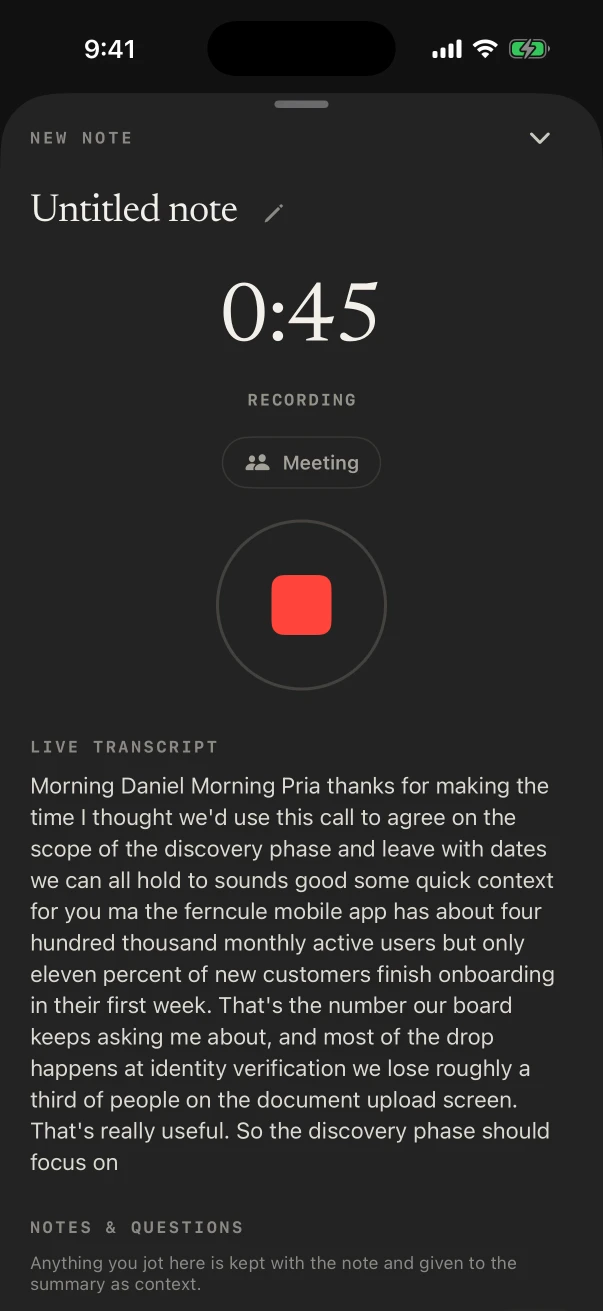
NoteOwl for iPhone recording, with the timer, a red Stop button and the transcript filling in as it listens
Recording, with the transcript live.
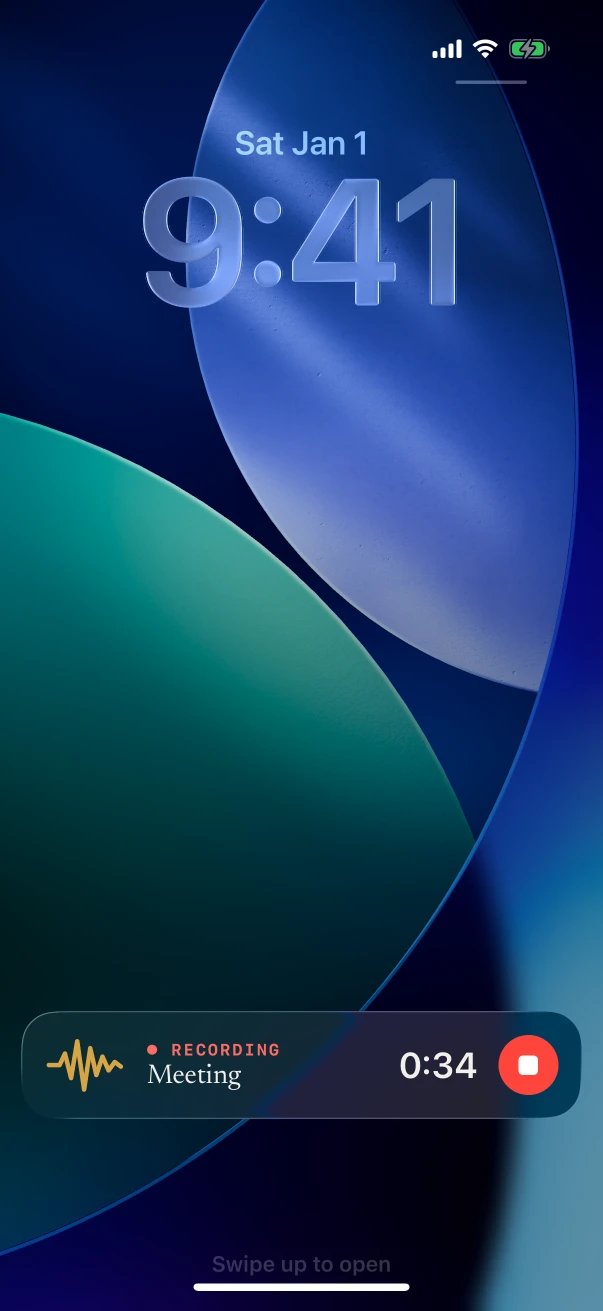
The iPhone Lock Screen with NoteOwl’s recording Live Activity: Meeting, 0:34 and a Stop button
Still recording on the Lock Screen.

Which AI voice recorder apps for iPhone are worth trying?

These seven, in order: NoteOwl, Voice Memos, Otter, Just Press Record, Rev, Voicenotes and Notta. All of them record with the iPhone’s microphone and turn speech into text; they differ in what they write afterwards, where your recordings go and what they cost.

01 · 1070 AI Labs

NoteOwl

Best overall: a live transcript on the iPhone, free, with notes afterwards.

Recording
Through the iPhone’s microphone. It keeps going with the screen locked, with the timer and Stop on the Lock Screen and in the Dynamic Island.
As you record
The transcript appears as NoteOwl listens. Free, with no limit.
Afterwards
With NoteOwl Pro: speakers, a summary, action items and a title, in any of 22 templates.
Your audio
Recorded and transcribed on the iPhone with on-device AI models, and never uploaded.
Price
Recording and transcripts free. NoteOwl Pro $20 lifetime, no subscription, 7-day free trial.
Limits
iOS 26 or later; Auto-detect, English, Hindi, Spanish, French and German; a download of about 3.2 GB when you set it up.

02 · Apple, built into iOS

Voice Memos

Best built-in recorder: nothing to install, with transcripts on newer iPhones.

Recording
The built-in microphone, a supported headset or an external microphone. It keeps recording in other apps that don’t play sound.[1]
As you record
A live transcript on iPhone 12 or later, in ten languages, though not in every country or region.[2]
Afterwards
Writing Tools can summarize the transcript on iPhones with Apple Intelligence. Speaker labels aren’t mentioned.[2,3]
Your audio
In Voice Memos, and in iCloud on your other devices if Voice Memos is turned on there.[1]
Price
Built into iOS.[1]
Limits
If another app starts playing audio, Voice Memos stops recording.[1]

03 · Otter.ai, Inc.

Otter

For people who want a cloud meeting assistant and shared notes.

Recording
One tap, through the built-in microphone or a Bluetooth device; start and stop from a Siri Shortcut or a Home Screen widget.[4]
As you record
Transcribes in real time.[4]
Afterwards
A summary, outline and keywords; ask questions about a meeting; tag speakers.[4]
Your audio
Not stated on its App Store listing.[4]
Price
Free to start; Pro is $16.99 a month or $99.99 a year in the App Store.[4]
Limits
English, Spanish, French and Japanese; iOS 16 or later.[4]

04 · Open Planet Software

Just Press Record

For people who want a plain recorder with transcripts and no subscription.

Recording
The built-in mic, AirPods or an external microphone. It keeps recording in the background or with the iPhone locked.[5,6]
Starts from
The Lock Screen, Control Center, the Action Button, Shortcuts, Siri or a widget.[5]
Transcripts
Usually turned into text on the iPhone; depending on the device and language, audio may go to Apple’s iCloud servers, never to Open Planet’s own.[7]
Afterwards
Summaries and speaker labels not stated.[5]
Price
$6.99 in the App Store, with no subscription or in-app purchases.[5,8]
Limits
iOS 18.6 or later; over 30 languages, by its listing.[5]

05 · Rev.com, Inc.

Rev

For people who may want a human transcript later.

Recording
The built-in or an external microphone, with the recording shown on the Lock Screen.[9,11]
As you record
A live transcript.[11]
Afterwards
Transcribed once the recording reaches your Rev account, with speakers, summaries from templates and questions about a recording.[9,10]
Your audio
Uploaded to Rev; with no signal it records to the phone and uploads later.[10]
Price
Free for 45 AI minutes a month, English only; Essentials $29.99 a seat a month; human transcription $1.99 a minute. Plans can’t be bought in the app yet.[11,12]
Limits
iOS 16.4 or later; it replaced Rev’s previous recorder app.[9,10]

06 · Coping Hard Inc.

Voicenotes

For people who talk through ideas and want to ask questions about them later.

Recording
Meetings, reflections and ideas; up to 60 minutes a recording on iPhone, then a new recording starts.[13,15]
As you record
Live transcription, on Pro.[14]
Afterwards
A meeting report with key points, decisions and follow-ups; questions to its AI; speaker labels for meetings.[17,18]
Your audio
Uploaded to the cloud when you stop recording.[16]
Price
Free with limits; in the App Store $14.99 a month or $99.99 a year; Pro from $9 a user a month on its website.[13,14]
Limits
iOS 16 or later; free meetings up to 30 minutes.[13,14]

07 · Mind Cruiser Limited

Notta

For people who record in many languages and want translation.

Recording
Live transcription as you record, plus pre-recorded files.[19]
Languages
58 for transcription, and translation into 42, by its listing.[19]
Afterwards
AI summaries; speaker labels on Premium.[19]
Your audio
Not stated for the iPhone app.[19]
Price
Free: 120 minutes a month, and 3 minutes a recording in the app. Pro $97.99 a year.[19,20]
Limits
iOS 15 or later.[19]

Which iPhone voice recorders keep your audio on the phone?

NoteOwl records and transcribes on the iPhone and never uploads. Just Press Record turns speech into text on the iPhone or, for some devices and languages, on Apple’s iCloud servers[7]. Rev and Voicenotes upload recordings to transcribe them[10,16].

NoteOwl
Live transcriptYes, free
Where your recordings goStays on the iPhone
PriceFree; Pro $20 lifetime
Voice Memos
Live transcriptiPhone 12 or later
Where your recordings goIn Voice Memos and iCloud
PriceBuilt into iOS
Otter
Live transcriptYes
Where your recordings goNot stated
PriceFree to start; Pro $16.99 a month
Just Press Record
Live transcriptNot stated
Where your recordings goThe iPhone, or Apple’s servers
Price$6.99
Rev
Live transcriptYes
Where your recordings goUploaded to Rev
PriceFree 45 minutes; from $29.99 a month
Voicenotes
Live transcriptOn Pro
Where your recordings goUploaded to the cloud
PriceFree with limits; $14.99 a month
Notta
Live transcriptYes
Where your recordings goNot stated
PriceFree with limits; Pro $97.99 a year
From each maker’s own pages and App Store listings, checked on 13 November 2026; “Not stated” means the maker’s pages don’t say. The details and the sources are in the cards above.

FAQ

Questions about AI voice recorder apps for iPhone

What is the best AI voice recorder app for iPhone?

NoteOwl, for most people: it records the room with a live transcript for free, keeps going with the screen locked, and turns the recording into notes on the iPhone, with nothing uploaded. NoteOwl Pro, $20 lifetime, adds speakers, a summary and action items.

Is there a free AI voice recorder for iPhone?

Yes. NoteOwl records with a live transcript for free, with no limit, and Apple’s Voice Memos is free and transcribes on iPhone 12 or later. Rev, Voicenotes and Notta have free plans with monthly or per-recording limits.

Which voice recorder apps for iPhone keep recordings on the phone?

NoteOwl records and transcribes on the iPhone and never uploads. Just Press Record says speech is usually turned into text on the iPhone, sometimes on Apple’s iCloud servers, and never on its own. Rev and Voicenotes upload recordings to transcribe them.

Can an iPhone voice recorder tell who is speaking?

Some can. NoteOwl Pro puts a speaker on every line of the transcript, Rev attributes speakers, Otter lets you tag speakers, and Voicenotes labels speakers in meeting recordings. Apple’s Voice Memos guide doesn’t mention speaker labels.

Do I need a separate AI voice recorder like Plaud?

Not to record with your iPhone. Plaud’s app is built around its own recorders: its App Store listing says to use a Plaud device for in-person meetings, and Plaud says recordings go to the cloud for processing. The apps on this list record with the phone you already carry.

Will an AI voice recorder keep going with the screen locked?

NoteOwl and Just Press Record say yes, and NoteOwl keeps its timer and a Stop button on the Lock Screen. Voice Memos keeps recording while you use other apps, unless one plays audio.

Sources

Last checked . Each pick’s facts are from its maker’s own website, help pages or App Store listing; Apple’s from the iPhone User Guide for iOS 26.

  1. [1]Apple, Make a recording in Voice Memos on iPhone (iOS 26)
  2. [2]Apple, View a Voice Memos transcription on iPhone (iOS 26)
  3. [3]Apple, Use Apple Intelligence in Notes on iPhone (iOS 26)
  4. [4]Apple App Store, Otter Transcribe Voice Notes
  5. [5]Apple App Store, Just Press Record
  6. [6]Open Planet Software, Just Press Record FAQ: recording in the background
  7. [7]Open Planet Software, Just Press Record FAQ: where transcription happens
  8. [8]Open Planet Software, Just Press Record FAQ: subscriptions and in-app purchases
  9. [9]Apple App Store, Rev: Recorder & Transcription
  10. [10]Rev, Voice recorder app
  11. [11]Rev Help Center, Mobile App
  12. [12]Rev, Pricing
  13. [13]Apple App Store, Voicenotes AI Notes & Meetings
  14. [14]Voicenotes, Pricing
  15. [15]Voicenotes Help Center, Recording limits on different devices
  16. [16]Voicenotes Help Center, How to avoid losing a recording before it uploads
  17. [17]Voicenotes Help Center, What can Voicenotes do?
  18. [18]Voicenotes Help Center, How to get speaker identification in Voicenotes
  19. [19]Apple App Store, Notta Transcribe Voice to Text
  20. [20]Notta, Pricing
  21. [21]Apple App Store, Plaud: AI Work Companion
  22. [22]Plaud, Trust

Record and read along, on your iPhone

Free to download. Runs entirely on your Mac or iPhone.

Mac: macOS 26 or later · Apple Silicon (M1 or newer) · 16 GB memory minimum, 24 GB recommended · iPhone: iOS 26 or later

About NoteOwl

NoteOwl is private AI meeting notes and memory for Mac and iPhone. It captures meetings without a bot joining the call, labels every speaker, writes summaries and action items, and builds a memory of every conversation that you can chat with — fully offline, because the speech recognition and the AI run on the Mac or iPhone itself. Dictation into any app is free; Pro is a lifetime licence.

NoteOwl pricing: what’s free and what Pro adds

Last updated