AI voice recorder · iPhone
AI voice recorder for iPhone that writes the transcript as you record
NoteOwl is an AI voice recorder for iPhone: tap New Note and the iPhone records the room through its microphone while the transcript appears on screen. Recording and the transcript are free and unlimited, and the recording stays on your iPhone.
With NoteOwl Pro, a conversation gets a speaker on every line, a summary, action items and a title when you stop. The timer stays on the Lock Screen and in the Dynamic Island, with Stop one tap away, and it all works with the iPhone you already carry.
How do you record audio on iPhone and turn it into text?
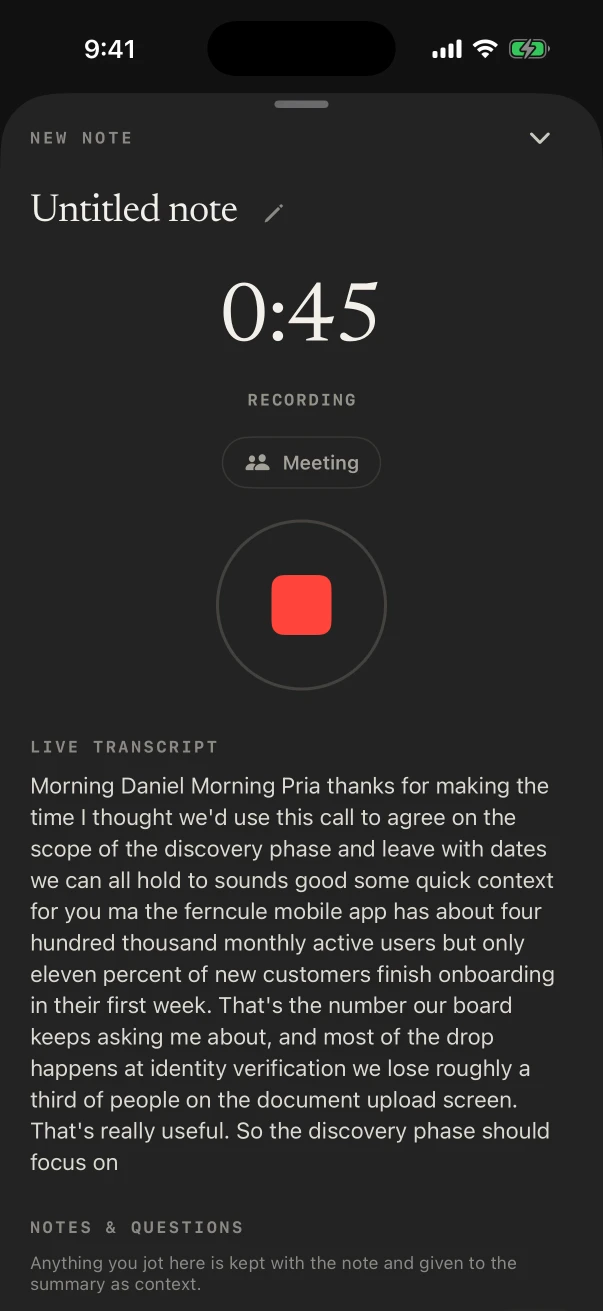
Open NoteOwl and tap New Note: recording starts at once, and the transcript fills in as people speak. Tap the red Stop button when you’re done, and the recording and its transcript are saved together as a note on your iPhone.
No separate recorder to buy or charge: NoteOwl uses the iPhone’s own microphone.
- 1
Tap New Note
The round button in the middle of NoteOwl’s tab bar. Recording starts at once; touch and hold it instead for New meeting, Import audio or video, or a typed note.
- 2
Watch the words appear
The live transcript fills in under the timer as people speak. Lock the phone if you like: the recording keeps going.
- 3
Stop from anywhere
Tap the red Stop button in NoteOwl, on the Lock Screen or in the Dynamic Island.
- 4
Play, copy or share it
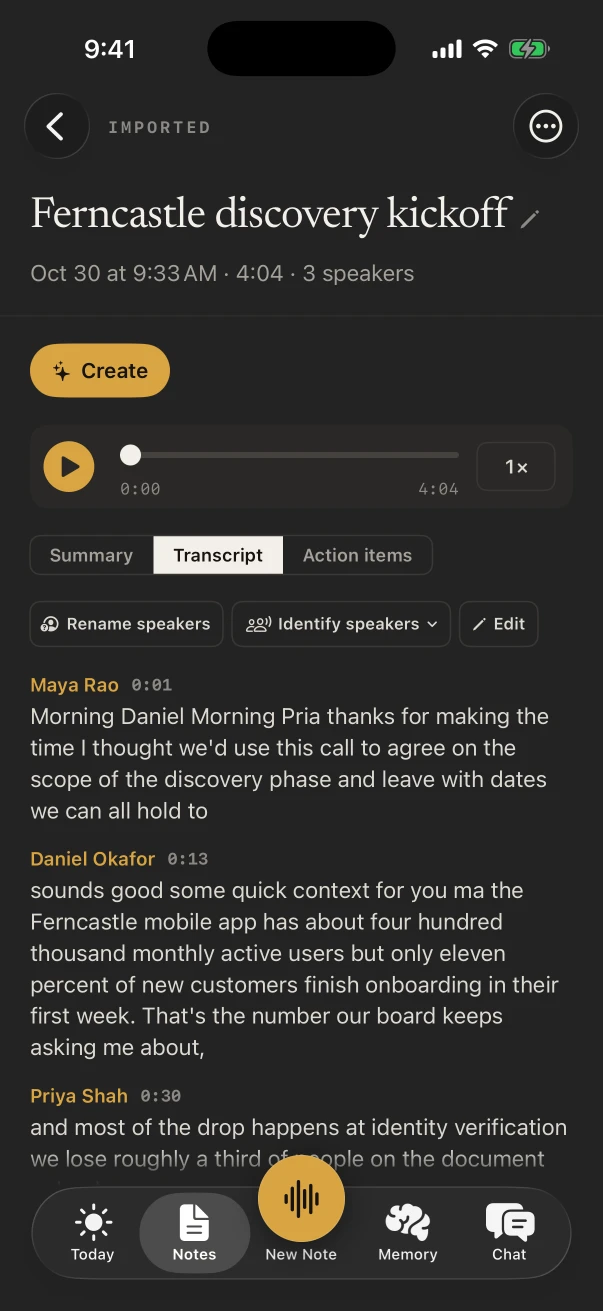
The note keeps the audio with the transcript, so you can play it back, copy the text, or share it as Markdown, PDF, plain text or subtitles.
Is there an iPhone voice recorder app that converts to text?
Yes. NoteOwl turns speech into text on the iPhone itself while you record, using on-device AI models, so the words appear as they’re spoken and nothing is uploaded. Your own recordings and their transcripts are free, with no limit on how many.
- Record in the room
- FreeYes
- NoteOwl ProYes
- Live transcript while you record
- FreeYes
- NoteOwl ProYes
- Play back, copy and export
- FreeYes
- NoteOwl ProYes
- A speaker on every line
- FreeNo
- NoteOwl ProYes
- Summary and a title, when you stop
- FreeNo
- NoteOwl ProYes
- Action items, by owner
- FreeNo
- NoteOwl ProYes
- Summarize as another template
- FreeNo
- NoteOwl ProYes
- Import a recording from Voice Memos or Files
- FreeNo
- NoteOwl ProYes
| Free | NoteOwl Pro | |
|---|---|---|
| Record in the room | Yes | Yes |
| Live transcript while you record | Yes | Yes |
| Play back, copy and export | Yes | Yes |
| A speaker on every line | No | Yes |
| Summary and a title, when you stop | No | Yes |
| Action items, by owner | No | Yes |
| Summarize as another template | No | Yes |
| Import a recording from Voice Memos or Files | No | Yes |
NoteOwl Pro on iPhone is $20 lifetime, with no subscription.
Does NoteOwl keep recording when the iPhone is locked?
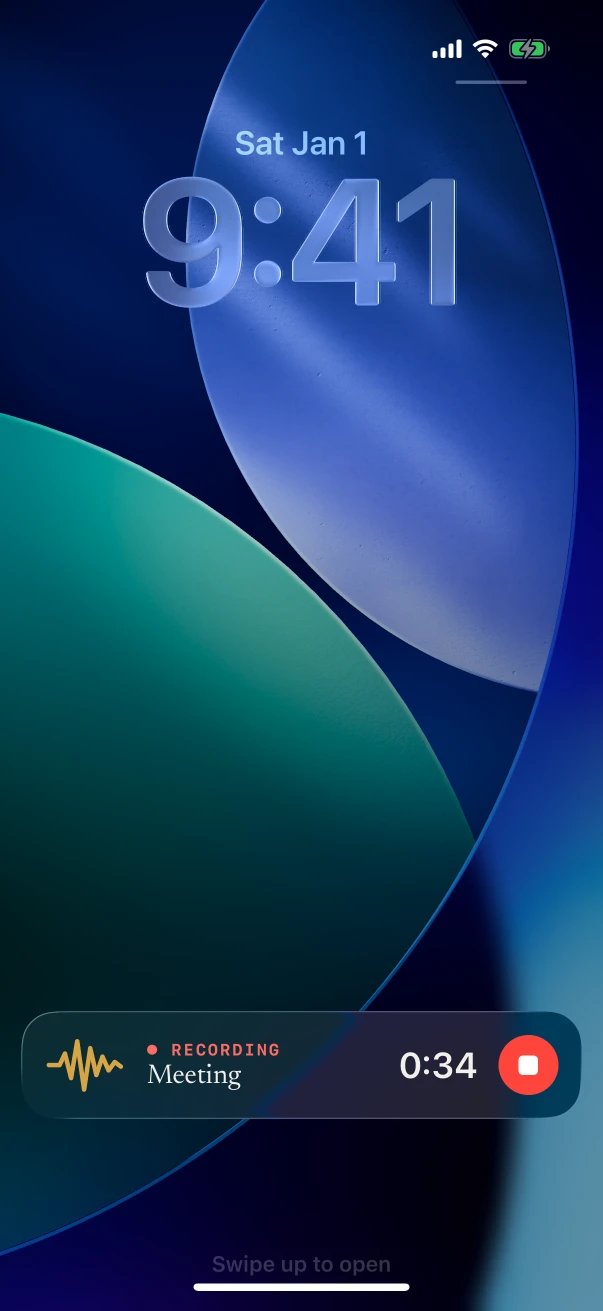
Yes. Lock the phone and NoteOwl keeps recording. The timer shows on the Lock Screen and in the Dynamic Island, each with a red Stop button; with NoteOwl Pro, the same place then shows the notes being written and “Notes ready” with an Open button.
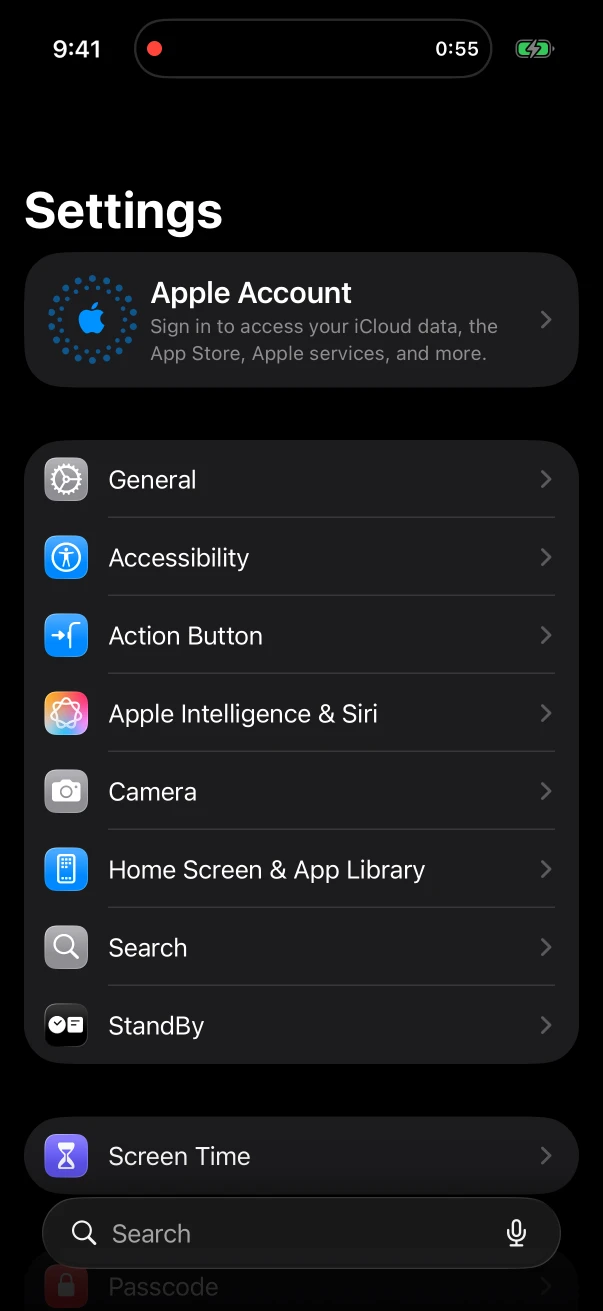
A recording can also start from the New note widget on the Home Screen or Lock Screen or from the Action button and Control Center, without opening NoteOwl first.
Can an iPhone voice recorder write an AI summary?
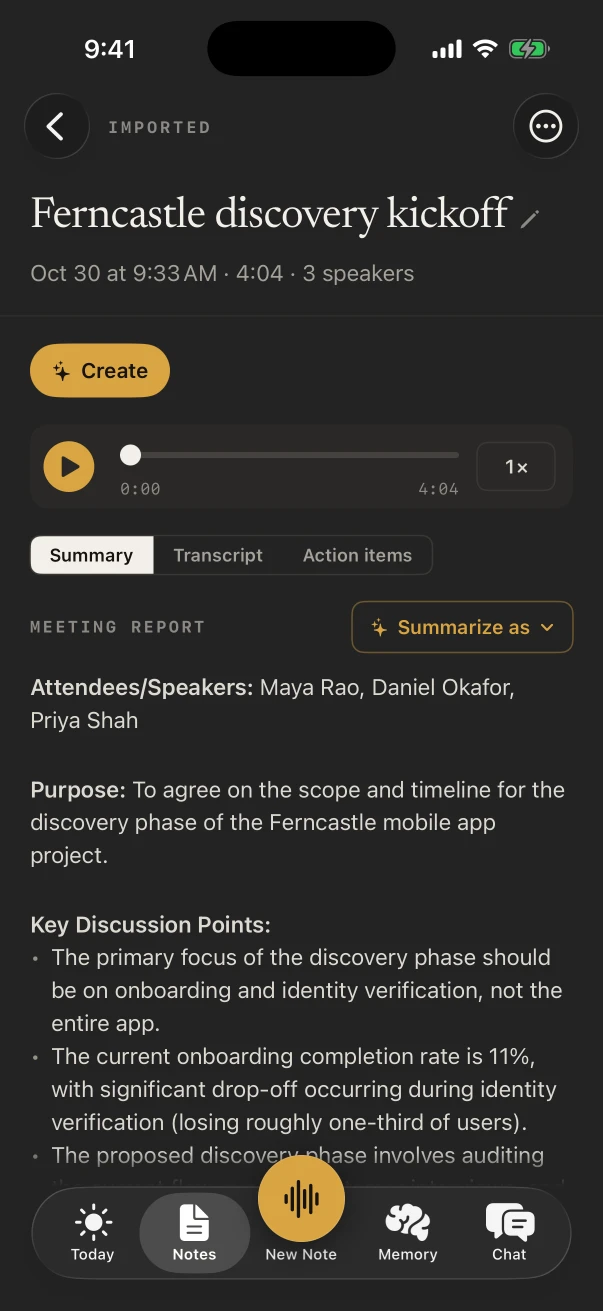
NoteOwl can, with NoteOwl Pro. When you stop, it writes a summary, the action items and a title on the iPhone, and Summarize as rewrites the summary in another template, such as Meeting Report for a meeting or Student Lecture for a class.
A meeting at a table
Speakers on every line and a summary with action items; Summarize as › Meeting Report turns it into minutes.
A lecture or a class
Record it from your seat; Summarize as › Student Lecture turns the transcript into study notes.
An interview
Every answer under the right speaker, with the audio kept beside the words so you can check a quote.
A thought on the go
A voice note in a few seconds. The transcript is free; with Pro it also gets a short summary and a title.
Where are NoteOwl recordings saved on iPhone?
On the iPhone, in NoteOwl’s Notes list, each with its audio and transcript. Nothing is uploaded: the transcript and, with Pro, the summary are written on the phone. Settings › Your data shows how much space the recordings use, and exports or deletes everything.
It works offline once the models have downloaded, and exporting your notes is free on every plan.
FAQ
Questions about recording on iPhone with NoteOwl
Is NoteOwl’s AI voice recorder free on iPhone?
Recording in the room and the transcript are free, with no limit on how many recordings you make. Speakers, the summary, action items and the title need NoteOwl Pro. NoteOwl Pro on iPhone is $20 lifetime, with no subscription, with a 7-day free trial.
Does NoteOwl tell speakers apart in an iPhone recording?
Yes, with NoteOwl Pro. When you stop, NoteOwl puts a speaker on every line of a conversation with several people. Tap Rename speakers to name them, and where it can, NoteOwl learns each voice for later notes.
Can I stop a NoteOwl recording without opening the app?
Yes. While NoteOwl records, the Lock Screen and the Dynamic Island show the timer with a red Stop button. Tap it there and the recording ends and is saved as a note.
Can I start recording without opening NoteOwl?
Yes. The New note widget, the NoteOwl control in Control Center and the Action button start recording straight away, with the timer in the Dynamic Island. If the microphone or the speech model isn’t set up yet, NoteOwl opens to finish that first.
Does NoteOwl upload my recordings?
No. Recordings, transcripts and summaries are made and kept on your iPhone with on-device AI models. Once the models have downloaded, NoteOwl records and transcribes with no connection at all.
Related
- NoteOwl for iPhone Everything the iPhone app does, Free and Pro, and what it needs.
- Already recorded in Voice Memos? Share the memo to NoteOwl for a transcript with speakers.
- Lecture recorder Record a lecture and turn it into study notes, on Mac or iPhone.
- Speaker recognition Name a voice once and, where it can, NoteOwl knows it in later notes.
Keep exploring
More on iPhone
- iPhone dictation keyboardThe free NoteOwl keyboard: voice typing in any iPhone app, how to add it, its languages, Polish and Rewrite styles, and Notes › Dictations
- Voice memos to text on iPhoneShare a recording from Voice Memos, Files or Photos to NoteOwl on iPhone for a transcript with speakers and times and a summary (NoteOwl Pro), with the steps
- iPhone widgetsNoteOwl’s iPhone widgets (New note, Keyboard, Capture, Last capture, Due today, Up next), what each does and needs, and its Live Activities in the Dynamic Island
On Mac
- Voice notes on your MacVoice notes and dictations saved as searchable text on your Mac or iPhone, with the raw words beside the polished version on the Mac; free
- Lecture recorderRecord lectures in the room on your Mac or iPhone, in an online class on the Mac with no bot, or from a file, then turn them into study notes
- Speaker recognitionTranscripts that say who said what: speakers separated automatically, and a voice named once is recognised in later meetings, on your Mac or iPhone
Who uses it
- Real estate agentsListing appointments, buyer consultations, showings and inspection walk-throughs recorded on iPhone, the Consultation template, a profile per client, and calls on the Mac
- Insurance adjustersClaim inspections and room-by-room damage notes recorded on iPhone, speakers, summaries and action items with Pro, search across every claim, and calls on the Mac
- Interior designersConsultations in the client’s home, showroom visits and concept presentations recorded on iPhone, Consultation and Presentation notes, and email drafts and to-do lists from ✦ Create
In these situations
- In-person meetingsRecord a meeting around a table on iPhone (who said what, a summary and action items) or on a Mac (a hybrid meeting with a call), which device fits, the Meeting Report template, and Free vs Pro
- Conferences and talksRecord talks, panels and seminars from your seat on iPhone, the Presentation template with the Q&A, remembering the people you meet, and online sessions recorded on a Mac
- Parent-teacher conferencesRecord a parent-teacher conference on iPhone and keep the teacher’s points and who agreed to do what: questions to ask, the 1:1 Check-in template, follow-ups and Translate to, video-call conferences on a Mac, and notes for teachers
Guides
- Meeting notes on iPhoneHow to record a meeting in the room on iPhone and get the transcript (free), then speakers, a summary and action items with NoteOwl Pro, step by step; calls are recorded on the Mac
- Record lectures on iPhoneHow to record a lecture on iPhone with Voice Memos or NoteOwl (recording and transcript free), and turn it into study notes with the Student Lecture template in NoteOwl Pro
- Best voice recorder for iPhoneSeven AI voice recorder apps for iPhone compared on six tests (keeps recording, live transcript, notes afterwards, where your audio goes, price, limits), from each maker’s own pages, with NoteOwl first
- Record audio on iPhoneRecord audio on iPhone with Voice Memos (start, pause, Voice Isolation, stereo and Spatial Audio) or with NoteOwl’s live transcript, keep recording in other apps, and start in one press
Record and transcribe your next conversation on iPhone
Free to download. Runs entirely on your Mac or iPhone.
Mac: macOS 26 or later · Apple Silicon (M1 or newer) · 16 GB memory minimum, 24 GB recommended · iPhone: iOS 26 or later
About NoteOwl
NoteOwl is private AI meeting notes and memory for Mac and iPhone. It captures meetings without a bot joining the call, labels every speaker, writes summaries and action items, and builds a memory of every conversation that you can chat with — fully offline, because the speech recognition and the AI run on the Mac or iPhone itself. Dictation into any app is free; Pro is a lifetime licence.
NoteOwl pricing: what’s free and what Pro adds
Last updated