Guide · iPhone · iOS 26
How to record lectures on iPhone and turn them into notes
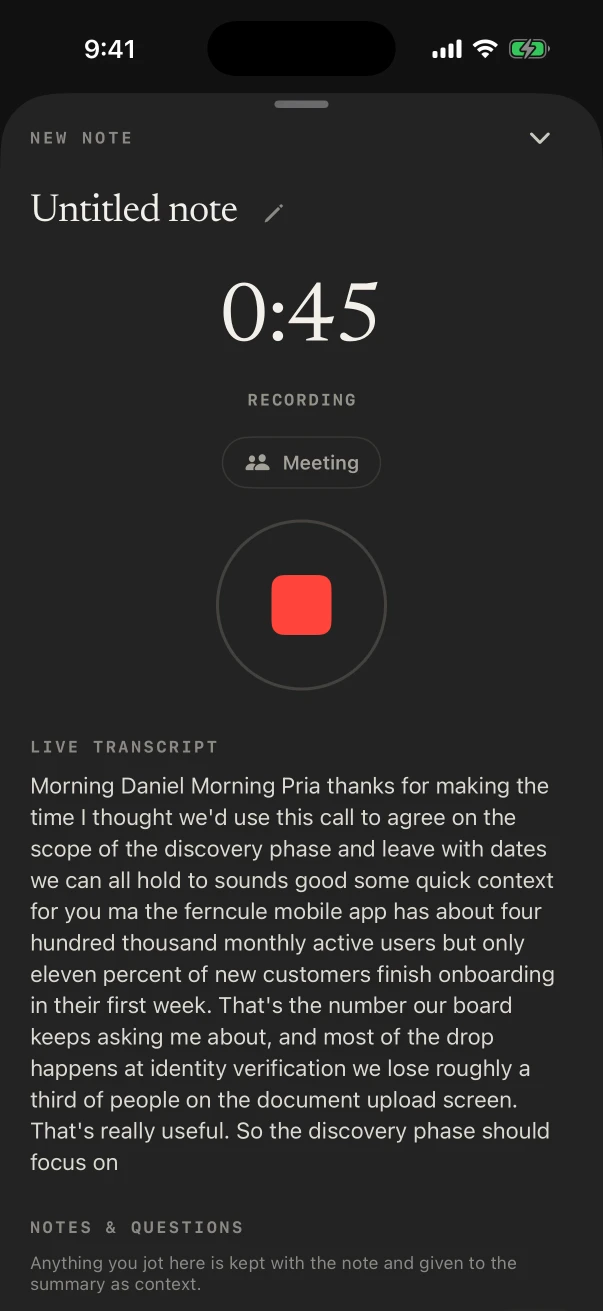
To record lectures on iPhone, open NoteOwl in the lecture hall and tap New Note: the iPhone records through its microphone, keeps going with the screen locked, and shows the transcript as it listens. The recording and its transcript are free, and both stay on the phone.
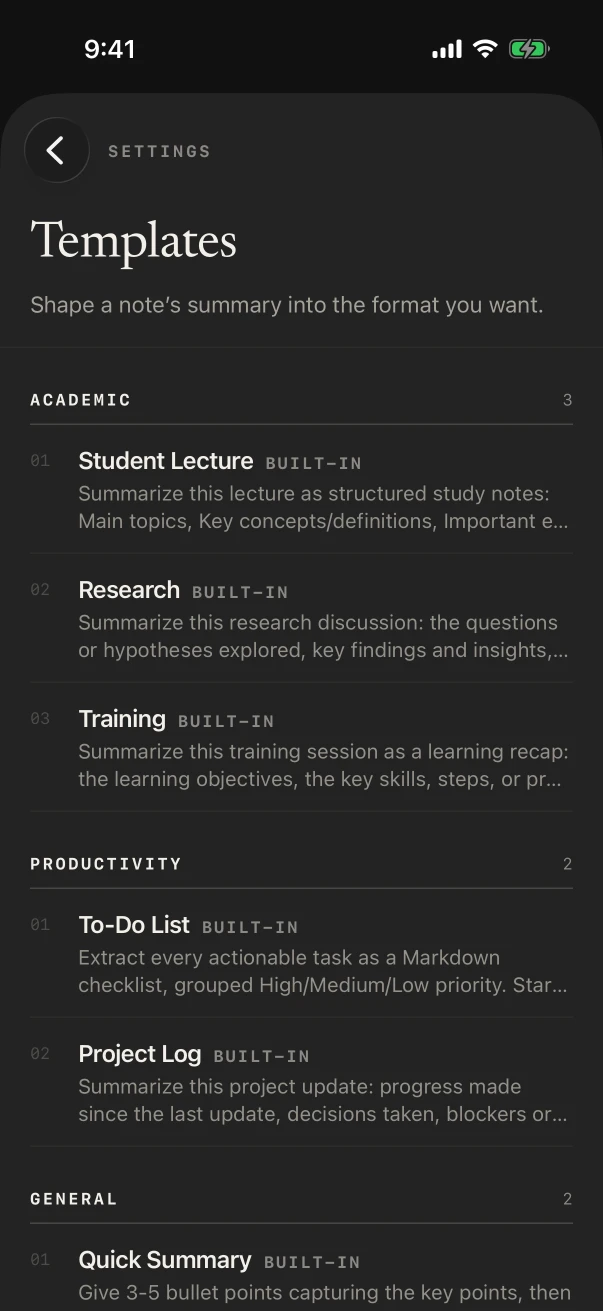
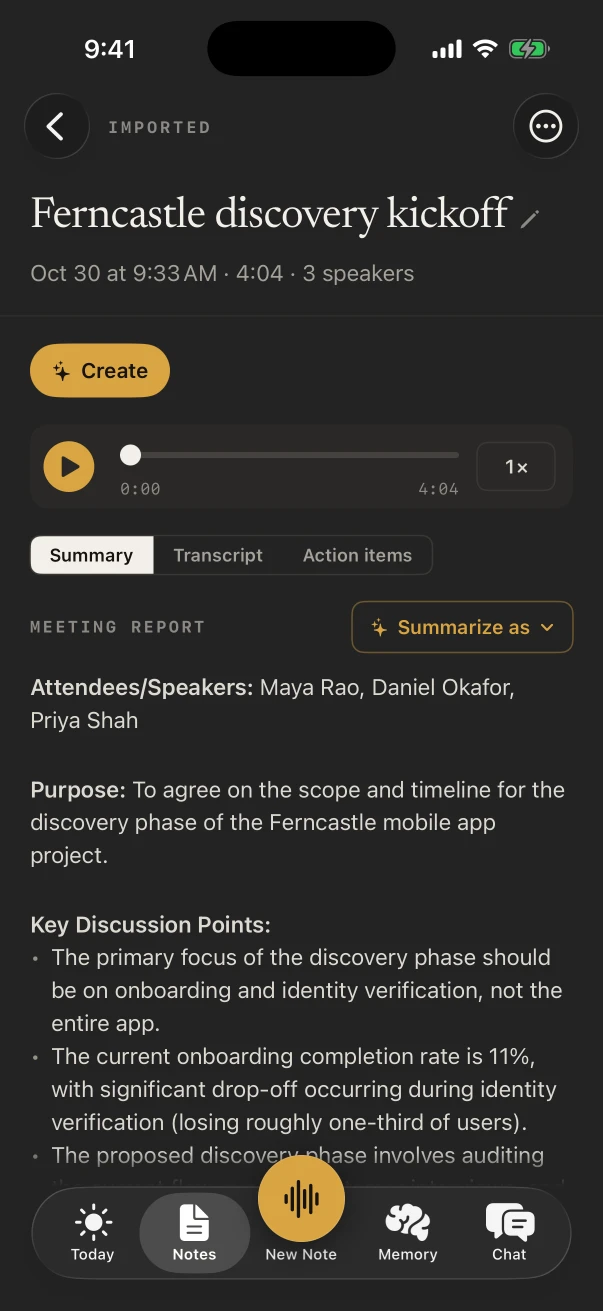
Then, with NoteOwl Pro, Summarize as › Student Lecture turns the lecture into study notes: the main topics, key concepts and definitions, important examples and anything flagged for the exam. Pro is $20 lifetime. Apple’s Voice Memos records lectures too, with a transcript on iPhone 12 or later.
Can you record a lecture on your iPhone?
Yes. Apple’s Voice Memos records lectures through the built-in microphone, a headset or an external microphone[1]. NoteOwl records through the iPhone’s microphone too, shows the transcript as it listens, free, and with NoteOwl Pro turns the lecture into study notes on the phone.
- Record in the lecture hall
- Voice MemosThe built-in microphone, a supported headset or an external microphone
- NoteOwlThe iPhone’s microphone; keeps going with the screen locked
- Transcript
- Voice MemosOn iPhone 12 or later, in ten languages, not in every country or region
- NoteOwlOn the iPhone, as it listens; free
- Study notes
- Voice MemosWriting Tools can summarize a transcript, with Apple Intelligence
- NoteOwlSummarize as › Student Lecture, written on the iPhone (Pro)
- Search
- Voice MemosTitles and transcripts, inside Voice Memos
- NoteOwlTitles, free; your whole memory with NoteOwl Pro
- Ask questions about a lecture
- Voice MemosNot mentioned in Apple’s guide
- NoteOwlChat answers from your notes and lectures (Pro)
- Price
- Voice MemosBuilt into iOS
- NoteOwlRecording and transcripts free; NoteOwl Pro $20 lifetime
| Voice Memos | NoteOwl | |
|---|---|---|
| Record in the lecture hall | The built-in microphone, a supported headset or an external microphone | The iPhone’s microphone; keeps going with the screen locked |
| Transcript | On iPhone 12 or later, in ten languages, not in every country or region | On the iPhone, as it listens; free |
| Study notes | Writing Tools can summarize a transcript, with Apple Intelligence | Summarize as › Student Lecture, written on the iPhone (Pro) |
| Search | Titles and transcripts, inside Voice Memos | Titles, free; your whole memory with NoteOwl Pro |
| Ask questions about a lecture | Not mentioned in Apple’s guide | Chat answers from your notes and lectures (Pro) |
| Price | Built into iOS | Recording and transcripts free; NoteOwl Pro $20 lifetime |
Which iPhone app records lectures and writes the notes?
NoteOwl is an iPhone app to record lectures and write the notes. Tap New Note when the lecture starts and Stop when it ends: the audio and transcript are saved on the iPhone, free. With NoteOwl Pro, Summarize as › Student Lecture writes the study notes, offline.
In NoteOwl for iPhone (iOS 26 or later)
- 1
Download the on-device AI models once
The first time you open NoteOwl, it downloads its on-device AI models: about 600 MB for speech, plus about 2.6 GB for the notes model Pro uses. After that, nothing needs Wi-Fi.
- 2
Tap New Note when the lecture starts
NoteOwl records through the iPhone’s microphone, and the transcript appears as it listens.
- 3
Lock the phone if you like
The recording keeps going with the screen locked, and the timer stays in the Dynamic Island.
- 4
Tap Stop
The lecture is saved with its audio and its transcript, free, on the iPhone.
- 5
Choose Summarize as › Student Lecture
NoteOwl Pro writes study notes from the lecture on the iPhone: the main topics, key concepts and definitions, important examples and anything flagged for the exam.
How do you turn a recorded lecture into study notes?
Open the lecture in NoteOwl and choose Summarize as › Student Lecture. NoteOwl Pro writes study notes on the iPhone: the main topics, key concepts and definitions, important examples and anything flagged for the exam.
Student Lecture is one of NoteOwl’s built-in templates, beside Research and Training. NoteOwl Pro is $20 lifetime, with a 7-day free trial. What good study notes contain
How do you record a lecture with Voice Memos?
In Voice Memos on iOS 26
- 1
Open Voice Memos
It’s in the Utilities folder on your iPhone.
- 2
Tap the Record button
Move the iPhone closer to the speaker, or farther away, to change the recording level. You can pause and resume as you go.
- 3
Tap Stop
The recording is saved as New Recording, or with the name of your location if Location Services is on. Tap the name to change it.
- 4
Read the transcript
On iPhone 12 or later, in the languages Apple lists, tap the recording, then View Transcript or Copy Transcript.
What can stop a lecture recording on iPhone?
Another app taking the audio: then NoteOwl pauses the recording and shows “Paused — another app is using audio”. NoteOwl for iPhone records the room through its microphone, so it doesn’t record an online class playing in another app.
For a class you attend online, NoteOwl on the Mac records your Mac’s audio with no bot joining the class. Recording lectures on Mac and iPhone
Sources
Last checked . Apple’s steps are from the Voice Memos chapter of the iPhone User Guide for iOS 26.
FAQ
Questions about recording lectures on iPhone
Can I record a lecture on my iPhone?
Yes. Apple’s Voice Memos records lectures through the built-in microphone, a headset or an external microphone. NoteOwl records through the iPhone’s microphone too, shows the transcript as it listens, and with NoteOwl Pro turns the lecture into study notes, all on the iPhone.
How do I record audio lectures on iPhone?
In NoteOwl, tap New Note when the lecture starts and tap Stop when it ends; the audio and transcript are saved on the iPhone, free. In Voice Memos, tap the Record button, then Stop; on iPhone 12 or later you can read its transcript.
Does NoteOwl keep recording when my iPhone is locked?
Yes. The recording keeps going with the screen locked, and the timer stays in the Dynamic Island with a Stop button. If another app takes the audio, the recording pauses.
Is recording lectures on iPhone free with NoteOwl?
Yes. Recording a lecture in the room and its transcript are free. The study notes from the Student Lecture template are part of NoteOwl Pro: $20 lifetime, with no subscription and a 7-day free trial.
Can NoteOwl record an online class on iPhone?
No. On iPhone, NoteOwl records the room through the microphone, and if another app takes the audio, the recording pauses.
Do I need Wi-Fi to record a lecture with NoteOwl?
No. After a one-time download of NoteOwl’s on-device AI models, recording, the transcript and the study notes all happen on the iPhone, so it works offline in the lecture hall.
Keep exploring
What this guide recommends
- Lecture recorderRecord lectures in the room on your Mac or iPhone, in an online class on the Mac with no bot, or from a file, then turn them into study notes
- Lecture notes templateA template to copy for study notes from a lecture: topics, definitions, examples and exam points, with an example, and how NoteOwl writes it
- StudentsLectures recorded in the room or an online class, or imported, turned into study notes you can ask questions of before the exam; dictating essays is free
- AI voice recorder for iPhoneRecord in the room on iPhone with a live transcript (free), then speakers, a summary and action items with Pro; the timer on the Lock Screen and in the Dynamic Island
More guides
- Best voice recorder for iPhoneSeven AI voice recorder apps for iPhone compared on six tests (keeps recording, live transcript, notes afterwards, where your audio goes, price, limits), from each maker’s own pages, with NoteOwl first
- Best transcription app for iPhoneSeven transcription apps for iPhone compared on files, where they transcribe, speakers and times, exports such as SRT, languages and price, from each maker’s own pages, with NoteOwl first
- Best AI note taker for iPhoneSix AI note taker apps for iPhone compared on meetings in the room, summaries and action items, speakers, asking your notes, where meetings are processed and price, with NoteOwl first
Record your next lecture on your iPhone
Free to download. Runs entirely on your Mac or iPhone.
Mac: macOS 26 or later · Apple Silicon (M1 or newer) · 16 GB memory minimum, 24 GB recommended · iPhone: iOS 26 or later
About NoteOwl
NoteOwl is private AI meeting notes and memory for Mac and iPhone. It captures meetings without a bot joining the call, labels every speaker, writes summaries and action items, and builds a memory of every conversation that you can chat with — fully offline, because the speech recognition and the AI run on the Mac or iPhone itself. Dictation into any app is free; Pro is a lifetime licence.
NoteOwl pricing: what’s free and what Pro adds
Last updated