Get started with NoteOwl on iPhone
Last updated Checked against NoteOwl 0.1.0
To get started with NoteOwl on iPhone, install it from the App Store, open it and follow the welcome screens: allow the microphone, download the on-device AI models once, add the keyboard, and teach NoteOwl your voice if you like. Setup needs no account, and you start on NoteOwl Free.
What do I need to run NoteOwl on iPhone?
An iPhone with iOS 26 or later, free space for the on-device AI models, and an internet connection while they download. They download once, about 3.2 GB in all, and from then on NoteOwl works offline.
- iOS 26 or later
- About 600 MB for speech and about 2.6 GB for notes. If your spoken language is Hindi or Auto-detect, speech is about 650 MB.
- About 1 GB of free space on top of each download while it runs.
- For Polish in the NoteOwl keyboard: iPhone 15 Pro or later.
Install NoteOwl
- On your iPhone, open NoteOwl on the App Store, or search the App Store for NoteOwl.
- Tap Get.
- Open NoteOwl from your Home Screen. The welcome screens start.
What do the welcome screens ask?
A few pages show what NoteOwl does: swipe, or tap Continue. Then come six steps, in this order. Every step except the last can be skipped and done later.
| Step | What to do | To do it later |
|---|---|---|
| Your microphone. | Tap Allow microphone, then Allow in the iOS prompt | The Settings app › NoteOwl › Microphone |
| Download the on-device AI models. | Tap Download and continue | NoteOwl's Settings › On-device AI models |
| Dictate into any app. | Add the NoteOwl keyboard (three steps) | NoteOwl's Settings › Keyboard |
| Who you are. | Type your name in Your name, then tap Continue | NoteOwl's Settings › Who you are |
| Teach NoteOwl your voice. | Read one line aloud, about 10 seconds | NoteOwl's Settings › Speakers |
| Record your first note. | Tap Record your first note | — |
Your name lets NoteOwl tell what you owe from what's owed to you in action items. If you skip it, NoteOwl calls you "Me".
If the NoteOwl Pro trial is on offer, the last of the welcome pages is Try everything free for 7 days. Tap Start free trial to start it, or Not now to start on NoteOwl Free; you can start the trial later in Settings › NoteOwl Pro. See NoteOwl Pro on iPhone.
Download the on-device AI models
On the Download the on-device AI models screen, tap Download and continue. NoteOwl downloads two models, once, while you finish setting up. You can't record or dictate until the speech model is on your iPhone.
| Model | What the screen says it's for | Size |
|---|---|---|
| Speech | Recording and transcription | About 600 MB, or about 650 MB for Hindi and Auto-detect |
| Notes | Summaries, action items and titles | About 2.6 GB |
Each row shows a percentage, then Downloaded. While they download, the setup screens show AI MODELS and a percentage at the top right, and after setup a strip under each screen's heading says Downloading on-device AI models.
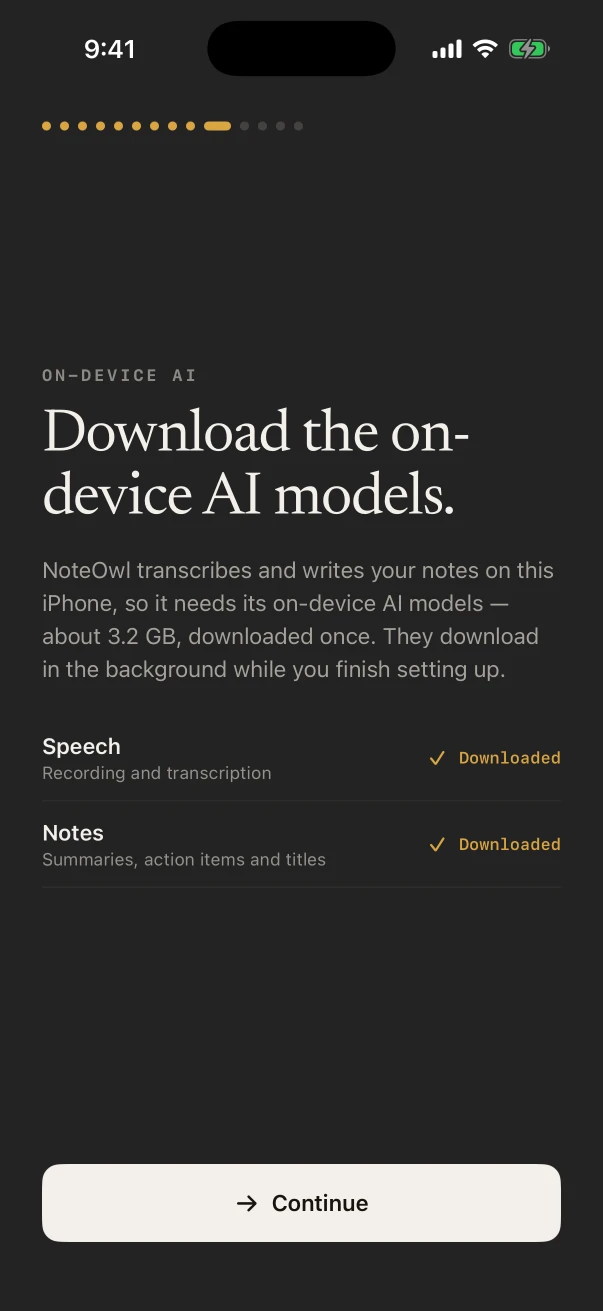
NoteOwl recommends Wi-Fi. On mobile data it says You're on mobile data. This download is about 3.2 GB — Wi-Fi is recommended., and you can still download.
If you tapped Not now, open Settings (the gear at the top right of Today, Notes, Memory or Chat), scroll to On-device AI models and tap Download in each panel. When a model is ready, its panel says Downloaded. If a download stops or there isn't enough space, see fix common problems on iPhone.
How do I teach NoteOwl my voice?
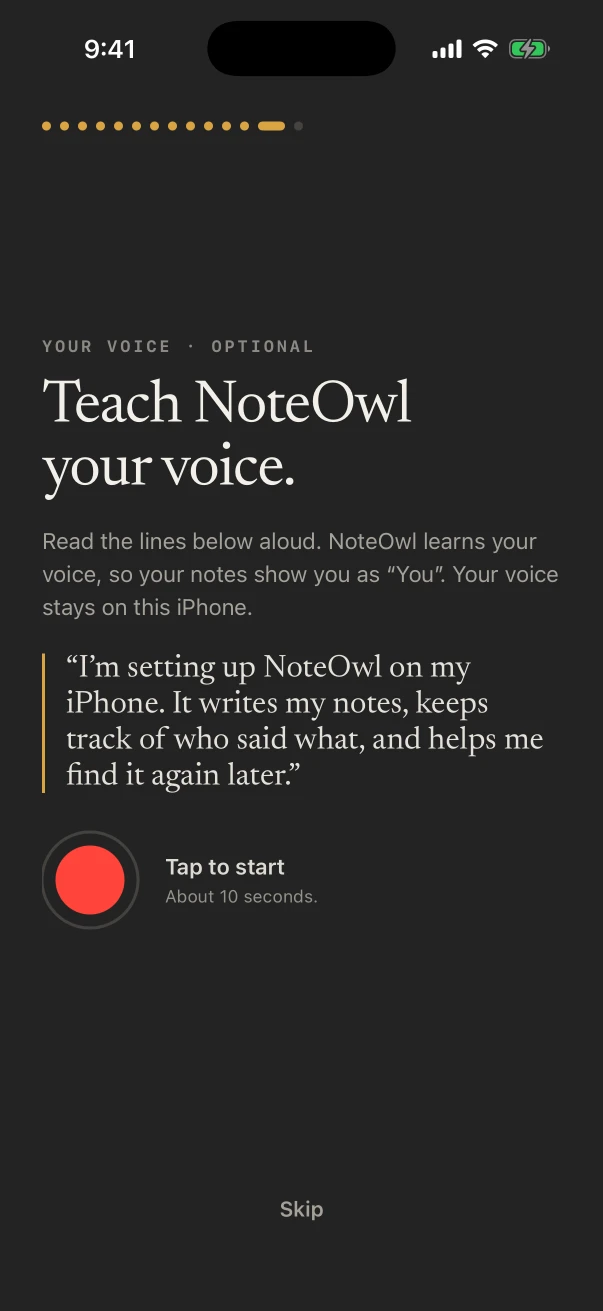
On Teach NoteOwl your voice., tap the red button, read the line on screen aloud, and tap again. It takes about 10 seconds. Your notes then show you as "You", and your voice stays on the iPhone.
The line to read is "I'm setting up NoteOwl on my iPhone. It writes my notes, keeps track of who said what, and helps me find it again later." NoteOwl stops by itself after 10 seconds and says NoteOwl knows your voice. It needs the speech model: while that is still downloading, the step says Waiting for the on-device AI models…, and you can tap Skip.
To teach it later, or again, open Settings › Speakers and use Your voice. Telling speakers apart in a meeting is part of NoteOwl Pro: see speakers, summaries and templates on iPhone.
What happens after setup?
Record your first note finishes setup. A short tour points out each tab, then the recording sheet opens: tap the record button to start. Unless you started the trial, you're on NoteOwl Free: recording, transcripts, voice notes and the keyboard work with no limit.
NoteOwl has five places along the bottom of the screen:
| Tab | What's there |
|---|---|
| Today | A daily brief, action items due, today's calendar and recent notes |
| Notes | Every note, meeting and imported recording, and your Dictations |
| New Note | The round button in the middle: tap it to record, or touch and hold it for more |
| Memory | People and action items from your notes |
| Chat | Questions about your notes, answered with sources |
To record, see record a meeting, lecture or voice note on iPhone. To dictate into other apps, see dictate in any app with the NoteOwl keyboard.
Where are NoteOwl's settings on iPhone?
Tap the gear at the top right of Today, Notes, Memory or Chat. Settings opens over the app; tap ✕ to close it.
| Section | Rows |
|---|---|
| License | NoteOwl Pro |
| Notes | Templates, Vocabulary |
| Memory | Who you are, Speakers, Automatically identify speakers, What feeds memory, Calendar |
| Keyboard and quick access | Keyboard, Quick access |
| On-disk location | On this iPhone, Your data |
| On-device AI models | The download panels for speech and for Notes |
| About | Show the welcome screens again, Show the tour again, Privacy Policy, Version |
Common questions
Do I need an account to use NoteOwl on iPhone?
No. NoteOwl on iPhone has no account and no sign-in. NoteOwl Pro and its free trial go through the App Store, with the Apple Account your iPhone already uses.
How much space does NoteOwl need on iPhone?
About 3.2 GB for the on-device AI models, downloaded once, plus about 1 GB of free space while each one downloads. Your recordings take space too; Settings › Your data shows how much.
Does NoteOwl work offline on iPhone?
Yes. You need an internet connection to download the on-device AI models. After that, recording, transcription, the keyboard and your notes are made on the iPhone, with or without a connection.
Can I see the welcome screens again?
Yes. Open Settings in NoteOwl and, under About, tap Show the welcome screens again. Show the tour again replays the short tour of each tab.
Quick start: your first ten minutes
Get started with NoteOwl on your Mac. Dictate into any app with fn, record a meeting with ⌥Space, then ask a question about it in Chat.
Dictate in any app with the NoteOwl keyboard
Add the NoteOwl keyboard on iPhone, turn on Allow Full Access and tap the microphone in any app. Free and unlimited, with Polish and five languages.