Widgets, shortcuts and Siri on iPhone
Last updated Checked against NoteOwl 0.1.0
NoteOwl on iPhone starts from more places than its own icon. Widgets on the Home Screen and the Lock Screen start a recording, turn on the dictation keyboard or show what's due. The Action button, Control Center, Back Tap and Siri start a recording too. While NoteOwl records, its Live Activity shows the timer on the Lock Screen and in the Dynamic Island.
Which NoteOwl widgets are there?
Six: New note, Keyboard, Capture and Last capture are free, and Due today and Up next come with NoteOwl Pro. All but Capture also come in Lock Screen sizes.
| Widget | What it does | Sizes | Plan |
|---|---|---|---|
| New note | Starts recording with one tap | Small; Lock Screen | Free |
| Keyboard | Gets the NoteOwl keyboard ready to dictate in any app | Small; Lock Screen | Free |
| Capture | Record and Dictate; the medium size adds Import | Small, medium | Free (Import is NoteOwl Pro) |
| Last capture | Your most recent recording; tap it to open the note | Small; Lock Screen | Free |
| Due today | What you owe and what's owed to you, due today. Tap the circle to tick one off | Small, medium; Lock Screen | NoteOwl Pro |
| Up next | Your next meeting, who's in it, what you last discussed and what's open between you | Medium, large; Lock Screen | NoteOwl Pro, with the calendar on |
Up next can start a meeting note linked to that event: the round button on the medium size, or Record this meeting on the large one. For Due today, touch and hold the medium widget and choose Edit Widget to switch its Layout between List and You owe and owed to you.
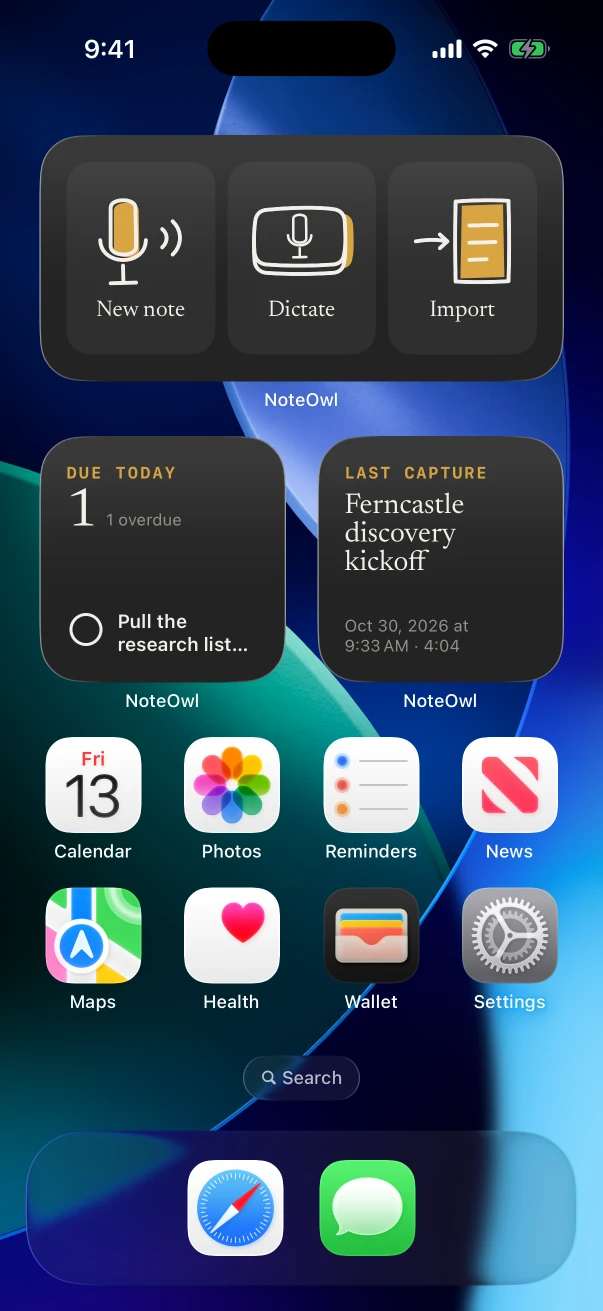
How do I add a NoteOwl widget?
- Touch and hold the Home Screen background until the apps jiggle, tap Edit at the top, then tap Add Widget.
- Scroll or search for NoteOwl, tap it, and swipe through its widgets and sizes.
- Tap Add Widget, move the widget where you want it, then tap Done.
On NoteOwl Free, Due today and Up next show NOTEOWL PRO; tap one to open Settings › NoteOwl Pro. If Up next says Your calendar isn't on in NoteOwl, tap it and turn on Use your calendar in Settings › Calendar.
How do I record with the Action button?
Set the Action button to NoteOwl's New note control, then press and hold it to start recording. NoteOwl's Settings › Quick access gives the steps and calls the control Start recording.
- In the iPhone's Settings app, tap Action Button and swipe to Controls.
- Tap the button below Controls and choose NoteOwl's New note.
- Press and hold the Action button. NoteOwl starts recording, and the timer appears in the Dynamic Island.
NoteOwl has three controls for the Action button, Control Center and the Lock Screen:
| Control | What it does |
|---|---|
| New note | Starts recording a conversation in NoteOwl |
| Dictation | Gets the NoteOwl keyboard ready to dictate in any app |
| Ask | Opens Chat with the microphone listening, to ask your notes a question by voice (NoteOwl Pro) |
A press while NoteOwl is already recording leaves that recording running.
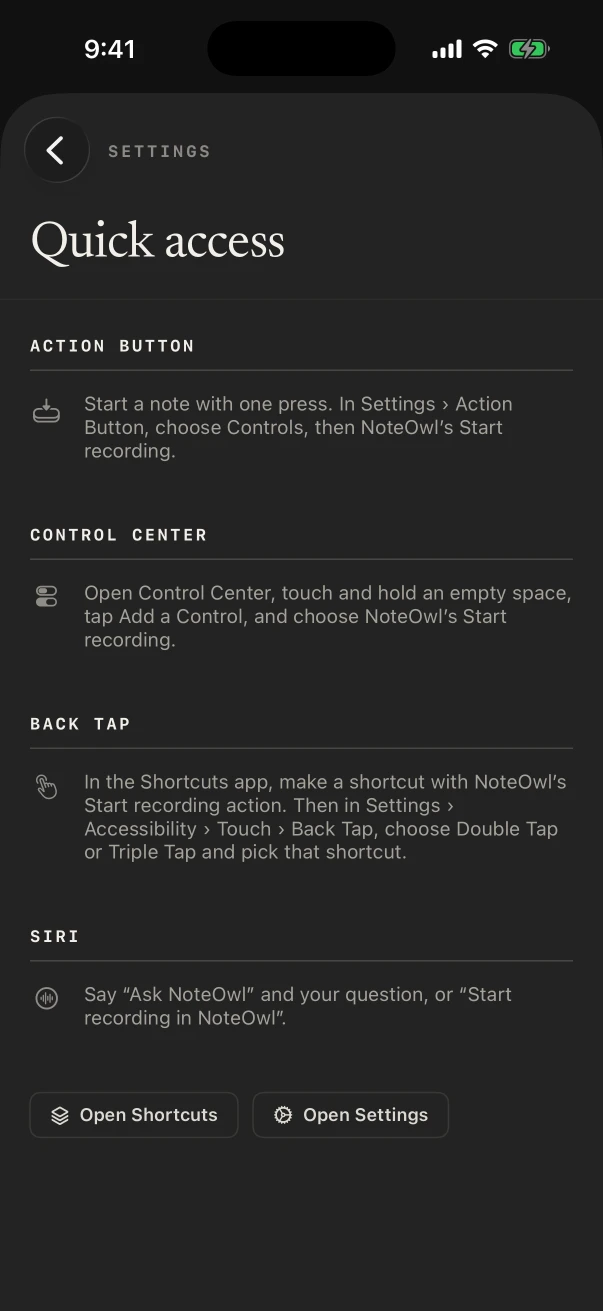
How do I add NoteOwl to Control Center or Back Tap?
Control Center: open Control Center, touch and hold an empty space, tap Add a Control, and choose NoteOwl's New note, Dictation or Ask. Back Tap: make a shortcut with NoteOwl's Start recording action, then choose it for a double or triple tap on the back of the iPhone.
For Back Tap:
- In the Shortcuts app, make a new shortcut and add NoteOwl's Start recording action.
- In the Settings app, go to Accessibility › Touch › Back Tap, choose Double Tap or Triple Tap, and pick that shortcut.
- Tap the back of your iPhone. NoteOwl opens and starts recording.
Settings › Quick access in NoteOwl has Open Shortcuts and Open Settings buttons to get you there.
What can I ask Siri to do in NoteOwl?
Start a recording, or ask your notes a question. Say "Start recording in NoteOwl" or "Record with NoteOwl" to start recording, and "Ask NoteOwl" to ask a question: Siri asks "What do you want to ask?", and the answer appears in Chat. Both open NoteOwl.
The same two actions, Start recording and Ask NoteOwl, are in the Shortcuts app for your own shortcuts. Asking your notes is part of NoteOwl Pro.
What do NoteOwl's Live Activities show?
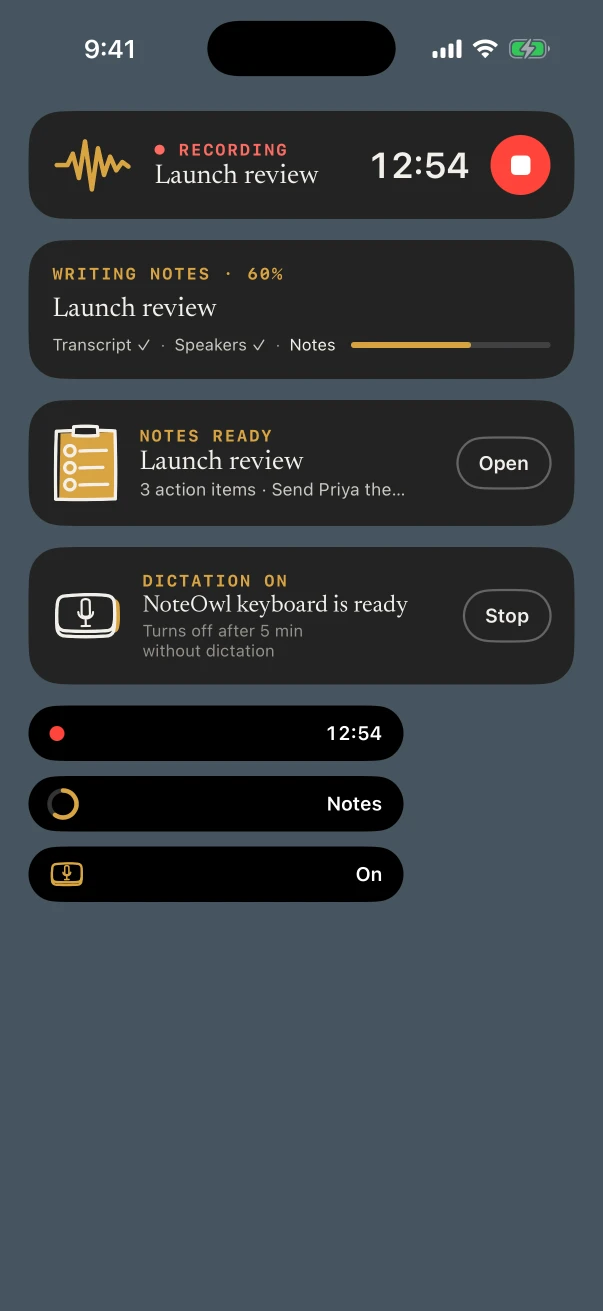
While NoteOwl records, the Lock Screen and the Dynamic Island show the timer and a stop button. After you stop, they show each step until the notes are ready. While the keyboard's dictation session is on, they show DICTATION ON. Live Activities need to be allowed for NoteOwl.
| When | On the Lock Screen | In the Dynamic Island |
|---|---|---|
| Recording | ● RECORDING, the timer and a red stop button, or PAUSED if another app took the audio | A red dot and the timer |
| After you stop | TRANSCRIBING, FINDING SPEAKERS, WRITING NOTES…, with Transcript ✓ · Speakers ✓ · Notes | A progress ring and Notes |
| Notes written (NoteOwl Pro) | NOTES READY, the title, a line such as the number of action items, and Open | Notes ready |
| Dictation session on | DICTATION ON, NoteOwl keyboard is ready, Turns off after 5 min without dictation, Stop | A key and On |
Tap the stop button to stop the recording without opening NoteOwl. NOTES READY stays for 30 minutes; tap it to open the note.
Common questions
Do NoteOwl's widgets open the app?
The New note and Keyboard widgets, and Record and Dictate in Capture, start in the background without opening NoteOwl, once the microphone is allowed and the speech model is downloaded. Until then, or while an import is running, they open NoteOwl instead.
Which NoteOwl widgets are free?
New note, Keyboard, Capture and Last capture are free. Due today and Up next are part of NoteOwl Pro, and Up next also needs the calendar turned on in Settings › Calendar.
What can I say to Siri?
“Start recording in NoteOwl” or “Record with NoteOwl” to start a recording, and “Ask NoteOwl” to ask your notes a question. Both open NoteOwl. Asking your notes is part of NoteOwl Pro.
What do NoteOwl's widgets show on a locked iPhone?
Counts and times only. While your iPhone is locked, Up next shows “Meeting” in place of the meeting's title, and the number of people and open items in place of the details.
Memory, People and Chat on iPhone
Find people and action items in NoteOwl's Memory tab on iPhone, keep a profile for everyone you meet, and ask your notes questions in Chat. NoteOwl Pro.
Export or delete your data on iPhone
Share a NoteOwl note on iPhone as Markdown, PDF, text or subtitles, export everything to one zip file, or delete a note or all your data. Free on every plan.